

Question

Looking for Total Consumed Backup Storage for a Single VM in Deduplicated HyperScale X

  • November 6, 2025
  • 4 replies
  • 27 views

Nikos.Kyrm
Community All Star
Forum|alt.badge.img+14

Hello Commvault Community,
 

I’m working on reporting the total backup storage footprint of a single VM protected in a (deduplicated) HyperScale X environment.

Using the Chargeback Details report, I noticed two relevant columns:
https://documentation.commvault.com/2024e/software/data_views_for_chargeback_details.html

  • Media Size: The amount of data that was saved on storage media during the specified time period, including aged and pruned data. For storage policy copies that have deduplication enabled, the media size for each job is calculated based on the average deduplication ratio of the copy. Where media size = application size * average deduplication ratio per copy. The average deduplication ratio of a destination copy is calculated by (total size on disk)/(total protected app size) for the destination copy.

  • Total Media Size: The amount of all active data that is saved on storage media, including all storage policy copies on all media types, and excluding aged data. For storage policy copies that have deduplication enabled, the media size for each job is calculated based on the average deduplication ratio of the copy. Where media size = application size * average deduplication ratio per copy. The average deduplication ratio of a destination copy is calculated by (total size on disk)/(total protected app size) for the destination copy.
     

My goal is to get the total storage capacity currently consumed by this VM’s backups in the HSX repository, spanning all backup images retained (all months and all copies).

If Chargeback Details is the ideal report, which column should I use to get the accurate total capacity consumed by this VM’s backups, across all time (without any date or retention restrictions)?


Any tips or best practices for generating a precise report of this would be appreciated.


Thank you!
Nikos

4 replies

Onno van den Berg
Community All Star
Forum|alt.badge.img+22

Good question! To be clear: you are referring to the complete footprint of a protected instance including all it's recovery points without compression and deduplication taken into account. 


Nikos.Kyrm
Community All Star
Forum|alt.badge.img+14
  • Author
  • Community All Star
  • November 6, 2025

Good question! To be clear: you are referring to the complete footprint of a protected instance including all it's recovery points without compression and deduplication taken into account. 


Hello ​@Onno van den Berg 

We are looking for the total amount of data that has been physically written and stored in the HSX, for a specific VM, without considering backup dates, retention periods, baseline backups or deduplication savings.

Just the actual consumed storage capacity for that VM’s backups currently present in the backup repository!

Best regards,
Nikos


Forum|alt.badge.img

Hello,

To provide more context on this: the customer’s question is —
“What is the exact capacity from HSX that the server xyz has stored until today and is still available (i.e., not deleted from storage)?”

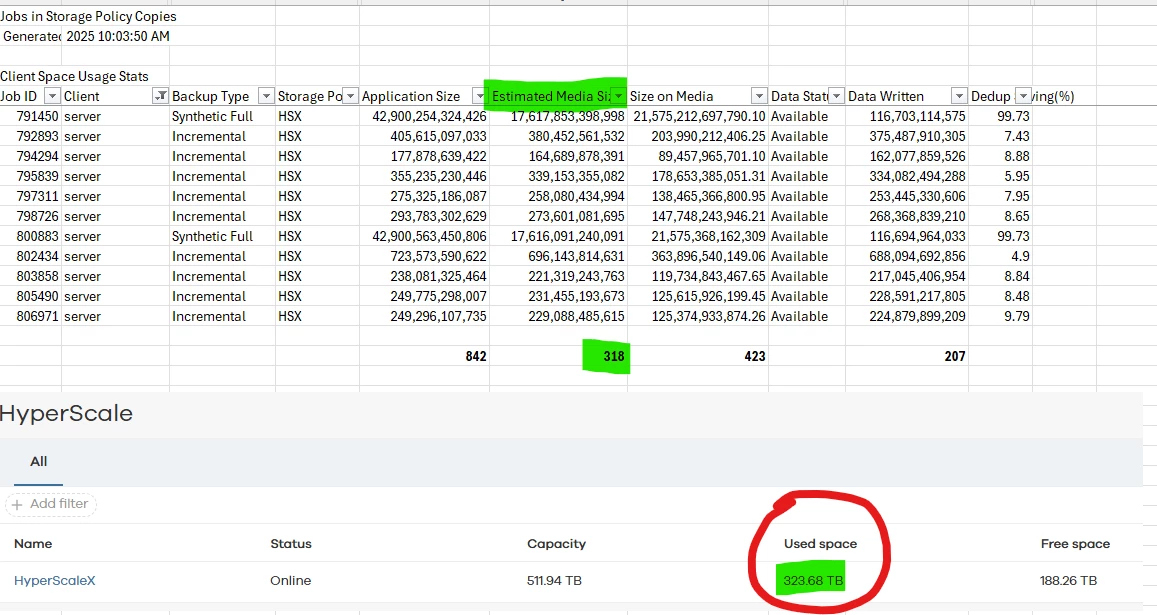
To answer this, I reviewed the report “Jobs in Storage Policy Copies”, where it appears that the relevant field might be “Estimated Media Size” (which is a bit unexpected) rather than “Size on Media.”

I exported this report for all jobs written to HSX with “Data Status = Available.” Then, I calculated the totals for “Application Size,” “Estimated Media Size,” “Size on Media,” and “Data Written,” and also captured a screenshot from the Hyperscale storage capacity report.

From the results, the “Estimated Media Size” value seems to align most closely with the Hyperscale capacity (318 TB vs. 323 TB — a small discrepancy that I believe is normal). Based on this, the total capacity consumption on HSX for this specific server appears to be around 35 TB, which is also close to the “Total Media Size” (40.52 TB) shown in the Chargeback Details report.

That said, I still have a few open questions:

  1. If “Estimated Media Size” from Jobs in Storage Policy Copies is indeed the correct value, why does the report show that the Synthetic Full job was written twice? Given the deduplication ratio (99.73%), the amount written for the second Synthetic job should have been only a few GB.

  2. If the “Total Media Size” value from the Chargeback Details report is the accurate metric, how can I extract a detailed report listing the individual jobs that make up the 40.52 TB total?

  3. If neither of the above interpretations is correct, which report and field should I use to accurately answer the customer’s question?

Thanks in advance for your help.


Nikos.Kyrm
Community All Star
Forum|alt.badge.img+14
  • Author
  • Community All Star
  • November 11, 2025

Here is also a response from Commvault support about this case:
 

Looking for Total Consumed Backup Storage for a Single VM in Deduplicated HyperScale X

To report the total backup storage footprint of a single VM in a deduplicated HyperScale X environment, you should use the Total Media Size column in the Chargeback Details report.

  • Total Media Size
    • Represents the amount of all active data saved on storage media for the VM, across all storage policy copies and media types, excluding aged data.
    • For deduplicated copies, it is calculated as:
      Total Media Size = Application Size × Average Deduplication Ratio per copy
    • The average deduplication ratio is:
      (Total Size on Disk) / (Total Protected App Size) for the destination copy.
    • This column reflects the current storage footprint of all retained backup images for the VM, not limited by time or retention period.

Do not use the Media Size column for this purpose, as it is time-bound and may include aged/pruned data for a specific period, not the total currently retained.

Reference:
Data Views for Chargeback Details


Best regards,
Nikos