




Question

Exchange Online Delete: Backend Data or Just Index? (Infinite Retention)

  • March 30, 2026
  • 5 replies
  • 34 views

Nikos.Kyrm
Community All Star
Forum|alt.badge.img+16

Hey Commvault Community,
 

I just deleted an Exchange Online mailbox backup from Command Center, kicking off Job ID: 1032081. Screenshot shows "Index Delete" phase done at 100%.
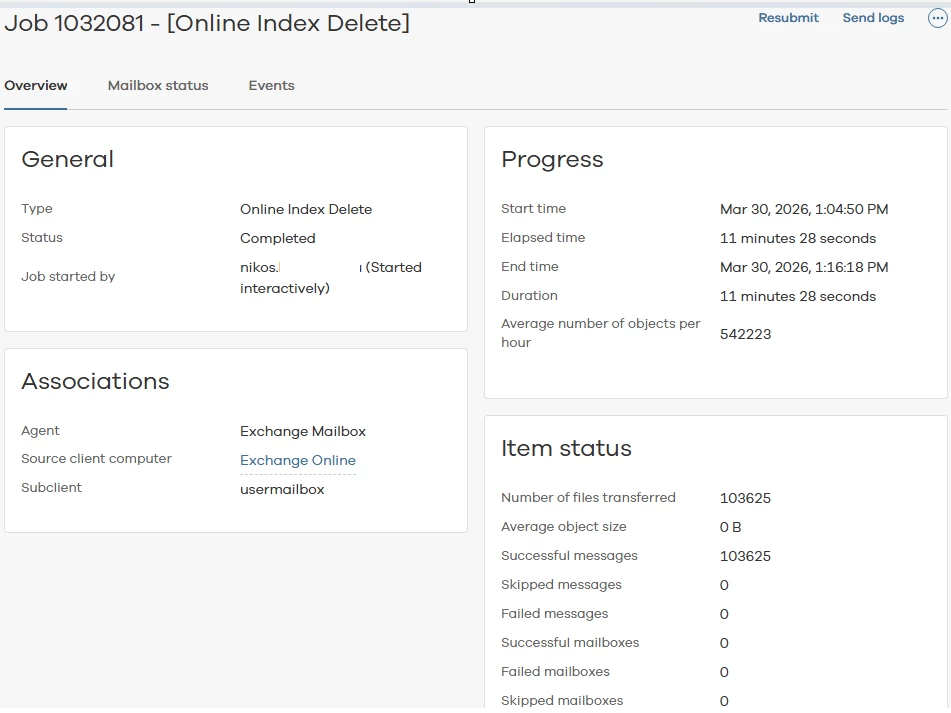


For Exchange Online (and other O365 services like Teams/SharePoint), does deleting the backup actually remove backend data from cloud storage, or just kill the index (no more browse/restore) while emails/files stay forever?

From what I know, Commvault uses only forever / infinite retention for O365 services (retention rules only apply to deleted data backups). So, that's why I'm asking in case of deleting an Exchange Online mailbox backup, does the backend backup data also get deleted from cloud storage, or just the index?


Please for your feedback.


Best regards
Nikos

5 replies

Paul G
Apprentice
Forum|alt.badge.img
  • Apprentice
  • March 31, 2026

Hi ​@Nikos.Kyrm,

Arlie states the following which is the same as I always expected it to work.

---------------------------------------------------------------------------------------

How Aging Works for Exchange Online Mailboxes

  • Special Aging Rules: Exchange Online mailbox backups are marked as "Data Aging Disabled For Special Clients." This means standard storage policy retention does not apply.
  • Retention Policy: Aging is governed by the retention settings in the Office 365 (Microsoft 365) plan assigned to the mailbox, not by the storage policy.
  • Job Aging Behavior:
    • A backup job will not age out (be deleted) until all items backed up by that job have been deleted from the source mailbox in Exchange Online.
    • Even if retention is reduced or storage policy is changed, the job remains until all its items are gone from the mailbox.
  • True-Up Process: For Exchange, a background "true-up" process runs approximately once per month per mailbox. This process:
    • Compares the backup job’s content to the current mailbox content.
    • Marks items as deleted and releases their space if they no longer exist in the mailbox.
    • The job itself will only age out when all items it protected are deleted from the mailbox.
  • Resource Considerations: The true-up process is resource-intensive, which is why it is not run more frequently.

---------------------------------------------------------------------------------------

You can see the jobs as a sort of virtual tapes that only release their storage once all data has been aged. When you delete the mailbox, only the index is purged and data is not recoverable but still on disk.

In practice this means that for infinite retention on deleted items, storage is never released as there will almost always be one mail or mailbox retained in a job. Even with specific retention time, it is hard to gain storage back when users don't clean-up or you have some kind of mailbox policy in Exchange online that reduces retention of mail in the mailbox itself.

Kind regards,

Paul


Nikos.Kyrm
Community All Star
Forum|alt.badge.img+16
  • Author
  • Community All Star
  • March 31, 2026

Hello ​@Paul G 

Thanks for the detailed explanation! Confirms my suspicion that only indexes get deleted while backend data stays tied to the job. Makes perfect sense now.

However, a bigger issue though. For O365 workloads, Commvault still only offers infinite retention (not talking deleted items retention here).

In large orgs (10k+ users), 5-6+ years of backups accumulate forever. Even with Commvault deduplication you're talking serious cloud / disk storage growth year after year! This needs to change! A finite retention options for O365 would be huge for cost control!

Anyone else dealing with exploding storage from this? Workarounds beyond pruning source mailboxes?


Thanks again!
Nikos


Paul G
Apprentice
Forum|alt.badge.img
  • Apprentice
  • March 31, 2026

Hi ​@Nikos.Kyrm 

I can see how you think Commvault only has infinite retention but that is not really the case. However, not being able to clean-up the items out of the older jobs makes it effectively infinite retention if you also do not clean-up the mailbox itself.

Commvault only backs up a mail once. If the mail is moved, the location is changed in the index but the mail itself is not backed up again.

If items would only be retained for a set amount of time, you would run into a situation where even if a user still has the mail in his mailbox, it is no longer able to be restored as it is no longer present in the backups. By setting only retention after items are deleted, you can still restore deleted data for a set amount of time but items that are still present in the mailbox will still be able to be restored.

This is why clean-up of the mailbox itself is important. Let's say for example you have set item retention to 2 years and you automatically clean-up mail in the mailbox after 2 year, all maildata will be gone after 4 year. As this rule would apply to all jobs with the same policy, after 4 years all mail will be aged in a job. At that time, the job can be aged off and release the storage.

I hope it is clearer why this happens and how to deal with it. I have seen this in a lot of environments and I always get the same questions regarding this.

Kind regards,

Paul


Nikos.Kyrm
Community All Star
Forum|alt.badge.img+16
  • Author
  • Community All Star
  • March 31, 2026

Hi ​@Paul G 

Thanks for clarifying.

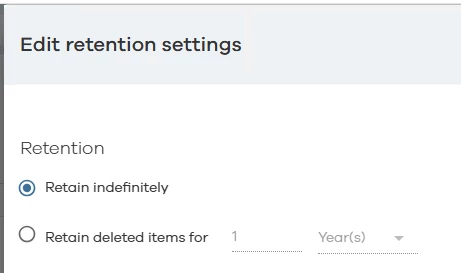
So, let's focus on the "Retain deleted items for" setting (the only real retention option besides infinite).


Two key questions:

  1. If I set this to 2 years, does it affect existing / past backup jobs for mailboxes, or only future jobs?

  2. Most important: When these deleted items age out, does this actually release backend disk / cloud storage, or just delete index pointers (data stays on disk)?


Best regards,
Nikos


Paul G
Apprentice
Forum|alt.badge.img
  • Apprentice
  • March 31, 2026

Hi ​@Nikos.Kyrm 

  1.  Yes, the setting also affects existing backups. So you can quickly reduce retention of those older deleted items.
  2. Initially, only index pointers are deleted when the item itself ages off. Only once every item in a backup job has been aged is the job itself aged and releases disk/cloud storage.

Kind regards,

Paul
