Solved

Meaning of "Snapshot options" in Server Plan for M365 backups

  • April 14, 2026
  • 3 replies
  • 60 views

Forum|alt.badge.img+18

Hi all,
 

I’m a bit confused about the "Snapshot options" section in the Server Plan settings, specifically when the plan is used for Microsoft 365 backups (Exchange, SharePoint, etc.).


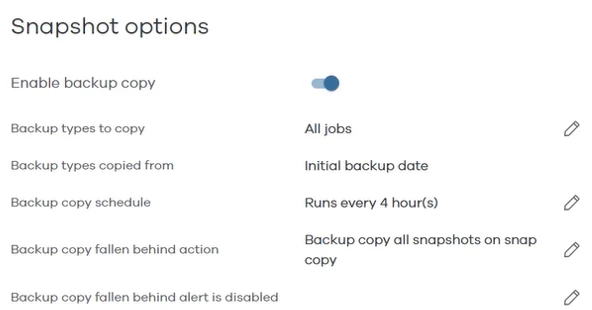
Since M365 backup is about mailboxes and sites, not VMs or LUNs, what is the actual purpose of this section? Does "Enable backup copy" or the snapshot schedule have any real effect on how M365 data is processed or moved to the storage?
 

Or is this just a generic UI section for all Server Plans, or should I be aware of some specific logic here for M365 apps?
 

Thanks for the clarification!

Best answer by Paul G

Hi ​@drPhil,

I will add to the information that ​@Sujay kumar  already provided.

When you setup the MS365 application, you need to define a MS365 plan and a server plan.

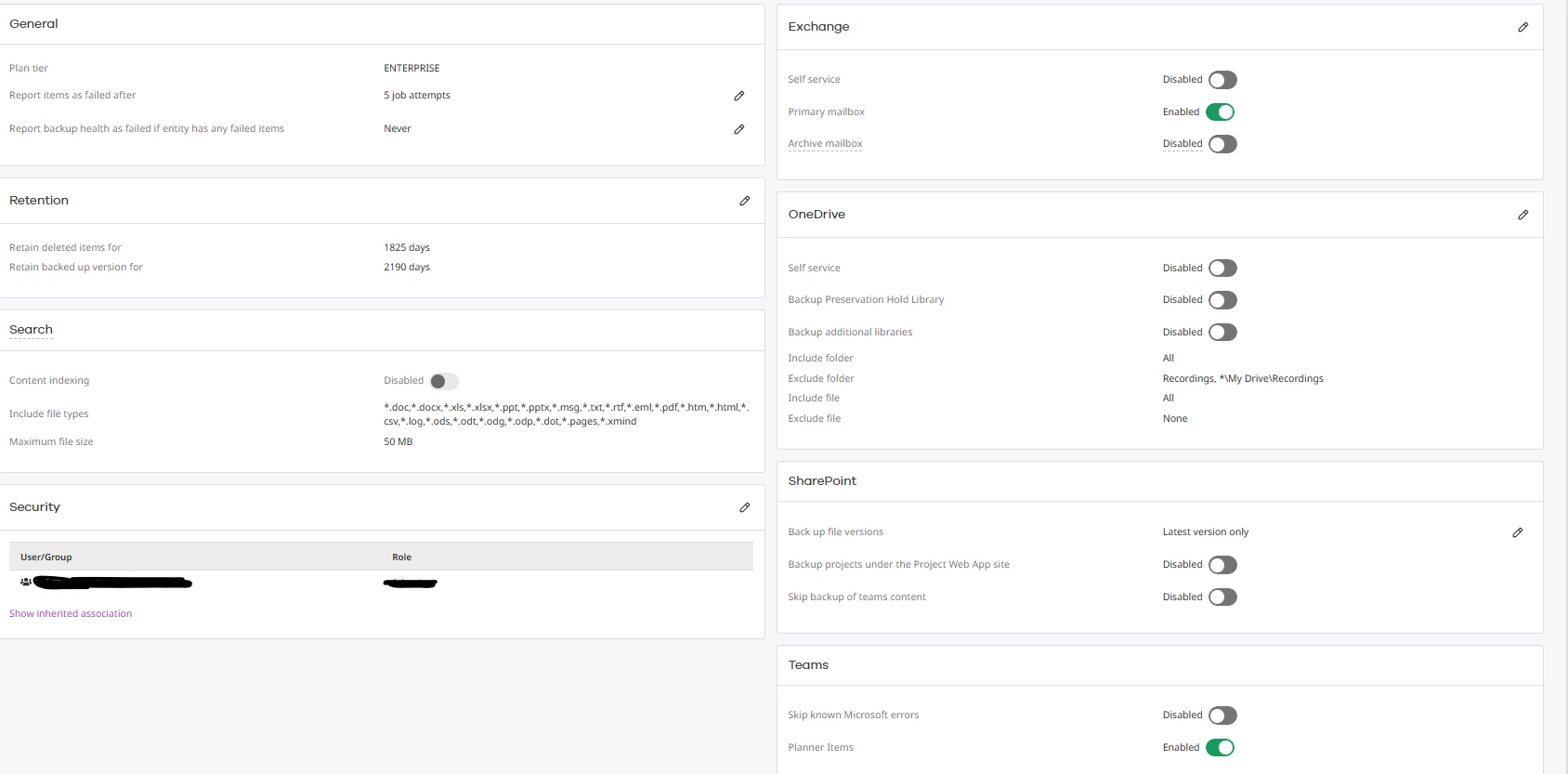
Your MS365 plan is a specific plan only usable for MS365 applications (hence the name 😉) and defines the way the MS365 application handle content and the retention. You can see these as the old Exchange policies combined (archive, retention and cleanup policies) and they are associated to the content in the applications. Retention rules overrule the retention settings in 

The server plan defines backup copies and schedules. You can see these as the combination of storage and schedule policies. You can use these for any type of agent/backup type. When a server plan has a snapshot copy (usually snap primary), these options are provided and go into effect when used for a backup agent that uses intellisnap.

If a backup agent does not use intellisnap, the snapshot copy and the snapshot option don't do anything and are ignored. As MS365 backups don't have an option to use snapshots, they don't do anything to the MS365 backups.

You don't have to create separate server plans for MS365 and just let you MS365 backups follow the usual backup copy logic you use for any other backup but I would advice you to think about it. Due to the aging mechanic I explained to you in another thread, it might be better to do create a separate server plan (without snapshot copies) that allow you to better control storage usage by these backups.

I hope this clears things up a bit.

Kind regards,

Paul

3 replies

Forum|alt.badge.img+8
  • Vaulter
  • April 14, 2026

hello ​@drPhil 

server plan in Commvault for Office 365 (O365) apps is primarily used to define the storage location and backup schedule for your O365 app.


The Snapshot options are part of a Server /Backup Plan and available when a snapshot copy is configured. These options control snapshot‑to‑backup copy behavior and are not applicable to SaaS 


For Office 365 apps it will use office 365 plan configuration to backup
example screenshot


https://documentation.commvault.com/11.40/software/create_office_365_plan_for_teams.html
https://documentation.commvault.com/11.40/software/create_office_365_plan_for_sharepoint_online.html
https://documentation.commvault.com/11.40/software/create_office_365_plan_for_onedrive_for_business.html
https://documentation.commvault.com/11.40/software/create_office_365_plan_for_exchange_online.html


Paul G
Explorer
Forum|alt.badge.img+1
  • Explorer
  • Answer
  • April 16, 2026

Hi ​@drPhil,

I will add to the information that ​@Sujay kumar  already provided.

When you setup the MS365 application, you need to define a MS365 plan and a server plan.

Your MS365 plan is a specific plan only usable for MS365 applications (hence the name 😉) and defines the way the MS365 application handle content and the retention. You can see these as the old Exchange policies combined (archive, retention and cleanup policies) and they are associated to the content in the applications. Retention rules overrule the retention settings in 

The server plan defines backup copies and schedules. You can see these as the combination of storage and schedule policies. You can use these for any type of agent/backup type. When a server plan has a snapshot copy (usually snap primary), these options are provided and go into effect when used for a backup agent that uses intellisnap.

If a backup agent does not use intellisnap, the snapshot copy and the snapshot option don't do anything and are ignored. As MS365 backups don't have an option to use snapshots, they don't do anything to the MS365 backups.

You don't have to create separate server plans for MS365 and just let you MS365 backups follow the usual backup copy logic you use for any other backup but I would advice you to think about it. Due to the aging mechanic I explained to you in another thread, it might be better to do create a separate server plan (without snapshot copies) that allow you to better control storage usage by these backups.

I hope this clears things up a bit.

Kind regards,

Paul


Forum|alt.badge.img+18
  • Author
  • Challenger
  • April 17, 2026

Thank you both ​@Paul G and ​@Sujay kumar for your contribution. According to Paul’s post, I understand, that the Snapshot option is pointless for M365. It is designed for IntelliSnap, and since M365 backups don't utilize snapshot technology, these settings should be ignored.