Answer

Workflow Commands that stops the schedule and the CV services

  • July 22, 2022
  • 4 replies
  • 312 views

Base64
Byte
Forum|alt.badge.img+5

Hey Team, 


i need to build an Workflow, for the “Update Team”. 

They should simply start the workflow which then 

stops all jobs, makes a DR backup, disables the schedule and stops the services for CS or Mediaagent. 

Unfortunately, I'm a noob when it comes to this topic. 

I got the point about stopping all jobs and then doing a DR backup. I even saw a point where the services are restarted but that doesn't help me either. 

Maybe someone has an idea from you :) 
 

Best answer by Orazan

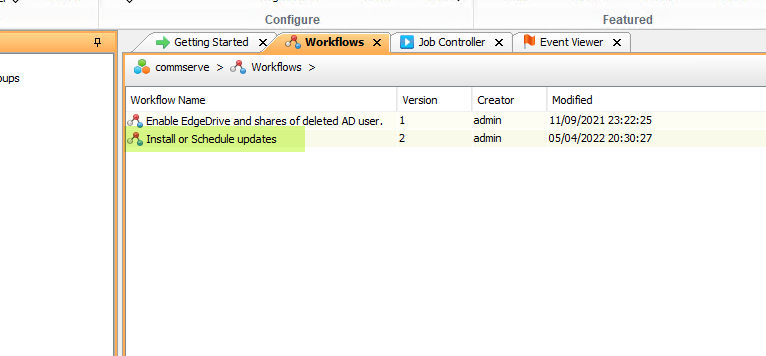
Have you looked at the Install or Schedule updates workflow that currently exists?


4 replies

Forum|alt.badge.img+15
  • Vaulter
  • Answer
  • July 22, 2022

Have you looked at the Install or Schedule updates workflow that currently exists?


Base64
Byte
Forum|alt.badge.img+5
  • Author
  • Byte
  • July 22, 2022

Have you looked at the Install or Schedule updates workflow that currently exists?


Hey Orazan, 


I took a look at the "windows update" workflow and found a Stop Services point. 

Thanks for your tip, I'll take a look at the two, maybe I can learn something from it :) 


Forum|alt.badge.img

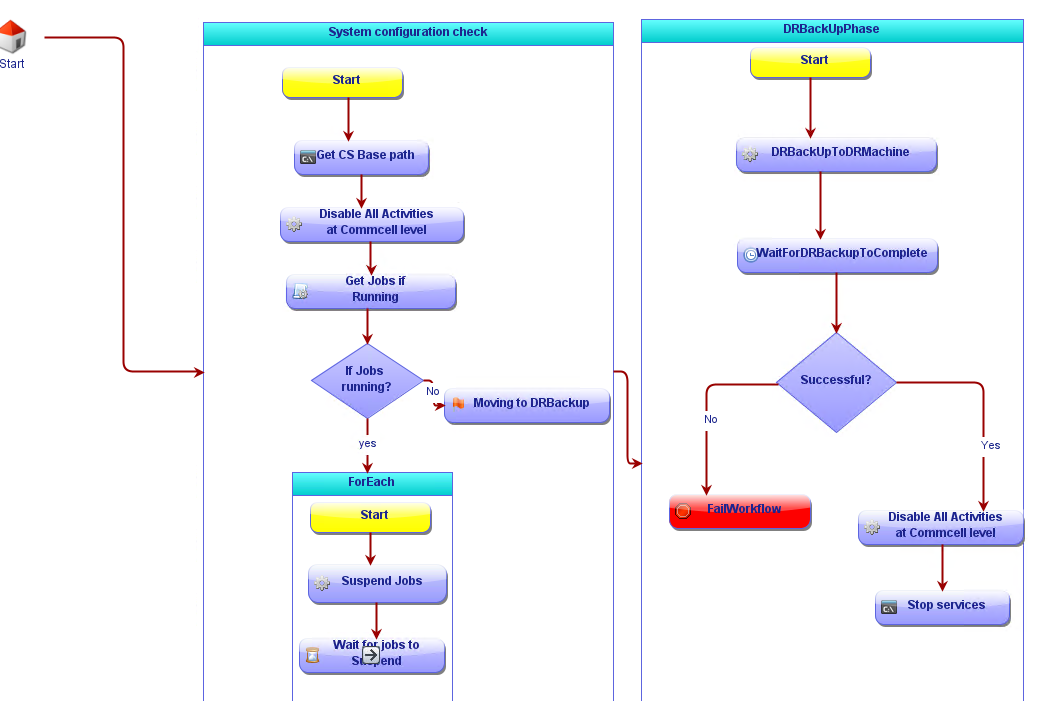
Use attached workflow to perform following operations. Drworkflow.xml is attached and sample is shown below.

  1. Disable Activity
  2. Suspend all jobs
  3. Run DR backup
  4. Disable all activity
  5. Stop services.


Forum|alt.badge.img+15
  • Vaulter
  • July 26, 2022

Thank you for sharing!