




hello everyone, please tell me what is the problem
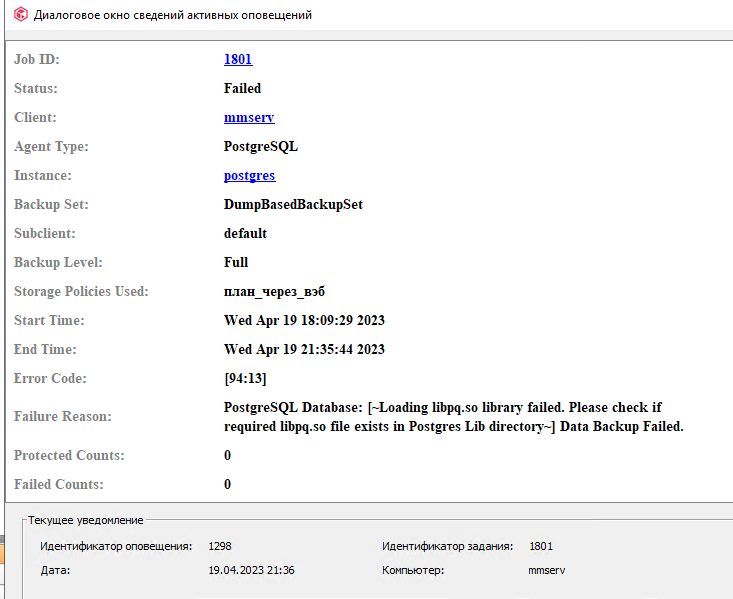
hello everyone, please tell me what is the problem
Best answer by Gowri Shankar
Hi
Please try the following steps outlined in the troubleshooting section of docs.
https://documentation.commvault.com/2022e/expert/21723_backup_troubleshooting.html
To locate the lib directory, run the following command:
bash-3.2# ./pg_config --libdirExample output:
/PostgreSQL/9.2/libIf pg_config is not present which is installed as part of PostgreSQL install, run the following command (on UNIX clients):
bash-3.2# locate libpq.soExample output:
/PostgreSQL/9.2/lib/libpq.soIf the lib path contains libpq.so.x.x instead of libpq.so, create a symlink libpq.so to libpq.so.x.x before attempting instance creation.
For example:
On some setups libpq.so may not be present, but there will be a numbered version like libpq.so.4 or libpq.so.5.
In this case, create a symlink version of libpq.so pointing to the numbered one:
bash-3.2# ln -s /usr/lib64/libpq.so.x.x /usr/lib64/libpq.soYou should be able to create instance successfully now.
Note: Library directory might differ for different setups. Find the proper library directory to create a soft link.

Enter your E-mail address. We'll send you an e-mail with instructions to reset your password.

