I’m backing up a MS SQL Server, and a DBA asked me to disable the maxtransfersize of the backups.
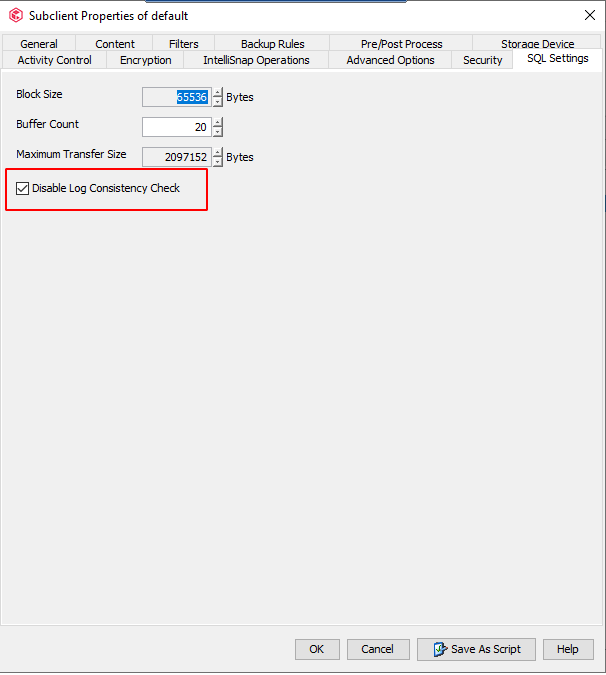
Taking a look at the configurations of the Subclient I found the option to disable the log consistency check, and I checked the box as you can see in the screenshot below:
My question is with this box checked, the maxtransfersize will be disabled too? Or do I need make anything else to disable it?
Thanks,
Best answer by Scott Reynolds
Hello @antonio
The DBA requested to “disable” maxtransfer size? It cannot be disabled. Maxtransfer size is the unit size SQL will transfer data to the backup media. You can lower it there in that window of your screenshot by using the arrows.
The other option disable log consistency check is unrelated to transfer size. That option is the check that is performed on the database to ensure the transaction log backups are in sync with the Commserve. No break in the chain. Link below covers both max transfer size and consistency check https://documentation.commvault.com/11.24/expert/61539_properties_of_sql_server_sql_settings.html
The DBA requested to “disable” maxtransfer size? It cannot be disabled. Maxtransfer size is the unit size SQL will transfer data to the backup media. You can lower it there in that window of your screenshot by using the arrows.
The other option disable log consistency check is unrelated to transfer size. That option is the check that is performed on the database to ensure the transaction log backups are in sync with the Commserve. No break in the chain. Link below covers both max transfer size and consistency check https://documentation.commvault.com/11.24/expert/61539_properties_of_sql_server_sql_settings.html
The DBA requested to “disable” maxtransfer size? It cannot be disabled. Maxtransfer size is the unit size SQL will transfer data to the backup media. You can lower it there in that window of your screenshot by using the arrows.
The other option disable log consistency check is unrelated to transfer size. That option is the check that is performed on the database to ensure the transaction log backups are in sync with the Commserve. No break in the chain. Link below covers both max transfer size and consistency check https://documentation.commvault.com/11.24/expert/61539_properties_of_sql_server_sql_settings.html
Thanks for the quick reply @Scott Reynolds I will take a look in both links you shared and talk back to the DBA about it.