



Hi All.
We have upgraded from 11.32 to 11.42.90 and after the upgrade the “install windows update” workflow is not working anymore, it gives the below error:
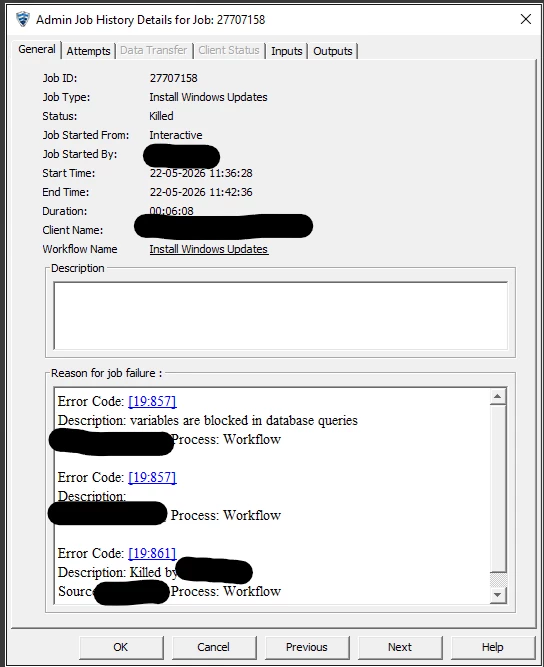
Anyone knows why this is happening?
Thanks
-Anders


 +7
+7
Hi All.
We have upgraded from 11.32 to 11.42.90 and after the upgrade the “install windows update” workflow is not working anymore, it gives the below error:
Anyone knows why this is happening?
Thanks
-Anders
Best answer by Scott Moseman
Reviewing some support cases, I came across this update:
“Starting with Commvault Innovation Update Release 11.38.35, all database queries in workflows containing XPath variables are blocked from execution to prevent SQL injection attacks. This means that if your workflow uses variables (such as XPath expressions) in database queries, those queries will not execute. To disable this protection and allow database queries with XPath variables, we used the BlockDatabaseXpath additional setting with value 0 and restarted the CV services.”
BlockDatabaseXpath
https://documentation.commvault.com/additionalsetting/blockdatabasexpath.html
I would suggest grabbing the latest version of the workflow from Commvault Store to make sure there hasn’t been an update. If it still has the issue, maybe open a Support case and see if we’re going to create an updated version.
Thanks,
Scott

Enter your E-mail address. We'll send you an e-mail with instructions to reset your password.


