


Solved

Install Windows update workflow not working after update to 11.42

  • May 28, 2026
  • 4 replies
  • 35 views

ApK
Apprentice
Forum|alt.badge.img+7


Hi All.


We have upgraded from 11.32 to 11.42.90 and after the upgrade the “install windows update” workflow is not working anymore, it gives the below error:
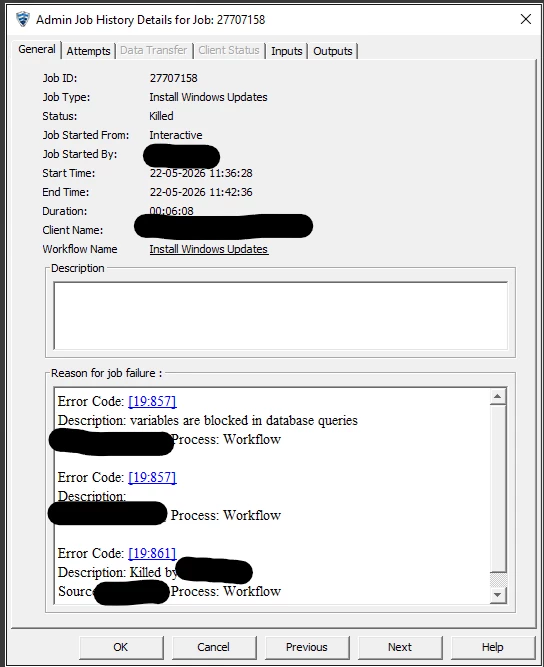
 

Anyone knows why this is happening?


Thanks

-Anders



Best answer by Scott Moseman

Reviewing some support cases, I came across this update:

“Starting with Commvault Innovation Update Release 11.38.35, all database queries in workflows containing XPath variables are blocked from execution to prevent SQL injection attacks. This means that if your workflow uses variables (such as XPath expressions) in database queries, those queries will not execute. To disable this protection and allow database queries with XPath variables, we used the BlockDatabaseXpath additional setting with value 0 and restarted the CV services.”

BlockDatabaseXpath
https://documentation.commvault.com/additionalsetting/blockdatabasexpath.html

I would suggest grabbing the latest version of the workflow from Commvault Store to make sure there hasn’t been an update. If it still has the issue, maybe open a Support case and see if we’re going to create an updated version.

Thanks,
Scott

 

4 replies

Forum|alt.badge.img+17
  • Vaulter
  • May 29, 2026

Hi ​@ApK ,

Request to review workflow engine logs for more details and share log snippet to provide next step.


Scott Moseman
Vaulter
Forum|alt.badge.img+23

Reviewing some support cases, I came across this update:

“Starting with Commvault Innovation Update Release 11.38.35, all database queries in workflows containing XPath variables are blocked from execution to prevent SQL injection attacks. This means that if your workflow uses variables (such as XPath expressions) in database queries, those queries will not execute. To disable this protection and allow database queries with XPath variables, we used the BlockDatabaseXpath additional setting with value 0 and restarted the CV services.”

BlockDatabaseXpath
https://documentation.commvault.com/additionalsetting/blockdatabasexpath.html

I would suggest grabbing the latest version of the workflow from Commvault Store to make sure there hasn’t been an update. If it still has the issue, maybe open a Support case and see if we’re going to create an updated version.

Thanks,
Scott


ApK
Apprentice
Forum|alt.badge.img+7
  • Author
  • Apprentice
  • May 29, 2026

Hi ​@Scott Moseman.


Thanks for the reply and valuable feedback. I would rather not disable something that prevents SQL injection attacks, 

I have updated to the latest version for the same reason. 


I will create a support case to get this addressed with an updated version of the workflow.


Thanks

-Anders 


Onno van den Berg
Community All Star
Forum|alt.badge.img+24

Feedback for the team: Please ensure that Commvault-provided workflows are maintained and updated so they continue to function correctly when impactful changes are introduced. Additionally, these workflows should be updated as part of the installation process for Innovation Release updates or Long-Term Support (LTS) feature releases so security is improved without impact on functions.




