Answer

Private metrics package install failure

  • April 12, 2022
  • 8 replies
  • 252 views

Forum|alt.badge.img+6

Hi,


I have a question regarding metrics server package installation.


Comcell to which I want to attach metrics host is on 11.24.32, but metrics package I chose is v11.25.latest because we have 5 comcells in total and 2 of them are already on sp25 and if I heard correctly - metrics should be the highest version?

Install is failing to check client install requirement with CommServe. When I specify commserve host name I can see in the logs @@COMMSERVE@@ instead of the hostname that I’ve specified as well.

Error: 
1900  8     04/12 14:39:15 ### ### ### - Error: Failed to check client install requirement with CommServe.
1900  1     04/12 14:39:15 ### ### ### - Server Error:  (Error) Given package is not a valid package [67109493].
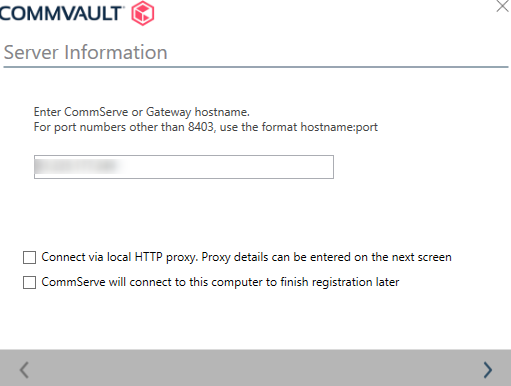


Any idea what does this mean? Not very informative.
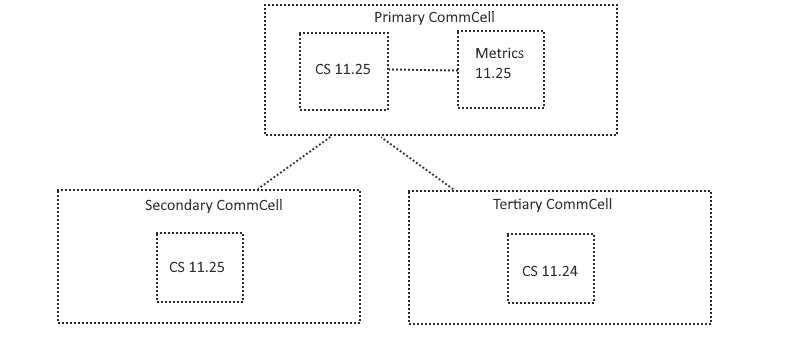
Best answer by Jos Meijer

@benjaminas The Metrics server and the Commserve which control the other CommCells should be on the highest level to prevent possible issues. For example:


If you have a question or comment, please create a topic

8 replies

Jos Meijer
Community All Star
Forum|alt.badge.img+16
  • Community All Star
  • April 12, 2022

Hi benjaminas,

The @@COMMSERVE@@ is just a parameter do to the 8403 tunnel, no worries there.
Your log also confirms no issue as it states CS tunnel is up.
The last 3 lines are the actual issue.

Assuming you are using one central Commcell to manage other Commcells, please correct me if I am wrong, on which software level is the Commserve where the private metrics server is being registered to during install?
Also does this match the level of the installer being used on the Metrics server?


Forum|alt.badge.img+6
  • Author
  • Novice
  • April 12, 2022

@Jos Meijer 


Hi Jos,

commserve to which I want to register the new private metrics server is on v11.24.32.

Package that I am using for that new private metrics server is v11.25.latest. I am using v11.25 because I have 2 other commserves on v11.25 which would report to this metrics server as child commserves.

I think the metrics server should be the highest version, then the commserve?


Jos Meijer
Community All Star
Forum|alt.badge.img+16
  • Community All Star
  • Answer
  • April 12, 2022

@benjaminas The Metrics server and the Commserve which control the other CommCells should be on the highest level to prevent possible issues. For example:


Forum|alt.badge.img+6
  • Author
  • Novice
  • April 12, 2022

@Jos Meijer 


But can metrics server be v11.25 and commserve to which this metrics will register be v11.24?


Jos Meijer
Community All Star
Forum|alt.badge.img+16
  • Community All Star
  • April 12, 2022

@benjaminas I am not sure if it is technically possible, but the general rule of thumb is that the Commserve is on the highest level or on equal level in relation to other objects. Based on this rule I would say no, do not install a metrics server on a lower level Commserve.


Mike Struening
Vaulter
Forum|alt.badge.img+22

@benjaminas I am not sure if it is technically possible, but the general rule of thumb is that the Commserve is on the highest level or on equal level in relation to other objects. Based on this rule I would say no, do not install a metrics server on a lower level Commserve.

Echoing the same.  They should be on the same levels.


Forum|alt.badge.img+6
  • Author
  • Novice
  • April 13, 2022

Fixed this, or maybe there was nothing fix.


So, what seems to be the situation is that you cannot install and register metrics server with newer level of package to the commserve which is on lower level of package.


So I installed metrics host and register it to commserv with a same version and lower service pack and that worked.


Mike Struening
Vaulter
Forum|alt.badge.img+22

Glad to hear it!