Solved

SendLog file e-mail configuration need to be modified

  • May 6, 2021
  • 9 replies
  • 322 views

Forum|alt.badge.img

how to modify the Mail Address in the Notification for sendlog.
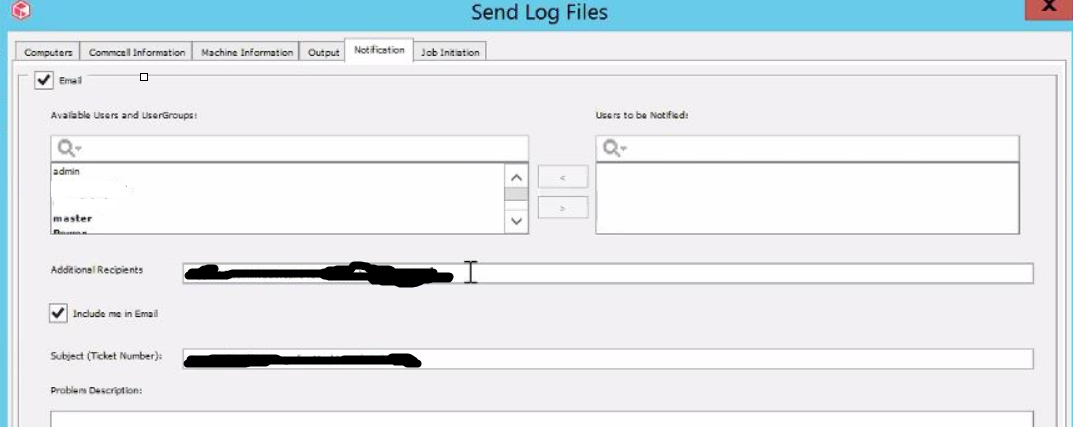


Whenever we tried to initiate the send log by default mail address are getting displayed.

Best answer by Narayanan

@Mike Struening - The issue is resolved now. 

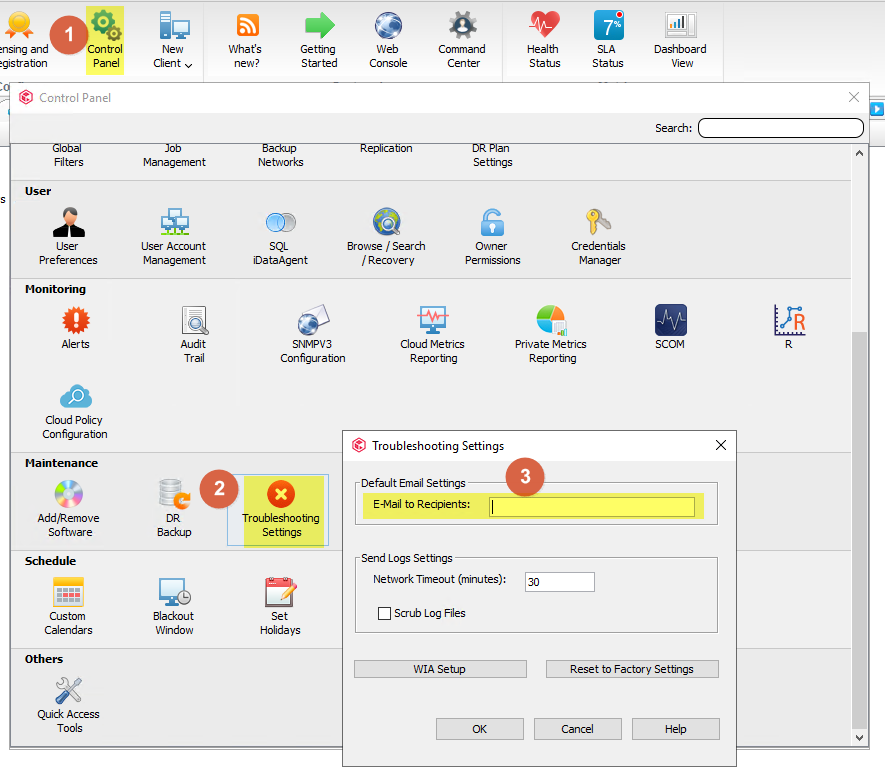
The entry in [Control Panel] / [Troubleshooting Settings]:[E-mail to recipients] is not reflected if "Additional recipients" was manually changed ie. other recipient added.

So if you want to send the emails for send logs jobs to a particular email specified in mentioned [Control Panel] section, please delete the whole list of recipients currently seen under [Send Logs]/[Notification]:[Additional Recipients] and run send logs job. Then kill the job straight away from Job controller. You'll see then the list of recipients is limited to what you set in [Control Panel]. It will be still used till the list of additional recipients is manually changed within the Send Logs task.

9 replies

Edd Rimmer
Vaulter
Forum|alt.badge.img+7
  • Vaulter
  • May 6, 2021

Hello Narayanan,

This is what you are looking for:


Forum|alt.badge.img
  • Author
  • Vaulter
  • May 10, 2021

Tried this setting but this is not working


Mike Struening
Vaulter
Forum|alt.badge.img+22

@Narayanan , can you clarify on what is not working?  Can you share a screenshot of the CommCell’s Troubleshooting settings and describe what is not happening?


Forum|alt.badge.img+1
  • Vaulter
  • May 12, 2021

@Narayanan, Also, what Service Pack / Feature Release are you currently on?


Mike Struening
Vaulter
Forum|alt.badge.img+22

@Narayanan , gentle follow up to see if you could clarify on what is not working and share a screenshot of the CommCell’s Troubleshooting settings and describe what is not happening.

Thanks!


Forum|alt.badge.img
  • Author
  • Vaulter
  • May 18, 2021

@Mike Struening 

Customer current Service pack is 11.21.27

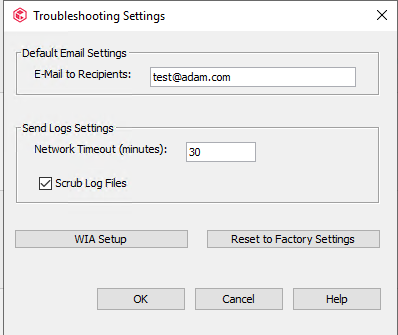
Tried to add test@adam.com in troubleshooting settings. It updated in Commvault database and logs also. But it is not replicating in the Send logs mail notification.

I increased debug for EVMGRS to 10:

15256 22f8  05/11 16:14:15 ### CVGlobalParam::getProperty() - fetching for propName [MiniBrandId] 15256 3360  05/11 16:14:15 ### EvExternal::onMsgEventNew() - Message = [Troubleshooting notification Email has been set to [^1%s].] 15256 3360  05/11 16:14:15 ### EvExternal::onMsgEventNew() - Event Args = [] 15256 22f8  05/11 16:14:15 ### CVGlobalParam::setProperty() - setProperty - propName [SendLogsCurrentRecipient] propValue [test@adam.com].


Even changes are reflecting in Commserver Database but not in console. Checked the SQL query in SSMS.

select * from GXGlobalParam where name = 'SendLogsCurrentRecipient' (Ran this query in SSMS)


Mike Struening
Vaulter
Forum|alt.badge.img+22

@Narayanan , that’s definitely odd.  all of the evidence points towards what SHOULD be working but is not.

Open a case with support and share the case number back for tracking.  Something is definitely not adding up :nerd:


Forum|alt.badge.img
  • Author
  • Vaulter
  • Answer
  • May 19, 2021

@Mike Struening - The issue is resolved now. 

The entry in [Control Panel] / [Troubleshooting Settings]:[E-mail to recipients] is not reflected if "Additional recipients" was manually changed ie. other recipient added.

So if you want to send the emails for send logs jobs to a particular email specified in mentioned [Control Panel] section, please delete the whole list of recipients currently seen under [Send Logs]/[Notification]:[Additional Recipients] and run send logs job. Then kill the job straight away from Job controller. You'll see then the list of recipients is limited to what you set in [Control Panel]. It will be still used till the list of additional recipients is manually changed within the Send Logs task.


Mike Struening
Vaulter
Forum|alt.badge.img+22

Appreciate the follow up @Narayanan !