Answer

File level restore - No. of skipped files issue

  • May 26, 2022
  • 2 replies
  • 693 views

Forum|alt.badge.img+5

Hello Team,

We have restored File system backup job, it’s got restored but is showing No. of Skipped files as per the restore job.


We checked skip files, but the files are restored in target location. We want to know the reason for skipped files.


As per the restore log, it’s showing “The failed byte count does not include files that failed due to seek error”.


Please advise.
Best answer by SparshGupta

Hi @Anand K 


Adding on top of what @DMowers mentioned.


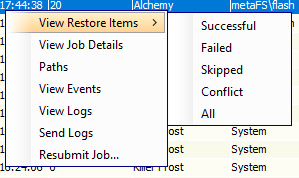
From Java console, you can simply just go to restore job history, right click on the job and View skipped items. It would give you the list of skipped files along with the reason. 


Thanks,

Sparsh

2 replies

DMowers
Vaulter
Forum|alt.badge.img+3
  • Vaulter
  • May 26, 2022

Can you tell me if the restore was a In Place restore? Was it set to Overwrite?

I looked at several like issues in support cases and it shows that either the file was already there and no overwrite option was selected or In Place restore attempted to restore file and it saw the skipped files were already on disk and if no overwrite was opted then files are skipped on restore.


SparshGupta
Vaulter
Forum|alt.badge.img+10
  • Vaulter
  • Answer
  • May 26, 2022

Hi @Anand K 


Adding on top of what @DMowers mentioned.


From Java console, you can simply just go to restore job history, right click on the job and View skipped items. It would give you the list of skipped files along with the reason. 


Thanks,

Sparsh