Solved

scrclientID, scrclientID and clientname

  • March 16, 2023
  • 5 replies
  • 98 views

Forum|alt.badge.img+4
 
Hello,I take scrClientID and destclientID from the command:qoperation execscript -sn DataInterfacePairConfig -si listByClient -si clientNameis there any way to associate scrClientID with client name (how to get client name using thise id’s)?thank you very much for helpDorothy

Best answer by Sebastien Merluzzi

@dorota 

ok, so you would need to migrate to FR28 to see the new options then.

You can use the SQL Query or REST API for now.

5 replies

Forum|alt.badge.img+14

Hi @dorota ,

You can run qoperation execscript -sn DataInterfacePairConfig -si listAll

or you can look at REST API: https://documentation.commvault.com/v11/essential/45898_rest_api_get_client_properties.html

Best Regards,

Sebastien


Forum|alt.badge.img+4
  • Author
  • Novice
  • March 21, 2023

Hi @Sebastien Merluzzi ,


thank you for hint, but when I run:

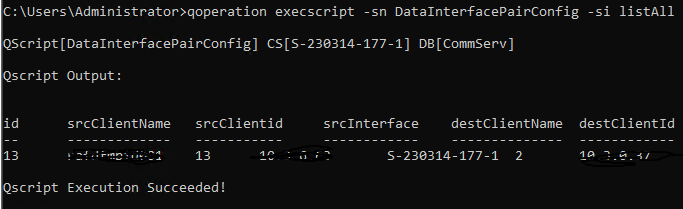
qoperation execscript -sn DataInterfacePairConfig -si listAll

In output I  have the same scrClientID and destclientID numbers as from command:

qoperation execscript -sn DataInterfacePairConfig -si listByClient -si clientName


and I want to find the ClientNames related to this scrClientID and destclientID.


Dorota


Forum|alt.badge.img+14

@dorota ,

What version are you running please, this is what I have on FR28 or above:


Forum|alt.badge.img+4
  • Author
  • Novice
  • March 23, 2023

@Sebastien Merluzzi 


Hi,


version is 11.24.90 and I see it like that (without client Name)


Forum|alt.badge.img+14

@dorota 

ok, so you would need to migrate to FR28 to see the new options then.

You can use the SQL Query or REST API for now.