


This is the fourth installment in our series of articles on the new Auto Recovery capabilities associated with Commvault Platform Release 2023E. Read more in the intro post here, the second installment here, and the third installment here.
One of the key benefits of Commvault Auto Recovery is its scalability and one-click recovery orchestration, which enables enterprises to recover large numbers of workloads quickly, without compromising recovery time objectives. Organizations can restore workloads to production with ease using sanitized recovery points and recover critical workloads within the defined recovery time objectives, reducing the risk of prolonged business downtime.
Command Center
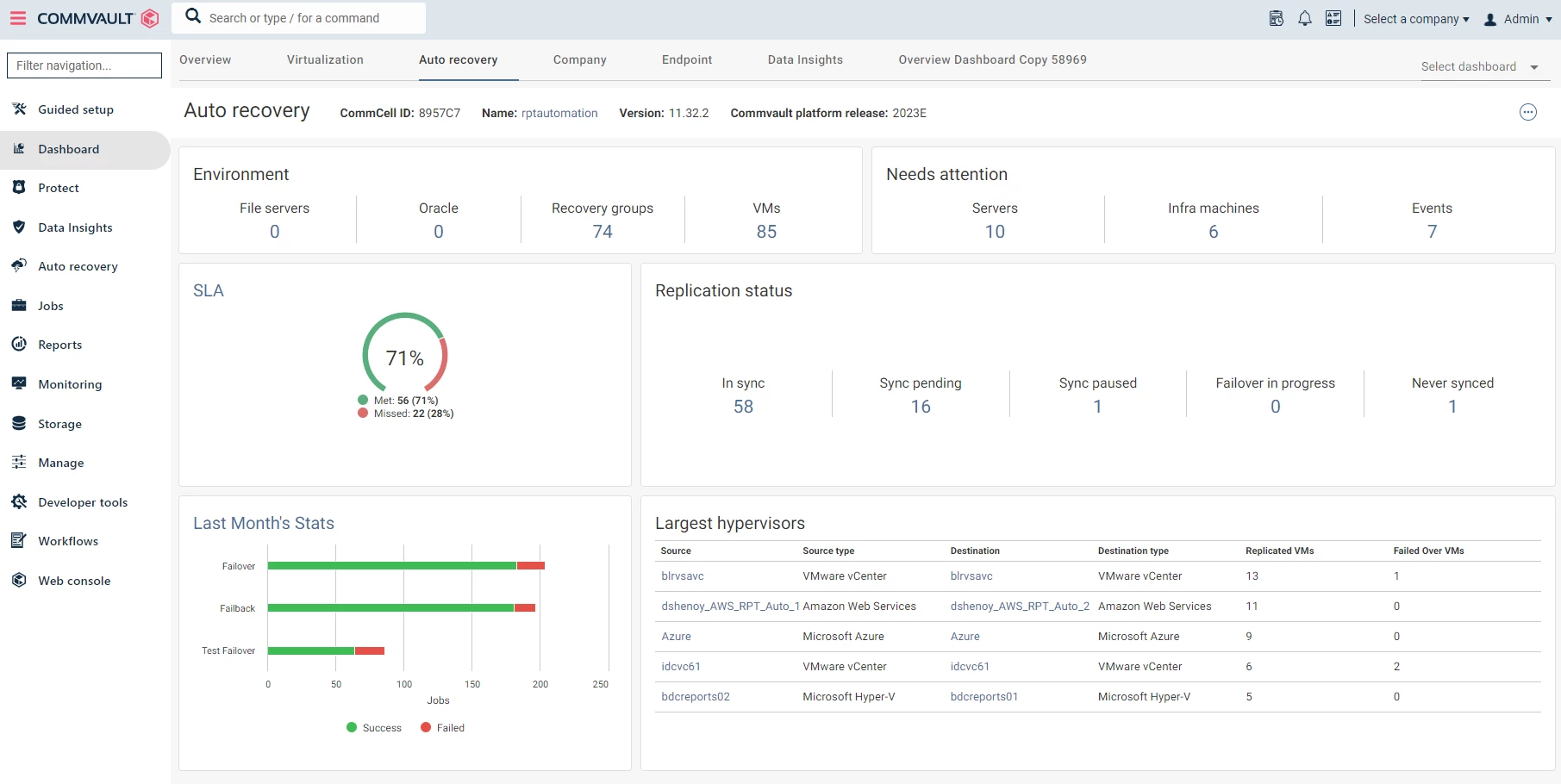
Commvault Command Center is a highly customizable web-based user interface that is designed to manage your data protection and disaster recovery initiatives with ease. It can be used for various purposes such as configuring backups and restores, defining data protection policies, scheduling tasks, monitoring operations, creating reports, and much more.
The Commvault Command Center consolidates critical information and functionality to help simplify the administration of your overall data protection strategy by providing a unified data protection dashboard for analytics, reporting, and more.
Recovery Groups
Recovery groups are a logical grouping of related servers that need to be replicated and/or recovered together. You can create recovery groups either using the intuitive user interface, the Command Center, or APIs. With the help of these recovery groups, you can mass recover and failover an application or group applications together in an uncomplicated way. Additionally, you can set the priority of each server to determines the order the servers should be recovered.
Recovery Operations
Commvault Auto Recovery automates the entire application recovery process by providing one-click orchestrated recovery operations such as failover, test failover, failback and undo failover.
Planned failover
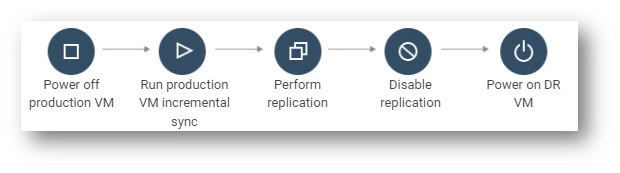
Planned failover is a process of intentionally transitioning a production workload from its primary site to a secondary or disaster recovery (DR) site in a controlled manner. This procedure is typically used in situations where the production site is going offline for maintenance, upgrades, or other planned events, and it is essential to maintain service availability by quickly activating a DR site.
The following are the steps involved in a planned failover:
- Power off production VM: The first step in a planned failover is to power off the production virtual machine (VM). This action ensures that any changes that occur during the planned failover are not lost or corrupted.
- Create incremental backup/snapshot: The next step is to create an incremental backup or snapshot of the production VM. This backup or snapshot captures all the changes that occurred since the last full backup or snapshot.
- Replicate incremental data: The next step is to replicate the incremental data to the DR site if replication is enabled. This step ensures that the DR site has the latest data required for failover.
- Disable replication: Once the incremental data is replicated to the DR site, replication from the production site to the DR site must be disabled. This action ensures that any changes made during the planned failover are not lost or corrupted.
- Power on the DR VM: Finally, the DR VM must be powered on, and the services must be started to complete the planned failover
Unplanned failover
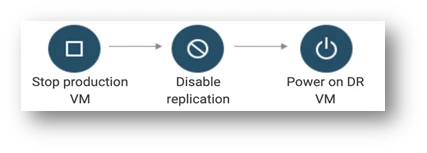
An unplanned failover is a procedure of transitioning a production workload from its primary site to a secondary or disaster recovery (DR) site due to an unexpected event that causes a disruption in the production environment. This procedure is typically used when the production applications (or production site) become unavailable due to a cyber-attack, a hardware failure, a natural disaster, or a power outage.
The following steps are involved in an unplanned failover:
- Power off production VM: The first step in an unplanned failover is to power off the production virtual machine (VM). This action is necessary to prevent any data loss or corruption during the failover process.
- Disable replication from production to DR site: Once the production VM is powered off, the replication from the production site to the DR site must be disabled. This step ensures that any changes made during the unplanned failover are not lost or corrupted.
- Power on the DR VM: Once the data consistency is verified, the DR VM must be powered on, and the services must be started to resume operations. The DR VM takes over the workload from the production VM, ensuring service continuity until the production site is back online.
After the DR site is operational, efforts must be made to restore the production site to its original state. This may involve repairing or replacing any failed hardware, restoring data from backups, or other measures to bring the production site back online.
Test failover/recovery
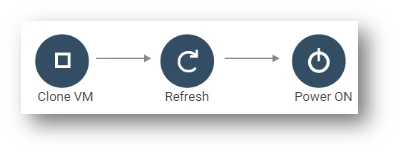
A test failover is a procedure of validating the recovery readiness and recovery SLAs by simulating a failover scenario in a controlled standby environment.
The following steps are involved in a test failover:
- Restore DR VM in a network of your choice: The first step in a test failover is to restore the DR VM in a network of your choice. This network can be isolated from the production environment to prevent any impact on the production workload.
- Power on DR VM: After restoring the DR VM, the next step is to power it on and ensure that it can start the necessary services and applications. This step validates the readiness of the DR VM to take over the workload from the production environment.
- Clean up test VMs: Once the expiration of the test VMs is reached, they are automatically cleaned up without use intervention.
Failback
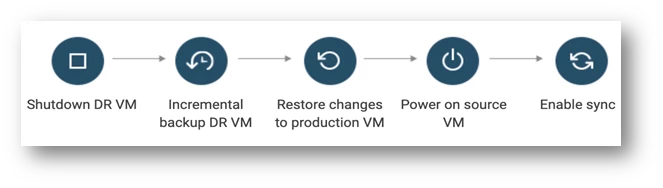
Failback is a procedure of transitioning a production workload from a disaster recovery (DR) site back to its primary site after a failover event. Failback is typically performed once the primary site is back online and fully operational.
The following steps are involved in a failback:
- Power off DR VM: The first step in a failback is to power off the DR VM that was running the production workload during the failover event.
- Create incremental backup/snapshot of DR VM: Once the DR VM is powered off, an incremental backup or snapshot of the VM should be created. This backup or snapshot represents any changes made to the VM during the failover event.
- Replicate incremental data to production site: After creating the backup or snapshot, any incremental data that was generated on the DR site during the failover event should be replicated back to the production site. This step ensures that any changes made to the workload during the failover are not lost or corrupted.
- Power on source VM: Once the replication is complete, the production workload can be powered on and resumed on the primary site.
- Re-enable replication from production site to DR site: After the source VM is operational, the replication from the production site to the DR site should be re-enabled. This step ensures that the DR site is up-to-date and ready to take over the workload in the event of another disruption or disaster.
The goal of failback is to transition the workload back to the primary site while ensuring data consistency and minimizing any impact on service availability.
Undo failover
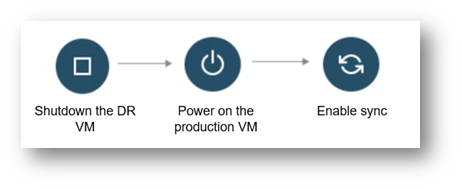
Undo failover is a procedure of reverting a failover event and transitioning the production workload back to its primary site. Undo failover is typically performed when the failover event was initiated by mistake or if the restored servers are corrupted and we want to rollback the failover operation.
The following steps are involved in an undo failover:
- Power off DR VM: The first step in an undo failover is to power off the DR VM that was running the production workload during the failover event.
- Discard the changes on the DR VM: After the DR VM is powered off, any changes made to the workload during the failover event should be discarded. This step ensures that the primary site can resume operations without any data inconsistencies or corruption.
- Power on source VM: Once the changes are discarded, the source VM can be powered on and started. The services should be initiated to resume operations on the primary site.
- Re-enable replication from production site to DR site: After the primary site is validated, the replication from the production site to the DR site should be re-enabled.
The goal of undo failover is to transition the workload back to the primary site without replicating the data from the DR site into the production site.