Solved

API - Automation for Setup Remote Software Cache

  • January 28, 2022
  • 3 replies
  • 115 views

Forum|alt.badge.img+8

Hey,

we are a Service Provider and Backup our Customer in Azure and own Private Cloud with our shared Commvault Installation. (11.24.29)

In the moment we have started to automate all basics thing like:

  • Add Hypervisor + VM Group
  • Add CLoud Storage
  • Create Plan/ Storage Policies / Schedule
  • etc

So we can do an Onboarding of new Customer with basic VSA Backup fully automated is the goal.


What we are looking for is to Setup the Remote Software Cache for each Customer via API. But we could not find anything regarding Software Cache and API.


Has anyone an idea how to do it via API? Or has anyone another solution to do it automated?


Thanks & BR

Marcel

Best answer by Gseibak

Hi Marcel,


I don’t see any API’s as well but we do have a command line option using qscripts which may help


https://documentation.commvault.com/11.24/expert/ConfigureRemoteCache.html

If you have a question or comment, please create a topic

3 replies

Forum|alt.badge.img+10
  • Vaulter
  • Answer
  • January 28, 2022

Hi Marcel,


I don’t see any API’s as well but we do have a command line option using qscripts which may help


https://documentation.commvault.com/11.24/expert/ConfigureRemoteCache.html


Forum|alt.badge.img+8
  • Author
  • Novice
  • January 28, 2022

@Gseibak  Thank you - I will check this with qscripts and maybe we trigger this via api.


Forum|alt.badge.img+8
  • Author
  • Novice
  • February 1, 2022

Hey,

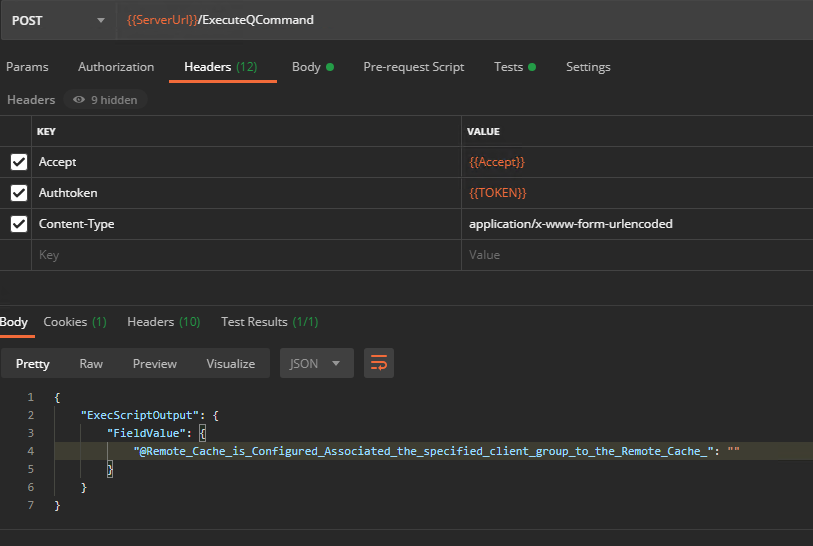
@Gseibak works fine with qscript and call it via api here the header information to call it via API:

and here are only one command in the body:

Command Call:

qoperation execscript -cs <cs> -sn QS_ConfigureRemoteCache -si <client> -si 'Cache Folder' -si <group> -si <0=local / 1=Network Share>

Only thing which cannot be done is to “Sync Cache” directly, i did not found to do it any Idea?

Thx & BR

Marcel