




Powershell module

  • October 22, 2025
  • 2 replies
  • 34 views

Henke
Byte
Forum|alt.badge.img+13

Hello,

What are other users of Commvault powershell module opinion of the module.

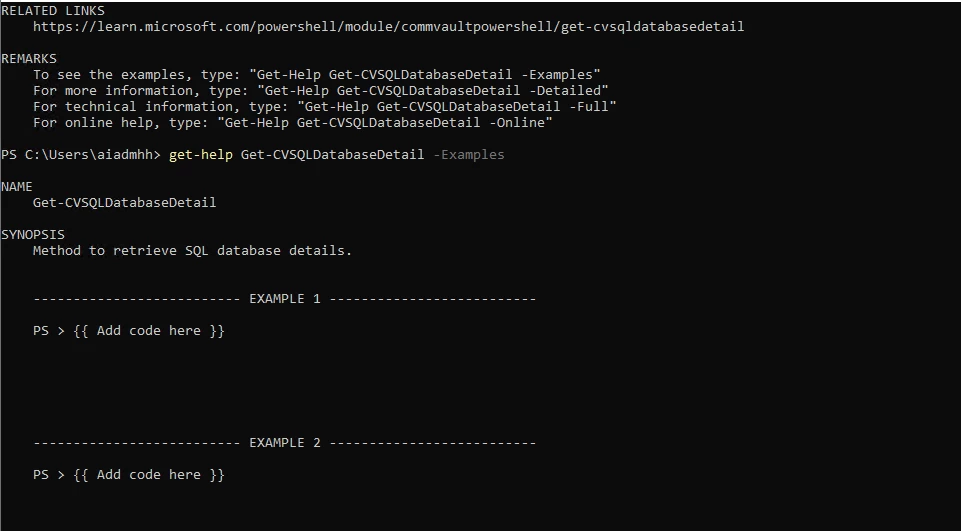
I am disapointed. I was hoping for a well working modle, but it is a struggle. Commands  aren’t logical, not following powershell best practices. Help is minimal and examples of commands are missing.

No where I can find that it is work in progress.

My opinion is that Commvault need to either put an effort in developing the module to a working module or state that it is a “Work in progress -- beta” module.

//Henrik


2 replies

Forum|alt.badge.img+4

Hi ​@Henke , we will check this out. is there a specific set of commands you are working with, if so pls let me know.


Henke
Byte
Forum|alt.badge.img+13
  • Author
  • Byte
  • October 23, 2025

Hello ​@MaheshPrakash 

I’ve listed two examples.

I guess what annoyes me is that it isn’t intuitive.


one example:

Get-CVSQLDatabase -Name xds, gives a result

Get-CVSQLDatabaseDetail -name xds, errors out
Write-Error: C:\Program Files\WindowsPowerShell\Modules\CommvaultPowerShell\0.3.4\custom\oldsdk\Submit-CVRESTRequest.ps1:68
Line |
  68 |                  ValidateResponse $response $output $ValidateProperty
     |                  ~~~~~~~~~~~~~~~~~~~~~~~~~~~~~~~~~~~~~~~~~~~~~~~~~~~~
     |  Status:  Message: Response status code does not indicate success: 500 (). ErrorMessage:  {   "errorMessage":
     | "Exception caught when database details retrieval with error [Invalid request, both instance and database ID is
     | required for this API.].",   "errorCode": 101 } RecommendedAction:


Another example

Get-CVAlert

notifType      : 131073
description    : Default alert for Commvault appliance and RefArch HyperScale platform monitoring
organizationId : 0
createdTime    : 1697538690
status         : 2049
creator        : @{name=admin; id=1}
alertType      : @{name=HyperScale platform and hardware monitoring alert rule; id=44}
alert          : @{name=HyperScale platform alert; id=158}
organization   :
alertCategory  : @{name=Custom Rules; id=9}

PS > Get-CVAlertCustomRuleDetail -AlertRuleId 158
Get-CVAlertCustomRuleDetail_Get: The server responded with a Request Error, Status: NotFound
PS> Get-CVAlertCustomRuleDetail -AlertRuleId 9
Get-CVAlertCustomRuleDetail_Get: The server responded with a Request Error, Status: NotFound
PS > Get-CVAlertCustomRuleDetail -AlertRuleId 44
Get-CVAlertCustomRuleDetail_Get: The server responded with a Request Error, Status: NotFound

