


Answer

Setting up "Client Group", "CommServe/Gateway hostname" and "Storage Policy" using API to install a new client

  • October 15, 2025
  • 2 replies
  • 51 views

Forum|alt.badge.img+3

Hello,

As the title says I’m trying to automate the installation of dozens of clients using API. For that I need to make sure I can select "Client Group", "CommServe/Gateway hostname" and "Storage Policy". Especially the “CommServe/Gateway” given we’re using proxies and that the client computer won’t directly connect to the Commserve:
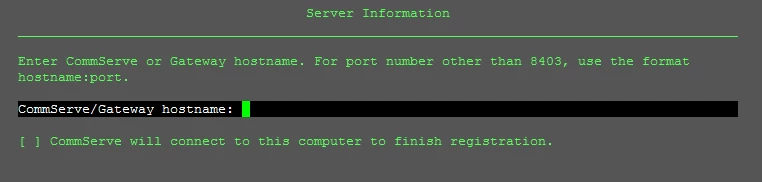
“Client Group” is also vital because of the way we have things set up. If the client doesn’t fall in the right client group it won’t communicate.

I’ve been looking at this documentation but I don’t see mention of these fields there:

https://api.commvault.com/docs/SP36/api/cv/FileServerOperations/post-install-client/

Can you please help me understand if this is possible?


Thank you very much for your help and have a nice day.


Best regards,



Best answer by Dheeraj Shetty

Hi ​@NOS ,
 

It is not possible to set "Client Group", "CommServe/Gateway hostname", or "Storage Policy" directly during client installation via the documented API.

These settings must be configured post-installation using REST API calls, auto-association rules, or workflows. Full automation is achievable, but requires a two-step process: installation followed by configuration. If you need to automate then you may consider the below

Clients can be associated to Client Group post-installation using API or automatic association rules (e.g., based on hostname or IP). Ref doc : https://docs.commvault.com/2024e/software/rest_api_post_client_properties.html , https://documentation.commvault.com/2024e/commcell-console/rules_available_for_smart_client_computer_groups.html.

CommServe/Gateway Hostname configuration is only available when using custom installation packages with command-line options (e.g., /httpproxyhostname or -proxyhost).

After the client is created, the storage policy can be assigned via the Subclient Properties API : https://documentation.commvault.com/2024e/software/rest_api_get_subclient_properties.html

Regards,
Dheeraj

2 replies

Forum|alt.badge.img+8

Hi ​@NOS ,
 

It is not possible to set "Client Group", "CommServe/Gateway hostname", or "Storage Policy" directly during client installation via the documented API.

These settings must be configured post-installation using REST API calls, auto-association rules, or workflows. Full automation is achievable, but requires a two-step process: installation followed by configuration. If you need to automate then you may consider the below

Clients can be associated to Client Group post-installation using API or automatic association rules (e.g., based on hostname or IP). Ref doc : https://docs.commvault.com/2024e/software/rest_api_post_client_properties.html , https://documentation.commvault.com/2024e/commcell-console/rules_available_for_smart_client_computer_groups.html.

CommServe/Gateway Hostname configuration is only available when using custom installation packages with command-line options (e.g., /httpproxyhostname or -proxyhost).

After the client is created, the storage policy can be assigned via the Subclient Properties API : https://documentation.commvault.com/2024e/software/rest_api_get_subclient_properties.html

Regards,
Dheeraj


Forum|alt.badge.img+3
  • Author
  • Byte
  • October 22, 2025

Thank you!

