



Question

Command Center dashboards show incomplete information on CommServe 11.40.30 (Linux)

  • December 24, 2025
  • 2 replies
  • 45 views

Forum|alt.badge.img+4

Hi Team,

I am running CommServe version 11.40.30 on Linux, and I am facing an issue where Command Center dashboards show incomplete information.

The following dashboards are affected:

  • Health

  • Storage Space

  • Storage

Some sections are missing or empty.
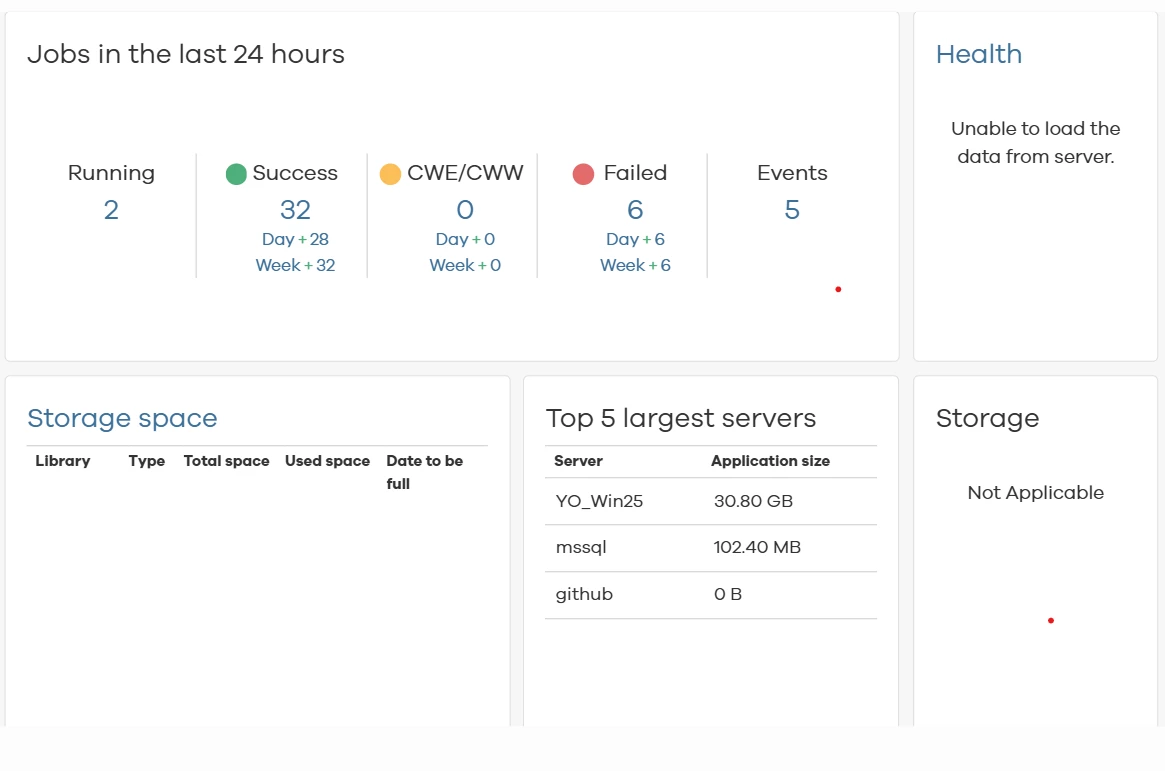
 

While reviewing the logs, I found the following errors:


SEVERE: failed to retrieve data for datasource [cs], dataset [GetTopUsedDiskLibraries], user [admin], error [Column name or number of supplied values does not match table definition.] SEVERE: failed to execute cache query for dataset [GetTopUsedDiskLibraries], cacheId [87c1520841b54f0388a2f5fe31ddcdbb], error [Table "Cache_93e2cdc681ac4744b54ea90cca217b30" not found (this database is empty)] SQL statement: SELECT * FROM [Cache_93e2cdc681ac4744b54ea90cca217b30] ORDER BY "Date to be Full"

Has anyone encountered this issue before?

  • Is this related to Command Center cache tables or database corruption?

  • Are there any known fixes or recommended troubleshooting steps?

Any guidance or similar experiences would be greatly appreciated.

Thanks in advance.

2 replies

Forum|alt.badge.img+8

Hi ​@Yassmin Omer,

It appears that the Health, Storage Space, and Storage panes on the Command Center dashboard are not displaying data as the Command Center is unable to retrieve and display the data correctly for these tiles.

The following error message indicates a schema mismatch between the report query and the underlying database table.

SEVERE: failed to retrieve data for datasource [cs], dataset [GetTopUsedDiskLibraries], user [admin], error [Column name or number of supplied values does not match table definition.]

Could you please confirm, if the Command Center is hosted on a separate machine?

Starting with SP40, all connections to the CommServe database and CVCloud (if it resides locally on the CommServe database) use the read-only account sqlmetrics_cv. 

I would recommend logging a Support Ticket as we may need to modify the dataset query to remove statements that require write access, or Adjust table permissions to allow 'sqlmetrics_cv' to perform the necessary updates.

As a temporary workaround, you can create a registry key Database\pCREAccess, copy the value from pExecAccess into this key, and then restart Tomcat and let us know, if the Health and Storage tiles are displaying the data in Command Center Dashboard. 


Regards,

Dheeraj


Forum|alt.badge.img+4
  • Author
  • Novice
  • December 25, 2025

Hi ​@Dheeraj Shetty 

Thank you for your assistance.

The Command Center is hosted on the same machine as the CommServe.
I have tried the suggested workaround, but the issue still persists.

