
Solved

Intellisnap backup

  • December 20, 2024
  • 5 replies
  • 185 views

Forum|alt.badge.img

Hi Team,

I would like to understand how IntelliSnap backups work and the detailed backup workflow, step by step.

Could someone please explain this in detail? Your help is much appreciated.

Thank you in advance!

Best answer by Albert Williams

Hello ​@Harsha V 

Documentation states the following: 
https://documentation.commvault.com/2024e/essential/snapshots.html

The IntelliSnap technology can be deployed as a lightweight, standalone solution for automating snapshot management and application-aware recovery across multiple storage arrays and physical or virtual servers, unifying the management of hardware snapshots through a single console to improve efficiency and unleash the true potential of snapshots. This maximizes the value of your existing snapshot investment by simplifying management, speeding recovery and making snapshots searchable. You can automatically create long-term snapshot backups and archives from snapshots using commodity disk, cloud or tape, without the need for traditional backup, potentially eliminating legacy backup solutions.


What this all translates to is a system that will allow your storage level snapshots to be compatible with the application to ensure that it is recoverable and consistent. 

The problem that IntelliSnap is attempting to solve is slow backup and restore operations at scale due to large amount of hop’s and environmental latency. For example if you are attempting to protect 1TB of Windows File System data that will need to perform the following hops: 

Prod Storage array » Host » MA » Backup Storage. 


Each one of those hops having to go into and out of a switch and network environment. That amount of handshakes and limits on streams will result in over all slower backups and restores. 

With IntelliSnap we put the application in question into a safe state for backup and tell the storage array to take a storage level snapshot. This takes just a few seconds, minutes are most depending on the array and such. Now we have a copy of the data on the storage array that is separate from the application and in a state we know is consistent. 


The final step is for us to perform a backup copy of that data off the primary storage and onto the backup storage. This will happen with a direct connection instead of all the other hops spoken about before. 


In short the process is as follows: 


1- Put application in backup state

2- Take snap copy ( this will be the backup job in CV job history ) 

3- Perform a backup copy job of the data  (this will show up in the history of the agent if you enable “show copy jobs” in the settings) 


Once the backup copy is complete then the primary storge will have its own snapshot retention settings and get rid of them as needed. 

This is a 10 year old video but helps understand the fundamentals. Please note at its core it is still correct: 


Kind regards
Albert Williams

5 replies

Forum|alt.badge.img+14

Hello ​@Harsha V 

Documentation states the following: 
https://documentation.commvault.com/2024e/essential/snapshots.html

The IntelliSnap technology can be deployed as a lightweight, standalone solution for automating snapshot management and application-aware recovery across multiple storage arrays and physical or virtual servers, unifying the management of hardware snapshots through a single console to improve efficiency and unleash the true potential of snapshots. This maximizes the value of your existing snapshot investment by simplifying management, speeding recovery and making snapshots searchable. You can automatically create long-term snapshot backups and archives from snapshots using commodity disk, cloud or tape, without the need for traditional backup, potentially eliminating legacy backup solutions.


What this all translates to is a system that will allow your storage level snapshots to be compatible with the application to ensure that it is recoverable and consistent. 

The problem that IntelliSnap is attempting to solve is slow backup and restore operations at scale due to large amount of hop’s and environmental latency. For example if you are attempting to protect 1TB of Windows File System data that will need to perform the following hops: 

Prod Storage array » Host » MA » Backup Storage. 


Each one of those hops having to go into and out of a switch and network environment. That amount of handshakes and limits on streams will result in over all slower backups and restores. 

With IntelliSnap we put the application in question into a safe state for backup and tell the storage array to take a storage level snapshot. This takes just a few seconds, minutes are most depending on the array and such. Now we have a copy of the data on the storage array that is separate from the application and in a state we know is consistent. 


The final step is for us to perform a backup copy of that data off the primary storage and onto the backup storage. This will happen with a direct connection instead of all the other hops spoken about before. 


In short the process is as follows: 


1- Put application in backup state

2- Take snap copy ( this will be the backup job in CV job history ) 

3- Perform a backup copy job of the data  (this will show up in the history of the agent if you enable “show copy jobs” in the settings) 


Once the backup copy is complete then the primary storge will have its own snapshot retention settings and get rid of them as needed. 

This is a 10 year old video but helps understand the fundamentals. Please note at its core it is still correct: 


Kind regards
Albert Williams


Forum|alt.badge.img+3

Hi Team,


To leverage IntelliSnap feature does it require separate license apart from backup and recovery license which is already exist. Please advice?

is there any way to check IntelliSnap is enabled in our environment?


Forum|alt.badge.img+1
  • Vaulter
  • December 17, 2025

Hi ​@Kumar Devaraj  

Please refer to the below article that addresses your query. 

https://documentation.commvault.com/11.40/software/intellisnap_backup_support.html#license-requirements

You can choose to use one of the following licensing mechanisms:

  • Traditional License that is based upon products and features in your CommCell.

  • Capacity License that is based upon the amount of data that you want to protect.

For comprehensive information about licensing, see License Administration.

Traditional License

The following license types are available for IntelliSnap.

Feature

License Type

License Consumption

IntelliSnap Operations

Hardware Snapshot Enabler

1 license per Client

NetApp SnapVault and SnapMirror

NetApp Snap Management

1 license per CommCell

Capacity License

License Type

License Consumption

Snapshot

1 license per CommCell for n Terabytes (TB) of protected data

Replication

1 license per CommCell for n Terabytes (TB) of protected data


Forum|alt.badge.img+3

Hi Kalaivanan,

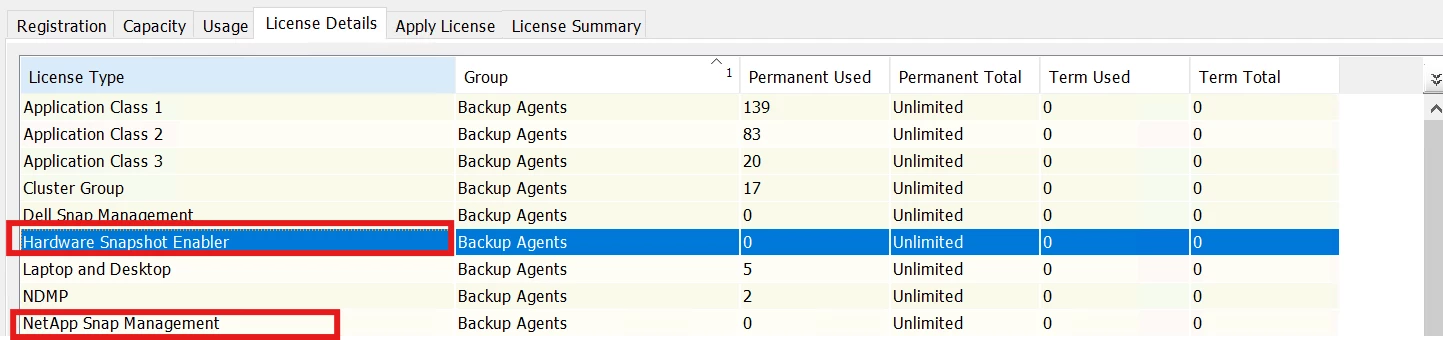
In our CommCell, under the license details, I can see the following information. Does this mean that the IntelliSnap feature is enabled? Could you please confirm? Kindly find the below screenshot of License details.

We are planning to enable IntelliSnap-based snapshots for the NetApp filer instead of NDMP backups.


Forum|alt.badge.img+1
  • Vaulter
  • December 17, 2025

Hi ​@Kumar Devaraj  
 

The screenshot says that you have unlimited licenses which doesn’t mean that intellisnap is enabled. Refer to the below articles if you want to enable intellisnap 


https://documentation.commvault.com/11.40/commcell-console/adding_nas_client_for_intellisnap.html

https://documentation.commvault.com/11.40/software/enable_intellisnap_backups_for_netapp_subclient.html