Question

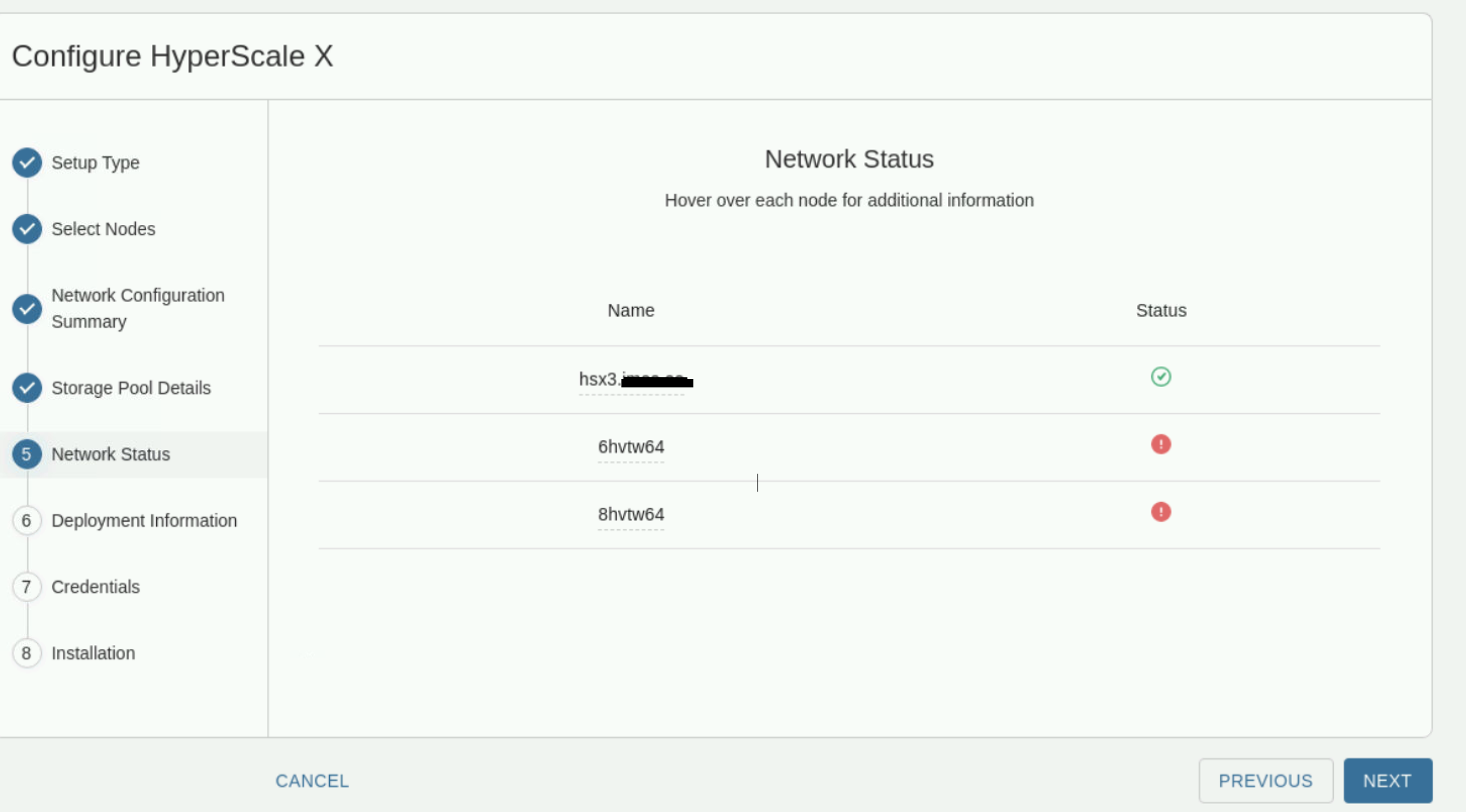
hsxsetup issue

  • January 9, 2025
  • 7 replies
  • 94 views

Forum|alt.badge.img+5

Hello all

please can you help with this issue there the A nad PTR records exists ?

Thanks Pavel
 

7 replies

Forum|alt.badge.img+5
  • Author
  • Byte
  • January 9, 2025

changed to xxx.local


the same for all nodes
root@hsx2 ~]# nslookup
> 192.168.166.74
74.166.168.192.in-addr.arpa     name = hsx1.ixxx.local
> 192.168.166.75
75.166.168.192.in-addr.arpa     name = hsx2.xxx.local
> 192.168.166.76
76.166.168.192.in-addr.arpa     name = hsx3.xxx.local
>

the same for all nodes
[root@hsx2 ~]# hostnamectl status | grep 'Static hostname' | awk '{print $3}'
hsx2.xxx.local


/var/log/commvault/Log_Files/cvinstall_hsxavahi.log


19460 140430382283648 2025-01-09 14:42:05,767 ERROR    Invalid IPv6 address [192.168.166.74]
19460 140430382283648 2025-01-09 14:42:05,767 ERROR    Invalid IPv6 information : IPaddr [192.168.166.74] Intx [] SerialNum [6hvtw64]. Checking if this is IPv4.
19460 140430382283648 2025-01-09 14:42:05,767          Using [192.168.166.74] for communication
19460 140430382283648 2025-01-09 14:42:05,847          Executing command on remote node: hostnamectl status | grep 'Static hostname' | awk '{print $3}'
19460 140430382283648 2025-01-09 14:42:06,072          Remote command execution stdout - [hsx1.xxx.local
]
19460 140430382283648 2025-01-09 14:42:06,073          Successfully obtained hostname from remote node [6hvtw64] - value [hsx1.xxx.local]
19460 140430382283648 2025-01-09 14:42:06,076          Remote node: 192.168.166.75
19460 140430382283648 2025-01-09 14:42:06,076 ERROR    Invalid IPv6 address [192.168.166.75]
19460 140430382283648 2025-01-09 14:42:06,076 ERROR    Invalid IPv6 information : IPaddr [192.168.166.75] Intx [] SerialNum [8hvtw64]. Checking if this is IPv4.
19460 140430382283648 2025-01-09 14:42:06,076          Using [192.168.166.75] for communication
19460 140430382283648 2025-01-09 14:42:06,156          Executing command on remote node: hostnamectl status | grep 'Static hostname' | awk '{print $3}'
19460 140430382283648 2025-01-09 14:42:06,364          Remote command execution stdout - [hsx2.xxx.local
]
19460 140430382283648 2025-01-09 14:42:06,364          Successfully obtained hostname from remote node [8hvtw64] - value [hsx2.xxx.local]
19496 140223681284992 2025-01-09 14:42:06,533          Argument [command_line_kwargs] : [{}]
19496 140223681284992 2025-01-09 14:42:06,533          Argument [hostnames] : [['jhvtw64', '6hvtw64', '8hvtw64']]
19496 140223681284992 2025-01-09 14:42:06,533          Argument [subcmd] : [getnwconfig]
19496 140223681284992 2025-01-09 14:42:06,533          Get NW configuration files from given hosts..
19496 140223681284992 2025-01-09 14:42:06,533          ['jhvtw64', '6hvtw64', '8hvtw64']


19496 140223681284992 2025-01-09 14:42:08,372          Copying file [/opt/commvault/MediaAgent64/Temp/HsInstaller/nwconfig/8hvtw64_getnwconfig.json] from node [hsx2.xxx.local]
19496 140223681284992 2025-01-09 14:42:08,470          NW configuration obtained from host hsx2.xxx.local saved in file /opt/commvault/MediaAgent64/Temp/HsInstaller/nwconfig/8hvtw64_getnwconfig.json
19730 139684921711488 2025-01-09 14:43:00,352          Argument [command_line_kwargs] : [{}]
19730 139684921711488 2025-01-09 14:43:00,352          Argument [filename] : [/opt/commvault/MediaAgent64/Temp/HsInstaller/avahibrowse.ini]
19730 139684921711488 2025-01-09 14:43:00,352          Argument [ips] : []
19730 139684921711488 2025-01-09 14:43:00,352          Argument [subcmd] : [discover]
19730 139684921711488 2025-01-09 14:43:00,353          Discover nodes with Installer Avahi Service.
19730 139684921711488 2025-01-09 14:43:00,353          Discover try #0
19730 139684555577088 2025-01-09 14:43:01,360          Service Discovery returncode = 0
19730 139684921711488 2025-01-09 14:43:01,360          self.browse_process.returncode = 0
19730 139684921711488 2025-01-09 14:43:01,361          Got avahi-browse output
19730 139684921711488 2025-01-09 14:43:01,367          Update hostnames for nodes where NW is already configured
19730 139684921711488 2025-01-09 14:43:01,372          Local node: fe80::aeb4:80ff:fe26:3669
19730 139684921711488 2025-01-09 14:43:01,372          Executing command on local node: hostnamectl status | grep 'Static hostname' | awk '{print $3}'
19730 139684921711488 2025-01-09 14:43:01,507          Local command execution stdout - [hsx3.xxx.local]
19730 139684921711488 2025-01-09 14:43:01,508          Successfully obtained hostname from remote node [jhvtw64] - value [hsx3.xxx.local


Forum|alt.badge.img+5
  • Author
  • Byte
  • January 9, 2025

changed to abc.local 

nslookup for all nodes the same
[root@hsx3 ~]# nslookup
> 192.168.166.74
74.166.168.192.in-addr.arpa     name = hsx1.abc.local
> 192.168.166.75
75.166.168.192.in-addr.arpa     name = hsx2.abc.local
> 192.168.166.76
76.166.168.192.in-addr.arpa     name = hsx3.abc.local
>


Forum|alt.badge.img+5
  • Author
  • Byte
  • January 9, 2025

[root@hsx2 ~]# hostnamectl status | grep 'Static hostname' | awk '{print $3}'
hsx2.abc.local


R Anwar
Vaulter
Forum|alt.badge.img+10
  • Vaulter
  • January 10, 2025

Hi ​@Pavel Banar 

After changing the hostname, I would recommend restarting avahi services(systemctl restart avahi) and run hsxsetup on all nodes again before doing on last node.

Regards,


Forum|alt.badge.img+5
  • Author
  • Byte
  • January 10, 2025

Hi Hi

yes server was restatred, cat /etc/hostname shows correct hsx1.abc.local (hsx2,hsx3)

Pavel


Forum|alt.badge.img+5
  • Author
  • Byte
  • January 10, 2025

HI R Anwar , maybe we are on right way

[root@hsx1 ~]# avahi-resolve -a 192.168.166.74
Failed to resolve address '192.168.166.74': Timeout reached
[root@hsx1 ~]# nslookup 192.168.166.74
74.166.168.192.in-addr.arpa     name = hsx1.abc.local


R Anwar
Vaulter
Forum|alt.badge.img+10
  • Vaulter
  • January 15, 2025

Hi ​@Pavel Banar 

Please check the file /etc/avahi/services/cvlt.service. It’s is definitely something on the avahi side failing to resolve the hostname so could need a minute tuning.

Regards,