





This is the second installment in a series of articles on the new Auto Recovery capabilities that are part of Commvault Platform Release 2023E. Read more in the intro post here.
Recovery Point Objective (RPO)
Commvault Auto Recovery provides replication options at multiple levels, ranging from storage to applications running on physical or virtual machines. The two main types of replications are periodic and continuous, with periodic replication offering a moderate recovery point objective (RPO) and continuous replication offering a low or near-zero RPO.
Regardless of the replication type or workload, Commvault Auto Recovery offers consistent configuration, recovery orchestration, and automation. The platform simplifies the replication process by abstracting complexities and offering a user-friendly interface and APIs that are easy to use and understand.
With Commvault Auto Recovery, replication and recovery needs can be seamlessly managed across different types of workloads and platforms. Whether data needs to be replicated periodically or continuously, the platform offers a reliable and consistent solution that helps ensures your data is always protected and recoverable. Additionally, Commvault's intuitive interface and APIs simplify how to configure and manage replication and disaster recovery making extensive technical knowledge or training unnecessary.
Commvault provides a simple, consistent, and intuitive UI and APIs for replication configuration and DR orchestration and automation. The replication configuration and DR orchestration are consistent across all replication types and workloads. Commvault abstracts all the complexities across various types, providing users the ability to manage and configure their replication and DR solutions in a simple way. With Commvault, you can choose the replication solution that best fits your needs, based on your environment and your RPO requirements.
| Replication type | Recovery type | RPO | RTO | |
| Periodic | Existing backup replication (classic) | Warm site | Typically, >= 6 hours | > 1 Hour |
| Hot site | Typically, >= 6 hours | <= 1 hour | ||
| New backup and replication (direct) | Warm site | > 15 mins | > 1 Hour | |
| Hot site | > 15mins | <= 1 hour | ||
| Continuous | Block level IO replication | Hot site | <= 15 mins | <= 1 hour |
Periodic replication
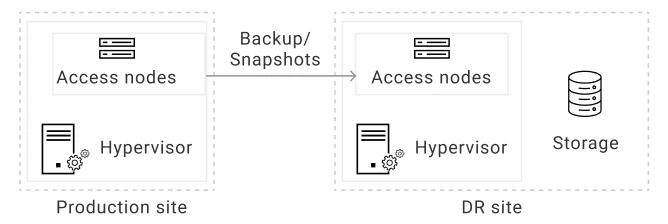
Periodic replication is a type of replication where backup data or snapshots are synchronously copied to the recovery site (DR site) as per the configured SLA. This replication can be done at the VM, Volume, or application level, depending on the user's requirements. Periodic replication is useful when your DR strategy requires protecting your workloads with hourly/daily RPOs.
To implement periodic replication, at least one access node with Virtual Server package installed in the production site and one access node with Virtual Server package in the DR site is needed. These access nodes connect to the hypervisor to read data from the source hypervisor and transfers it to the target access node. The MediaAgent package can be installed on the same access node in the DR site to manage data transfer. The MediaAgent performs data deduplication, compression, encryption, and other tasks. It transfers data over a network (WAN) or SAN to the destination hypervisor and writes data to the destination site.
Apart from the access nodes and MediaAgent, provisioning of storage(s) that will store the backup data or snapshots that are taken in the production site is also needed. The storage can reside in the production site, DR site, or any other location such as Metallic cloud. In the above diagram, the storage in the DR site.
For RPO requirement of 15 mins or higher, opt in for periodic replication. This replication type is typically used for non-mission critical workloads where a few minutes/hours’ worth of data loss can be tolerated. This option can optimize your replication and recovery costs.
Continuous replication
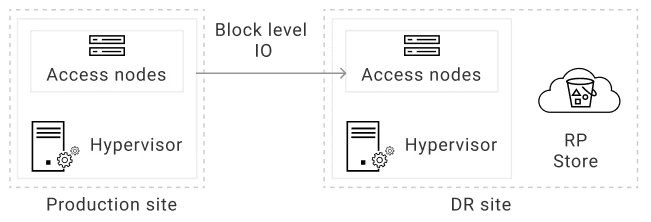
Continuous replication is a method of replication that offers near-zero RPO (Recovery Point Objective) by continuously replicating IOs (Input/Output) from production VM to the DR VM. This approach allows for the changes made to the production VM to be immediately replicated to the DR VM, providing the highest level of data consistency and minimal data loss in case of a disaster.
To implement continuous replication, at least one access node with Virtual Server package installed in the production site and one access node with Virtual Server package in the DR site is needed. These access nodes connect to the hypervisor to read data from the source hypervisor and transfers it to the target access node.
Additionally, storage for RP store needs to be provisioned, this will store the recovery points required to restore the VM during failover and test failover. The RP store storage needs to be located in the DR site or close to the DR site for faster restoration of the VM.
Continuous replication offers several benefits, such as low RPO, fast recovery time, and better data consistency. It is an ideal solution for mission-critical workloads that require high levels of availability and minimal data loss.
The demo video below shows how you can opt-in for continuous replication when creating a replication group.
Recovery Time Objective/Recovery Type (RTO)
Commvault Auto Recovery provides customers with flexibility when it comes to recovery options. Two types of recovery are supported: warm site and hot site.
Warm site recovery
When slightly higher downtime can be tolerated and reduction in replication and recovery costs is desired, use warm site recovery, available from version 11.28 of Commvault Auto Recovery. In warm site recovery the VM and disks is not deployed during initial replication group creation, instead they are deployed during failover. During replication only the data is replicated to the DR site which is what provides as potential reduction in recovery costs for non-mission critical workloads where higher downtimes can be tolerated.
Since the VMs and disks are created during failover, the time taken failover the VMs from the production site to the DR site is going to be greater than an hour in most scenarios.
Hot site recovery
When a very low downtime (near-zero RTO) is needed, for mission critical workloads, use hot site recovery. Hot site recovery deploys the VM and the disks in the DR site during initial replication and the subsequent replication will update the data in the storage. Since the VM and disks are deployed and maintained throughout replication, this incurs potentially higher costs, however failover of the production workloads to the DR site happens within few minutes.
The below video will showcase how to opt-in for hot site and warm site recovery during replication group creation and convert from/to hot site and warm site.
Ready to continue? Find out more how Auto Recovery can help protect and recover from ransomware attacks here.
