





More organizations are employing real-time analytics and insights to support the success of their digital transformation. For many, SAP HANA is their database of choice. SAP HANA is a large-scale, in-memory database used for real-time data processing and next-gen analytics and can be deployed both on-premises and in cloud infrastructure.
With business growth, there comes an increase in data management operations including data backup. SAP HANA provides various data protection capabilities.
- To help ensure data persistence and protection from memory failure, HANA periodically writes the changed data (data volume) to disk with logs containing data changes (log volume).
- To further protect from system failures, the data and log volumes must be backed up to other storage media. SAP HANA provides configurable backup settings in ini and APIs to be integrated with third-party vendors to fetch consistent data for backup.
- The data volumes are protected in complete (Full) and delta (Incremental) With delta backup method, only the changed blocks are backed up.
- Once the log volumes are full, the log segment must be backed up to get the necessary RPO.
As an SAP backup administrator, protecting the database logs is a critical responsibility, and taking appropriate steps can help the organization maintain business continuity with as little disruption as possible.
Log Management challenges
Typically, in a high-performing SAP HANA system with a single or multi-tenant database container (MDC), logs are generated very frequently. For an SAP HANA administrator, managing and protecting these database logs can be a challenge, as they need to be protected to meet Recovery Point Objectives (RPO).
To protect them, the SAP backup administrator configures the generated logs to be backed up automatically. With high log volumes and auto-backup functionality, the backup administrator selects a backup infrastructure that meets the criteria of log availability during recovery; log management during the backup management server downtime; handling conflicting target media for the case of using the same policy; and avoiding overlapping backup windows that might impact server performance.
Commvault Protection for SAP HANA logs
The Commvault SAP HANA agent is an SAP-certified backup and restore application for SAP HANA workloads running on-premises and in cloud infrastructure.
With Commvault, the HANA log protection is simplified, while addressing the backup infrastructure challenges and adhering to the SAP backint interface. This is achieved by enabling the disk cache functionality in the server plan.
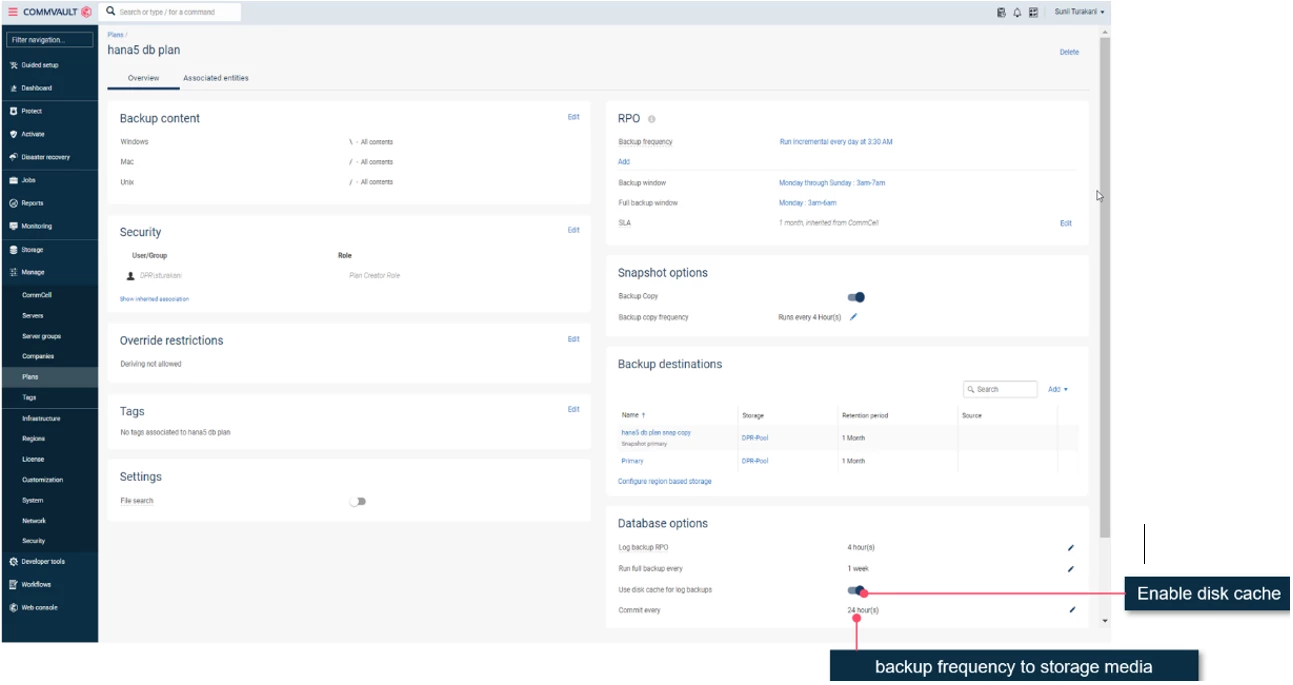
By enabling the disk cache, the logs are cached onto the mount point on the media server. Later, with the scheduled job, the data from the cached mount point are backed up to the alternative storage as per the server plan.
When using the Commvault disk cache functionality, log management is simplified for the SAP backup:
- Logs are protected as and when the HANA logs are generated.
- Allows for management server (CommServe®) downtime for periodic maintenance.
- As the logs are cached, fewer backup jobs can be scheduled to protect the cached logs to alternate storage.
- The SAP HANA database log segment size can be further reduced to benefit from better RPO.
References
To learn more about disk Cache functionality, visit Commvault documentation at:
https://documentation.commvault.com/2022e/expert/1580_software_overview.html
https://documentation.commvault.com/2022e/expert/114691_disk_caching_for_frequent_log_backups.htm
Summary
With each database vendor, the logs are an integral part of the data protection to get the required RPO. With Commvault disk cache functionality, the database logs are protected while properly managing the backup infrastructure challenges.
Stay tuned for further enhancements in this area.
