StickyAnnouncement

Web Console Deprecation: What Customers Need to Know

  • March 9, 2026
  • 12 replies
  • 305 views

Forum|alt.badge.img+17

Web Console Deprecation – What Customers Need to Know 

 
Commvault is continuing its move toward a single, modern management experience through the Command Center. As part of this transition, the legacy Web Console has been officially deprecated and is no longer included by default in newer Commvault platform releases. 

This article explains what the deprecation means for you, when the Web Console may still be required, and how to request access if your environment depends on it. 

Why is the Web Console being deprecated? 


The Web Console is being retired as Commvault standardizes on the Command Center as its primary management and reporting interface. The Command Center provides equivalent or enhanced capabilities, improved security alignment, and is the strategic platform for all future feature development. 

Deprecation timeline 
 

• Version 11.38: Web Console interface marked as deprecated 
• Version 11.40: Web Console removed from the default installation media 
• Version 11.42 and later: Web Console not available on new or upgraded installations 


When is the Web Console still needed? 
 

Although deprecated, Commvault recognizes that some customer environments still rely on Web Console functionality in limited scenarios, such as: 
• Editing or maintaining reports using Report Builder 

In these cases, access to the Web Console package is still supported through a controlled request process. 


How to request access to the Web Console package 
 

Commvault provides an automated workflow to request access to the Web Console package when there is a valid business or technical requirement. 

To submit a request: 
1. Sign in to the Commvault Cloud Services Portal 
2. Navigate to Workflows 
3. Select the workflow titled “Request WebConsole Package Access” 
4. Enter your CommCell ID and contact email address 
5. Provide a brief explanation of why the Web Console is required 
6. Submit the request 

What happens next? 
 

After submission, you will receive a confirmation notification. If additional information is required, a Commvault representative will contact you. Once approved, you will receive a secure download link for the Web Console package. 

Additional information 
 

For detailed eligibility criteria and workflow information, refer to the Commvault Knowledge Base article: 
How to obtain the Web Console Package (KB89689

Moving forward 
 

While access to the Web Console remains available for specific scenarios, customers are strongly encouraged to adopt the Command Center as their primary interface to take advantage of ongoing enhancements, security improvements, and future innovations.

12 replies

dude
Community All Star
Forum|alt.badge.img+20
  • Community All Star
  • March 9, 2026

@Pradeep 

Thanks for sharing the details about the future of WebConsole.

Addressing your section "When is the Web Console still needed?"  - From my perspective, we allow users to have access to WebConsole for other purposes. 

What does it actually mean for me running 11.36 and planning to upgrade to 11.40 soon? Will my webconsole stop working? Do I need any sort of form for a exception? Or Commvault support will provide steps / guides that allow me to reconfigure my environment and allow the users the same level of access they have today within the WebConsole but now in CommandCenter?


Can you please elaborate on the impact for existing customers and what we should expect when upgrading existing environments to 11.38 and newer versions?

Thank you


Forum|alt.badge.img+17
  • Author
  • Vaulter
  • March 10, 2026

Hi ​@dude ,

The current users configured for the Self-Service Portal to manage and run endpoint clients will continue to be redirected to the respective URL. However, options such as Reports, Dashboards, and similar features that are typically available under the Webconsole URL may no longer be available, as the Webconsole package has been deprecated, and these functionalities are now part of the Command Center.

The primary reason for to use Webconsole is to allow users to edit, modify, and customize existing reports. This requirement can still be achieved by installing the Webconsole package on an isolated machine that is not connected to the internet.

Refer to KB https://kb.commvault.com/article/?id=89689


dude
Community All Star
Forum|alt.badge.img+20
  • Community All Star
  • March 10, 2026

@Pradeep users who have access to Exchange Backups to restore previously backed up data will still be able to access?


Forum|alt.badge.img+17
  • Author
  • Vaulter
  • March 10, 2026

Hi ​@dude ,
Users will be able to perform the restore operations without any interruption.


I think it shoud be noted that during upgrade to 11.40 the Web Console package is removed silently.

We have been told (by Commvault support/development) that the custom report editor will be available again in upcoming 11.44 Command Center?


Forum|alt.badge.img+17
  • Author
  • Vaulter
  • March 13, 2026

I think it shoud be noted that during upgrade to 11.40 the Web Console package is removed silently.

We have been told (by Commvault support/development) that the custom report editor will be available again in upcoming 11.44 Command Center?

Yes, Andreas the report editor is expected to be part of command center in SP44.


Michael Woodward
Certified Expert
Forum|alt.badge.img+14

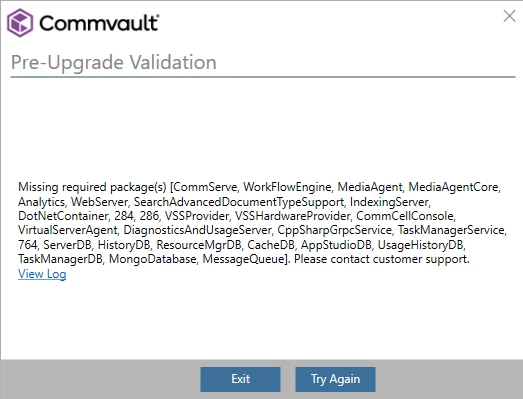
I’ve been given approval to install web console (via the workflow in Commvault cloud), I’ve built a lab which is isolated to install it in as per the recommendation, but when I try to install it, I get the following message:


I’ve tried both 11.40 packages available (11.40 and 11.40.42).  

Any clues? I’ve also tried a copy to cache which fails due to a checksum error.


I think you need to install the Web Console package on a new system (without any Commvault software installed), at least that did work for me.


Forum|alt.badge.img+9

Hi ​@Michael Woodward,
 

“Missing required package(s)” error during the Web Console installation can be confusing, but it does not mean that anything is actually missing in your environment.

For a standalone Web Console setup, components like CommServe or MediaAgent are not required. This message usually appears when the installer is unable to properly read or verify the installation package.

The other error you observed “Copy to cache fails due to a checksum error” suggests that the installation files may be corrupted or modified.

This can happen due to an incomplete or corrupted download, or if antivirus or other security software is interfering with the files.

Could you please ensure no antivirus or security software is modifying the files
Clear all installer/cache files and reboot the server
Verify that the server has direct internet access
Download a fresh copy of the package and retry the installation

Additionally, Checksum verification can help confirm file integrity. You may refer to the config folder for further troubleshooting of file copy errors.

Regards,
Dheeraj


Michael Woodward
Certified Expert
Forum|alt.badge.img+14

I think you need to install the Web Console package on a new system (without any Commvault software installed), at least that did work for me.

Yeah, this is quite odd.  I’m building this all in an isolated lab environment from production, I’ve built a new CommServe and a 2nd server as a web console.

I’ve validated the SHA256 hash of the zip file and it’s the same as published on the store (so it’s not a corrupted download). 

Interestingly the 11.40.42 file on the store doesn’t have a published hash so I can’t check that one, I downgraded the lab to 11.40.34 (reverted to snapshot and updated to the MR) and tried with the version I can validate as being correct.

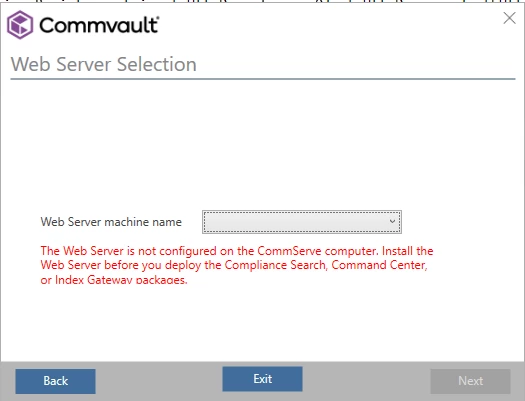
When I try to install web console on the 2nd server it installs but then gives me a message about no webserver being installed:


2492  1     04/14 17:50:33 ### ### ### - Error: Web Server list is empty.
2492  1     04/14 17:50:33 ### ### ### - The Web Server is not configured on the CommServe computer. Install the Web Server before you deploy the Compliance Search, Command Center, or Index Gateway packages.
2492  1     04/14 17:50:33 ### ### ### - Set application exit code=[Failed]


The CommServe is one that I’ve built at 11.32, created the custom report, then upgraded to 11.36 and then 11.40 to test where the report breaks.  If anyone has seen this before it would be great to know what I’m getting wrong (it’s probably something obvious :) )


Do you have the Web Server component installed on the Commserve machine?
Are you using additional setting WebConsoleURL? I had some troubles with this one because syntax changed with 11.40 (to http[s]://<hostname/alias>/webconsole/clientDetails/fsDetails.do?clientName=CLIENTNAME)


Michael Woodward
Certified Expert
Forum|alt.badge.img+14

Yep, Webserver etc is all installed, I think I’ll rebuild the lab again, see if I can get it working and then import the report I want to modify.