Question

Couple of questions about Commvault Cloud's API. SAML? EntityID?

  • June 17, 2025
  • 4 replies
  • 93 views

Forum|alt.badge.img+5

Hello,

I have a couple of questions regarding Commvault Cloud’s API.  

  1. I have learned through this forum that to authenticate successfully with Commvault Cloud (CC) API, that I have to give the Base-64 encoded password and add the MFA Pin number.  Which works great with local accounts.  However, with our accounts that are authenticated through Okta (SAML), how is that done?
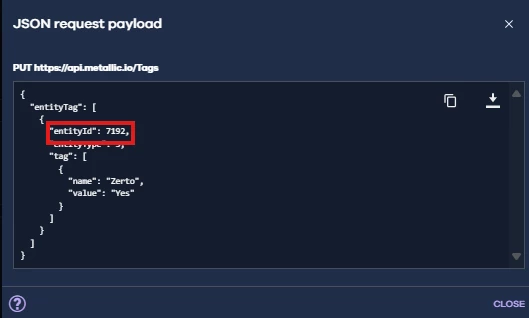
  2. I am trying to add a Tag to a long list of VMs, and the API mentions an EntityID.  When I use the API call to "https://api.metallic.io/V4/VirtualMachines" it gives me a lot of great info but no EntityID.  I tried calling "https://api.metallic.io/V4/VirtualMachines/$vmUUID" to see if that would give an EntityID, but I don’t see an EntityID in the results.  Where can I locate the EntityID?


Thank you!

4 replies

Forum|alt.badge.img+10

Hi ​@Brent Atwood ,,

Can you try with client entites to get the entity ID

GET https://api.metallic.io/V4/ClientEntities
 

Regards,

Sureshkumar S


Forum|alt.badge.img+5
  • Author
  • Byte
  • June 24, 2025

Hi ​@Sureshkumar S , thanks for the reply.  

I tried, "https://api.metallic.io/V4/ClientEntities" but got a 404 error.  I also tried "https://api.metallic.io/V4/ClientEntity" but got the same error.


Thanks!


Forum|alt.badge.img+5
  • Author
  • Byte
  • June 24, 2025

I was able to find the EntityID, even though it looks like it is technically the clientID.

$Url = "https://api.metallic.io/Entities/search?name=<vmname>"

$token = Read-Host "Enter login token"

$headers = @{
'EnumNames' = '1'
'Accept' = 'application/json'
'Authorization' = "Bearer $token"
}

$response = 'null'

[System.Net.ServicePointManager]::ServerCertificateValidationCallback = {$true}
$response = Invoke-RestMethod -Uri $Url -Headers $Headers -Method Get

$response | ConvertTo-Json

$response.entitySearchResultInfo.entityInfo | Select-Object -ExpandProperty detailedProperty | ConvertTo-Json

$response.entitySearchResultInfo.entityInfo.detailedProperty.vmProperty.vmStatusInfoList.client.clientId

The last command gives the clientID, which seems to match up with the EntityID.


Forum|alt.badge.img
  • Bit
  • July 17, 2025

Regarding API authentication with SSO enforced, you’ll need to generate an Access Token from your User page. I stumbled upon this myself, and found this related forum post.


Q: What happens if we use an external authentication method like SAML? A: If an external authentication method like SAML is set up, there will be no impact. You will not receive the notifications about the 2FA setup.

Q: How do I configure an Access Token? A: From the Command Center, navigate to Manage > Security > Users. Click on the Access Tokens tab and select Add Token to generate an Access Token with the required conditions.