Question

Backups from NAS Filer (NetApp) directly to tape

  • August 12, 2025
  • 2 replies
  • 65 views

Forum|alt.badge.img+5

Hi Commvault Community

I am performing backups of a NetApp cluster. This backup consists of two logical partitions (called "vserver", in case you are familiar with NetApp) and each of these partitions is domain-joined offering CIFS/SMB file services. The content of these servers are thousands of files, but we could say that their size ranges from medium to large.

The backups for these two servers are performed using the NAS Files agent — we are not using NDMP. Most importantly, the backups are written directly to a tape library. Each server’s backup goes to its own LTO9 drive, always as a full backup — we do not use incremental backups.

Over the past few months, we have noticed a drop in backup performance. No infrastructure changes have been made; the only change was updating the Commvault maintenance release.

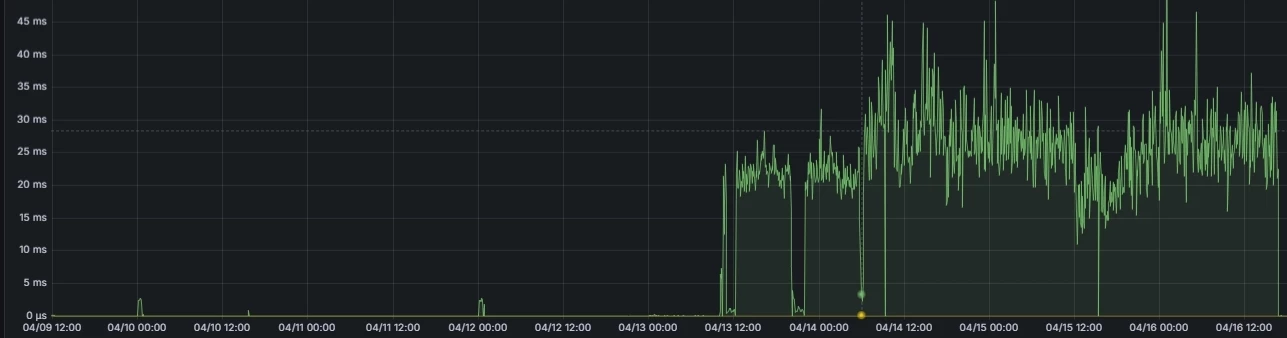
Here is a comparison of backups for the same server on different dates. Both servers have essentially the same data, but in the May backup, we can see a latency increase, which caused the backups to take significantly longer.

April
May
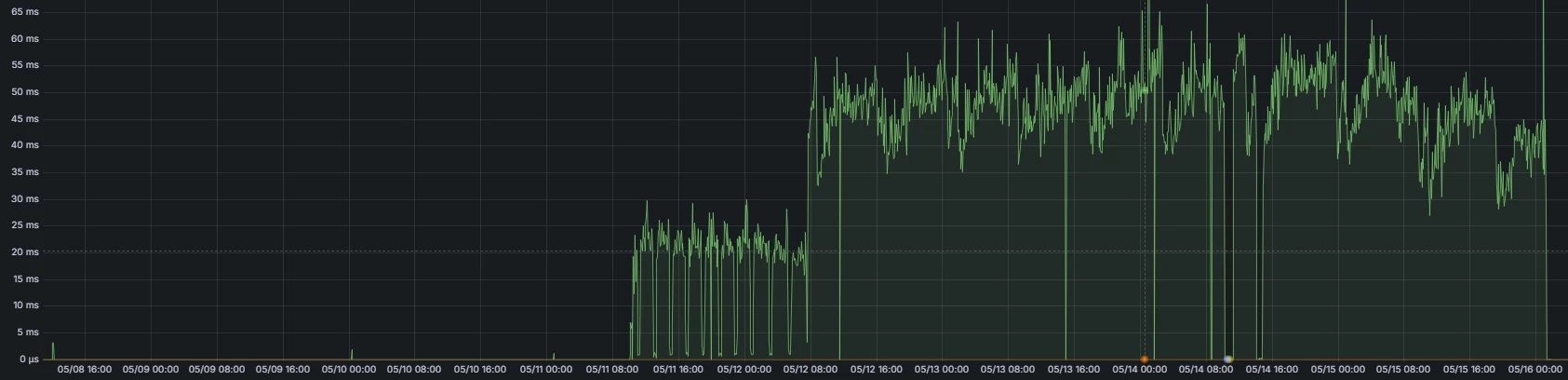
 

For this, we created a case 250516-205 . But support told us it was a storage problem.

We have observed it that Commvault uses a method to perfom backup very large files named Extend-Base Technology which, in our particular case and within our infrastructure, does not seem very efficient.

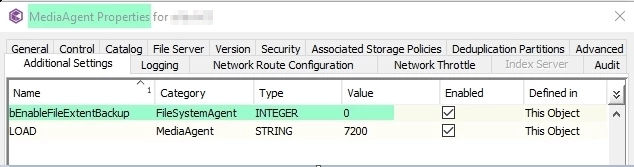
I am thinking to disable Extend-Based on the client to perform tests via the additional key “bEnableFileExtentBackup”, but it’s not avalaible  on a NAS Filer client.
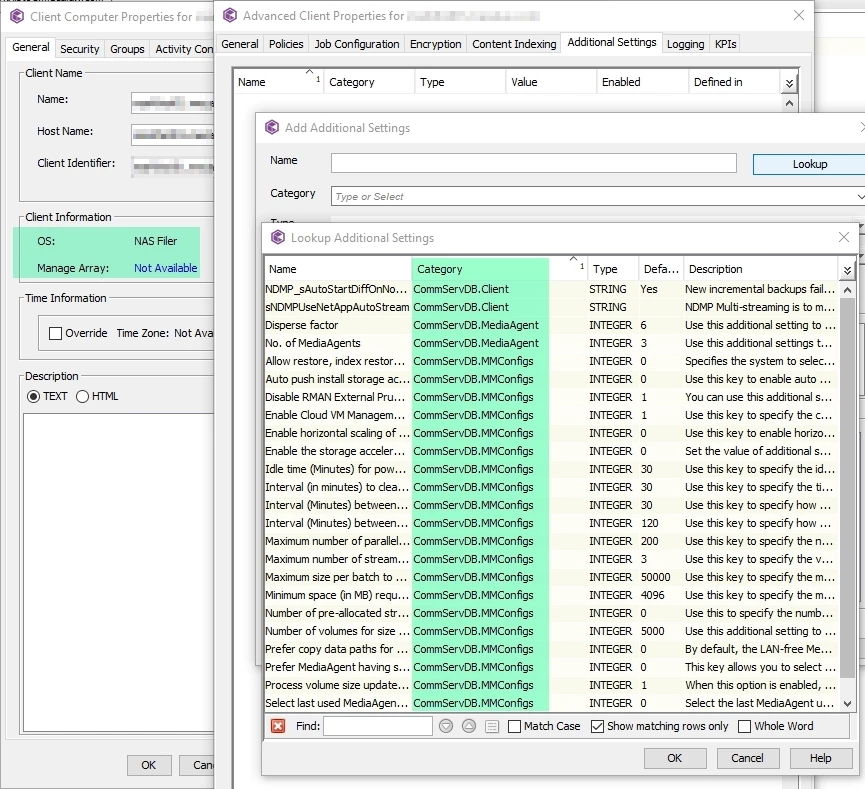


Finally, I was able to activate the key at the MediaServer level. 
 

2 replies

Forum|alt.badge.img+5
  • Author
  • Byte
  • August 12, 2025

Comparison

bEnableFileExtentBackup disabled

NAS Client A - Duration  56H - Size: 47.23TB - Av Throughput: 853GB/h

NAS Client B - Duration  60H - Size: 49.14TB - Av Throughput: 828GB/h


Each NAS client backs up directly to a different LTO-9 HH tape drive. Each LTO-9 HH has a native throughput of 250–300 MB/s. Direct-to-tape backups without disk staging and an average throughput per NAS client of 1000GB/h–800GB/h are acceptable times. Storage NSATA disks.


bEnableFileExtentBackup enabled

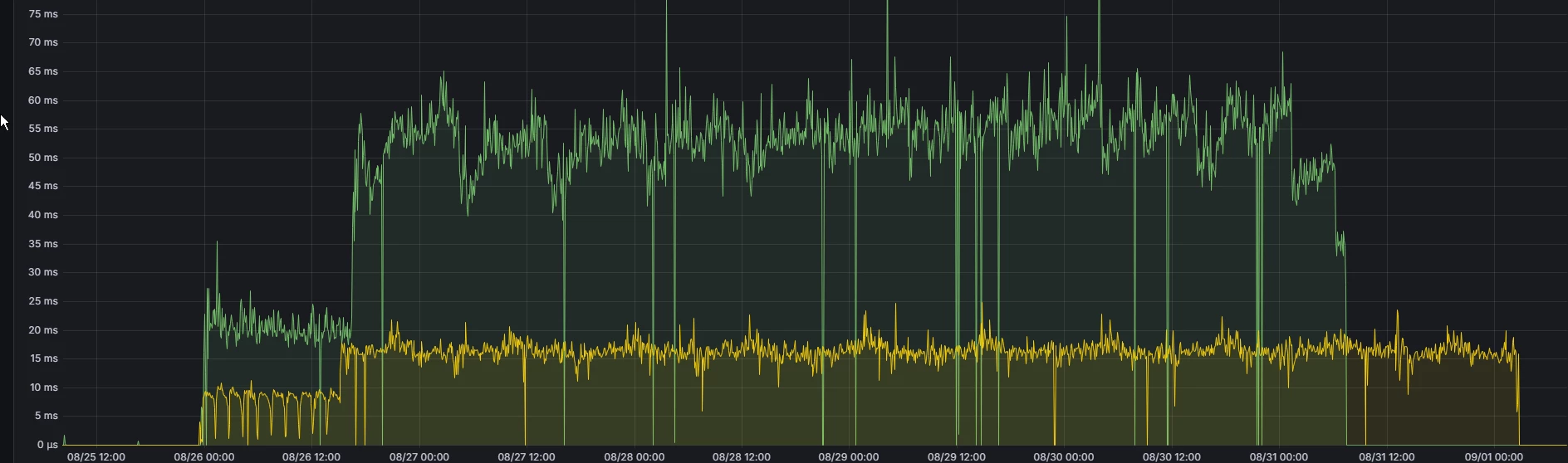
NAS Client A - Duration  128H !!!! - Size: 47.23TB - Av Throughput: 395GB/h

NAS Client B - Duration  147H !!! - Size: 49.26TB - Av Throughput: 328GB/h

With Extent-Based enabled, the backup times are really poor compared to when this functionality is disabled. What’s interesting here is that, looking at the graph, the backup starts on 08/25 at 23:XX, and after about 15–16 hours the latency increases, which is when I believe the Extent-Based functionality kicks in. We reported to support, and they told us the issue was with the storage.

Job history


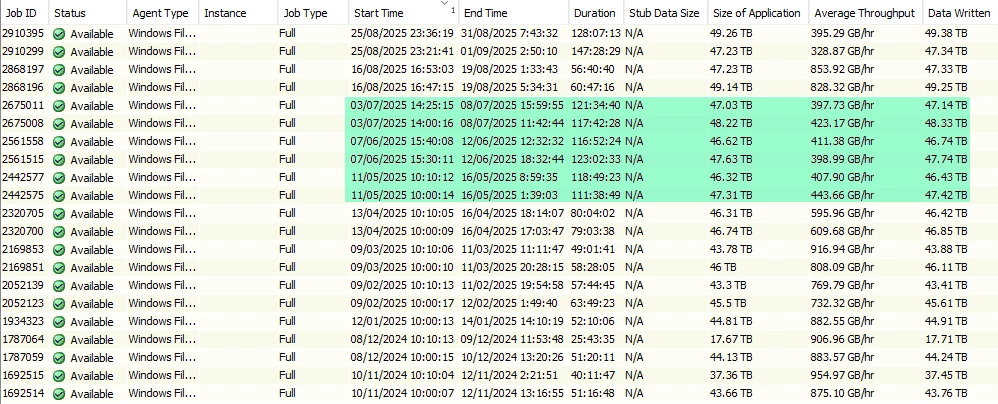
In May is when we started noticing that the backup times were getting delayed, and we opened case '250516-205'. (Note, since May, we’ve been running a lots of jobs backups test that don’t appear in this screenshot because we’ve been pruning jobs).


Case 250516-205 History

a) Initially, when I was unfamiliar with the Extend-Based functionality, I explained to the engineer that I couldn’t understand why, after 10 hours, latency would suddenly spike. The engineers told me it was a storage issue and suggested I open a case with the storage vendor. I told them I didn’t accept that answer because I had full visibility into the entire infrastructure, including storage. No changes had been made. The storage was working well. Even we updated and review the whole storage infra: os,firmware,drivers. The only things thats change during this times was Commvault maintenance-release. 

b) One of the managers insisted to open a case with the storage vendor.

c) I opened a case with the storage vendor, sending logs, performance charts.. etc. They told me I needed to add/buy more spinning-disks to improve transfers (seriously?). 

d) Personally, I started reviewing logs, performance-graphs, documentation, etc.. then I learned about the Extend-Based functionality and how inefficient it was in my environment.

e) I opened a new case, or it was merged with the existing one.

f) I created a detailed report (not even counting all the information, reports, logs, and screenshots already attached to the case) to recap the situation and highlight to the engineers that the Extend-Based feature was inefficient—at least in my setup.

g) The engineers asked me to explain why Extend-Based was inefficient. Really? Do I have to explain again how inefficient it is? Haven’t you seen the graphs and the huge difference in backup times? Have you checked the case detailing how backups are done directly to tape? Did you read the report?

h) The case was escalated to a manager. He suggested having a call with the engineers. I told him I was tired of this case, that I didn’t want to waste any more time, and I wouldn’t join any more calls. I just wanted to know if they could submit a feature request to disable Extend-Based for a NAS client, the same way it can be done with a standard Windows or Linux agent, instead of only at the Media Agent level.

i) My account manager called me to say that it wasn’t possible to add this feature-request.

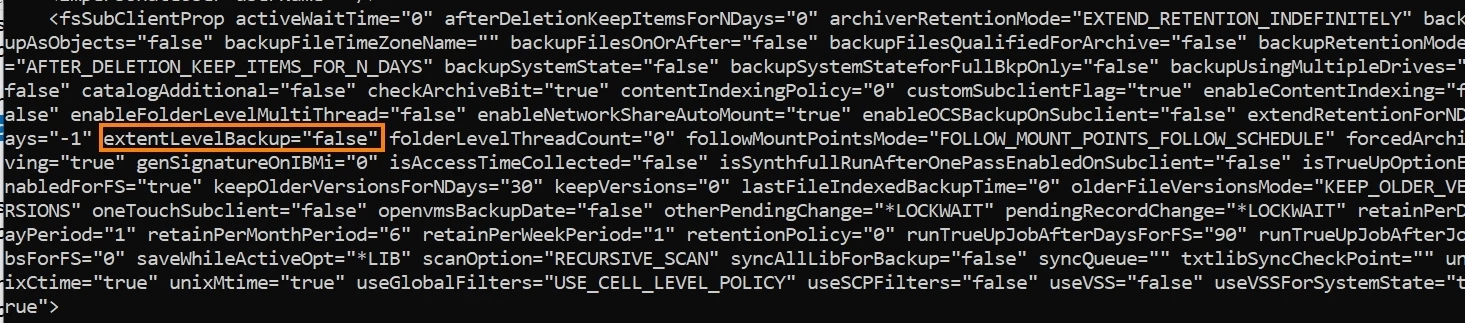
j)Support sent me the command to disable Extent-Based at subcliente level

​​​​​​​​​​​​​​k)Closed the ticket. 


Forum|alt.badge.img+5
  • Author
  • Byte
  • September 9, 2025


Last and final test:

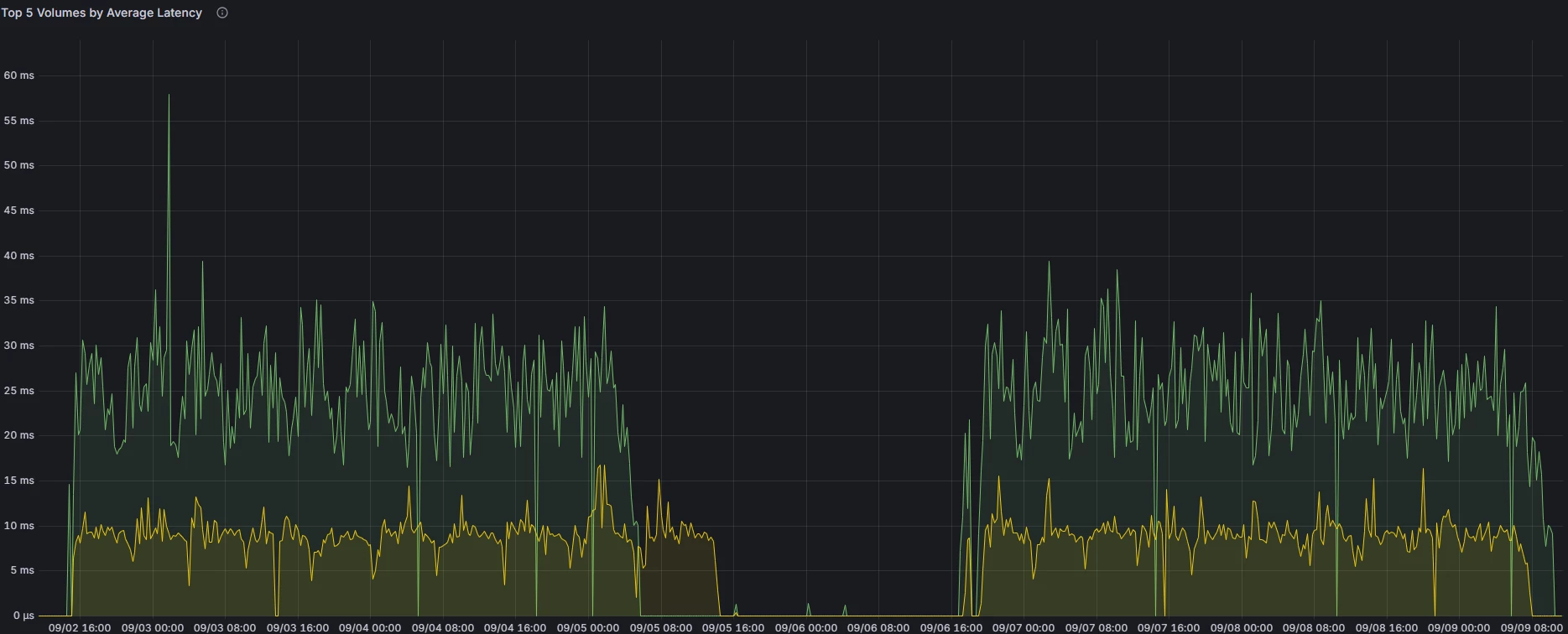
Support sent me the command to disable Extent-Based at subcliente level. Doc: https://documentation.commvault.com/v11/commcell-console/managing_optimized_backups_for_file_system_subclients.html

Comparison

bEnableFileExtentBackup disabled at subclient level


bEnableFileExtentBackup enable at subclient level but disable at mediaserver


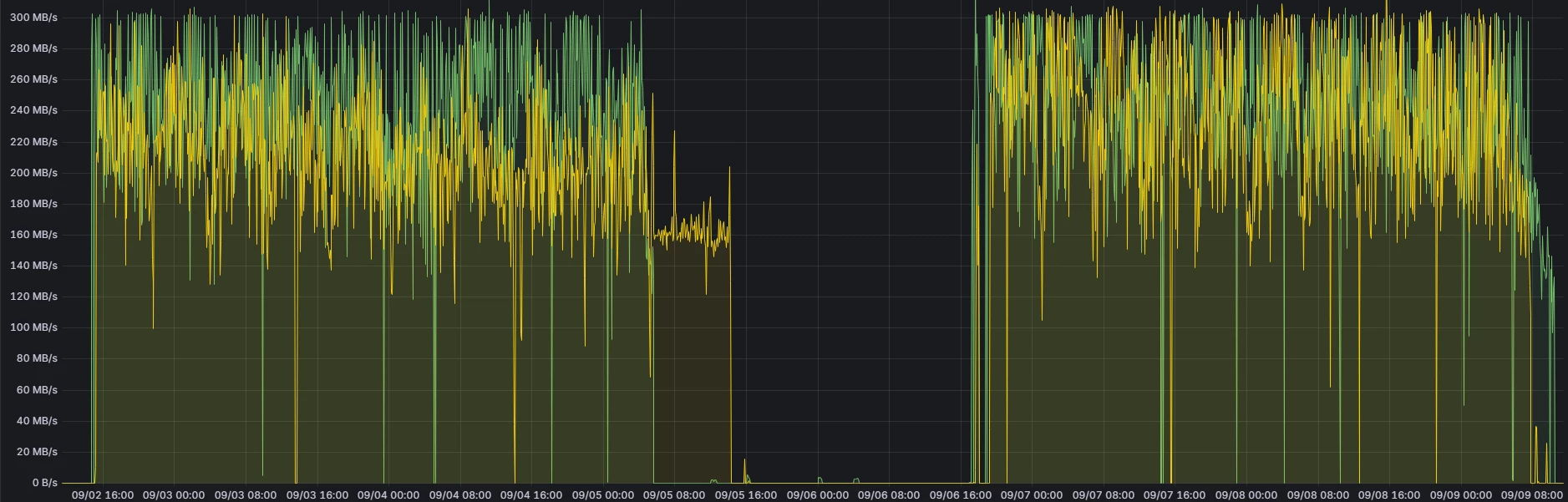
Throughput 

Latency


CONCLUSION:

In our infrastructure and configuration, latency is almost the same whether disabling via subclient or media server. Throughput is better when disabling at the media server for the client that has a variety of file sizes. For the other client, which has large files, the time difference more or less the same, 62 hours versus 63 hours. Note: No configuration changes were made between tests. Same streams on subclients, config, etc.