This is my 2nd time that Im facing this issue, during CS DR test. Please for your help!
During CommServe DR test, In “new” CS, I applied existing DB, the wizard finished and CV services are all up & running.
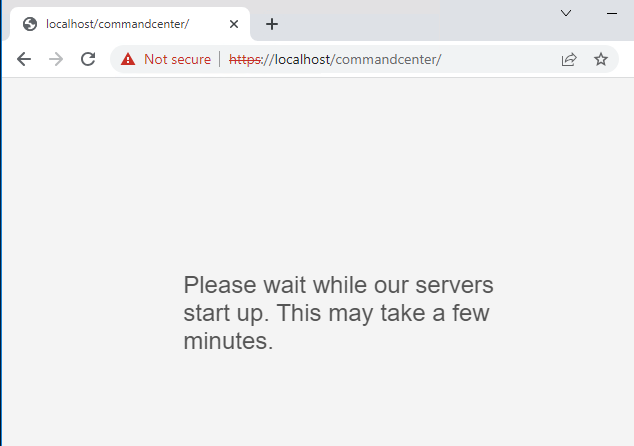
CommCell is opened, but Command Center has the following message even after Server restart:
(Please wait while our servers start up. This may take a few minutes.)
Windows OS and Commvault versions are the same during the DR test.
Does anyone has any solution about his?
Best answer by Nikos.Kyrm
Does the behaviour change if you perform an "iisreset" from the commandline?
Hello @Jos Meijer and thanks for your reply!
Tomcat and iisreset are not worked for me, but after troubleshooting and research in similar previous threads in community, I found the solution.
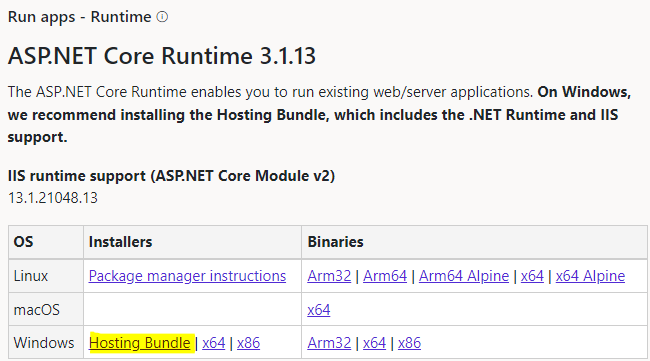
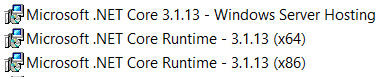
My issue was in dotnet core version! CS and temporary CS has different dotnet core version. I followed these steps and after that Command Center are opened without any issue.
Check you current version of dotnet with command: dotnet --list-runtimes
Does the behaviour change if you perform an "iisreset" from the commandline?
Hello @Jos Meijer and thanks for your reply!
Tomcat and iisreset are not worked for me, but after troubleshooting and research in similar previous threads in community, I found the solution.
My issue was in dotnet core version! CS and temporary CS has different dotnet core version. I followed these steps and after that Command Center are opened without any issue.
Check you current version of dotnet with command: dotnet --list-runtimes
Continue to get “Please wait while our servers start up. This may take a few minutes.” message from Tomcat after security patching the comserv web server. Anyone have any ideas? Loaded .Net Core Hosting bundle with .Net requirements are listed from the cmd line.
.Net framework 4.6 was loaded with the upgrade to 11.34. After initially reloading .Net Core 3.1 to fix the problem the issue has reoccured.