Question

Commserve migration to linux

  • October 25, 2023
  • 9 replies
  • 630 views

Forum|alt.badge.img+4

Hi,

Is there a procedure to migrate the commserve from windows to linux Rhel

I saw a someone ask this question before but it was quit a while back

I couldn’t find any procedure in the documentation


Best regards,

9 replies

Forum|alt.badge.img+14

Forum|alt.badge.img+4
  • Author
  • Novice
  • October 31, 2023

Hi,

Thanks for the replay - 

the first option is for Commserve recovery for linux commserve - recovering a linux commserve to another linux commserve (linux to linux)

the second option is configuration for linux commserve live sync (linux to linux)


my question is - if my commserve is windows - is there any procedure  t convert the commserve to linux commserve?


Forum|alt.badge.img+14

@LiorRN ,

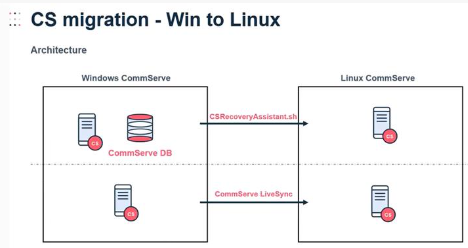
First one, Backup CS DR and Restore in Linux using the script.

Second one, create Live Sync from Windows CS to Linux CS.


Forum|alt.badge.img+7
  • Novice
  • November 1, 2023

Hello @LiorRN,


It currently is not supported to restore an existing CommServe on Windows to a CommServe on Linux.
To my knowledge this is roadmapped for a future release.

See: https://documentation.commvault.com/2023e/expert/132363_linux_commserve_getting_started_with_commserve_server_in_linux_environment.html


Forum|alt.badge.img+7
  • Vaulter
  • December 14, 2023

@mikevg @LiorRN,


I wanted to update you with a correction. Win CS → Linux CS migration is supported as of 11.32. Text that says otherwise in the documentation is being corrected and should be live over the next week or so.


As @Sebastien Merluzzi said, you can migrate by doing a hardware refresh:

  • Run a DR backup of the Win CS then shut it down.
  • You can restore that backup to the Linux CS during installation when prompted to create new DBs or use existing.
    - or -
    If the Linux CS is already fully installed, you can use CSRecoveryAssistant to restore those DBs.

Or you can use LiveSync by setting up the Linux CS as the standby, and then failing over once it’s caught up. The Windows CS should be removed after this, as ongoing LiveSync between Windows and Linux is not yet ready.


Forum|alt.badge.img+14

HI @LiorRN 

The CMR 402289 has been created, I will check the status and ETA.

Best Regards,

Sebastien


downhill
Novice
Forum|alt.badge.img+9
  • Novice
  • January 17, 2024

Hi guys, I have a “situation” where needed to do an unplanned failover to a windows standby (11.28.91). The old primary was 2012 Server and very old HW, so was due for a refresh.

Since that old primary is not recoverable, is it possible to build a new Linux CS running 11.32 and “recover/upgrade” or to add it as a new standby to accomplish the same goal - getting to Linux CS and new LTR?

thanks!


Forum|alt.badge.img+1

Hi,

the Restore of a Windows Commserve DB to a Linux Commserve is supported now.

Performing CommServe Migration from Windows to Linux

But if I test the procedure I always get following error messages during the restore section in the install.log:

48455 140581233628736 10/27 16:31:43 ###  Failed function call : Command(<dbdump_restore_space_check ()>)
48455 140581233628736 10/27 16:31:43 ###  Exception in gxlibrary.ui.CommandExecutor while calling Command(<dbdump_restore_space_check ()>)
Traceback (most recent call last):
  File "/big2/11.0/Build80_SP40/cxunix/source/installer/source/gxlibrary/ui/command.py", line 157, in run
  File "/big2/11.0/Build80_SP40/cxunix/source/installer/source/gxlibrary/ui/command.py", line 29, in __call__
  File "/big2/11.0/Build80_SP40/cxunix/source/installer/source/gxlibrary/mssql/utils.py", line 89, in wrapper
  File "/big2/11.0/Build80_SP40/cxunix/source/installer/source/gxlibrary/mssql/csdb.py", line 2599, in dbdump_restore_space_check
TypeError: 'NoneType' object is not iterable
48455 140581233628736 10/27 16:31:43 ###    File "/big2/11.0/Build80_SP40/cxunix/libraries/cvpython/linux-glibc2.3-x86_64/lib/python3.10/threading.py", line 973, in _bootstrap

  File "/big2/11.0/Build80_SP40/cxunix/libraries/cvpython/linux-glibc2.3-x86_64/lib/python3.10/threading.py", line 1016, in _bootstrap_inner

  File "/big2/11.0/Build80_SP40/cxunix/source/installer/source/gxlibrary/ui/command.py", line 169, in run

  File "/big2/11.0/Build80_SP40/cxunix/source/installer/source/gxlibrary/upgrade/utils.py", line 75, in wrapper

  File "/big2/11.0/Build80_SP40/cxunix/source/installer/source/gxlibrary/ui/wizard.py", line 413, in tasks_error_callback
Traceback (most recent call last):
  File "/big2/11.0/Build80_SP40/cxunix/source/installer/source/gxlibrary/ui/command.py", line 157, in run
  File "/big2/11.0/Build80_SP40/cxunix/source/installer/source/gxlibrary/ui/command.py", line 29, in __call__
  File "/big2/11.0/Build80_SP40/cxunix/source/installer/source/gxlibrary/mssql/utils.py", line 89, in wrapper
  File "/big2/11.0/Build80_SP40/cxunix/source/installer/source/gxlibrary/mssql/csdb.py", line 2599, in dbdump_restore_space_check
TypeError: 'NoneType' object is not iterable
 

If I use the CSRecoveryAssistent I get the same error message.


Source: Windows Server 2022

Destination: Rocky Linux 9.5 (fully patched)

Commvault Version 11.40.22


Did someone has testet to Restore on a Linux Commserve?

Kind Regards

Florian


Forum|alt.badge.img+7
  • Vaulter
  • October 27, 2025

Hi ​@Florian Kaiser,

Yes, these conversions are done regularly now, both in and out of production.

The only other case I see where this occurred was an issue fixed in 11.40.9. You may need to open a support ticket so we can troubleshoot this.