Solved

Create client group from Active directory group

  • September 7, 2022
  • 6 replies
  • 107 views

Forum|alt.badge.img+1

Hi,

I would like to create a client group based on an windows AD computer group, is there an existing way of doing this.

If this is not possible and I have a dump of the AD group how can I script the creation or the addition of these computers to a Commvualt client group.

Best answer by Sebastien Merluzzi

@Norms 

Also, you can check how to add using Command Line:

https://documentation.commvault.com/2022e/expert/4914_command_line_interface_client_computer_groups.html

6 replies

Forum|alt.badge.img+14

@Norms 

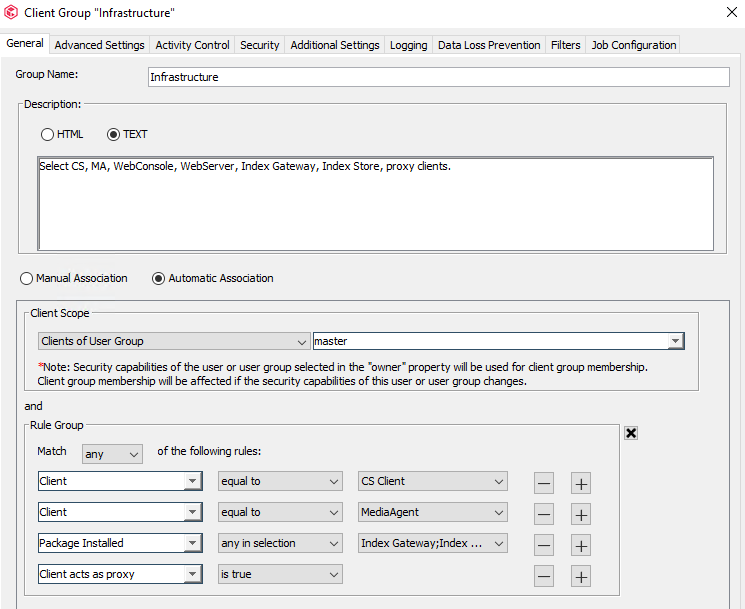
Have you checked “Automatic Association“ Groups, like the existing Infrastructure or Proxy Groups?


Best Regards,

Sebastien


Forum|alt.badge.img+14

Forum|alt.badge.img+1
  • Author
  • Novice
  • September 9, 2022

Thanks for the help, I am aware of the automatic group creation but I would need to be able to have the list of servers in the AD pulled by Commvault which does not seem possible. If I use the group creation template I will just have to pull the names of the servers from the AD


Jos Meijer
Community All Star
Forum|alt.badge.img+16
  • Community All Star
  • September 9, 2022

I have not found an opion in the gui either for this.
Guess you can only perform this by scripting.

Based on the assumption that your client names are equal to the computer object names in the AD you could retreive computer object names based on an AD group, pass these names in to a variable and use that variable in a qcommand:

https://documentation.commvault.com/2022e/expert/SetClientGroup.html


Forum|alt.badge.img+1
  • Author
  • Novice
  • September 14, 2022

Thanks Jos,

That is also a simpler  method.


Jos Meijer
Community All Star
Forum|alt.badge.img+16
  • Community All Star
  • September 14, 2022

Your welcome 😃