


Question

Cross Hypervisor Restore - Converting to Google Cloud

  • August 13, 2025
  • 1 reply
  • 27 views

Forum|alt.badge.img

I have downloaded the required driver files using the command  .\CVInstallGCPDrivers.ps1 "C:\CVDrivers" download. 
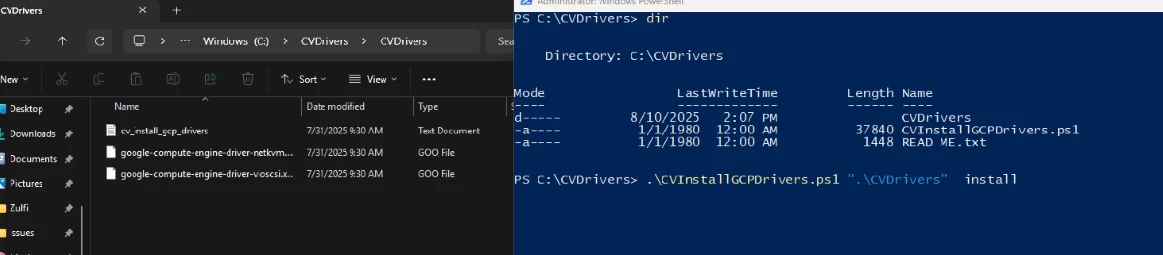


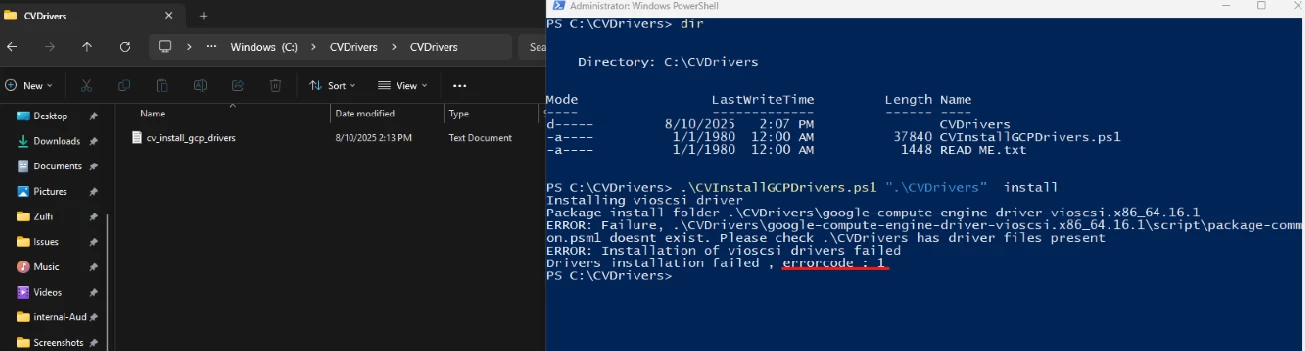
When we are trying to install the drivers, we are facing following issue.  And drivers files are getting removed automatically from the folder once we run the command 


1 reply

Forum|alt.badge.img+8
  • Vaulter
  • August 15, 2025

Hi Hussain, 

Looking at the output, it is trying to open .\CVDrivers path but .\ is not a valid root directory so when looking for the GCP drivers it will fail. It looks like the path should be C:\CVDrivers.

As per: https://documentation.commvault.com/11.40/essential/using_script_to_prepare_vms_for_conversion_to_google_cloud.html


I believe your syntax should be

.\CVInstallGCPDrivers.ps1 "C:\CVDrivers" install


