
Dedicate Web Server for Self-Service portal

  • May 23, 2025
  • 3 replies
  • 94 views

Nikos.Kyrm
Byte
Forum|alt.badge.img+15

Dear Commvault community,

We currently have a Self-Service portal supporting approximately 10,000 O365 users.
Given that the Web Server for this portal currently resides on the CommServe, does it make sense to move it to a dedicated Media Agent, leaving only the core CommServe Web Server components on the CommServe itself?

Please for your feedback.

Best regards,
Nikos

3 replies

Forum|alt.badge.img+6
  • May 25, 2025

Instead, it is better to use another server for webconsole and webserver.
You can do this by setting up a new server and assigning webserver and webconsole  role to it

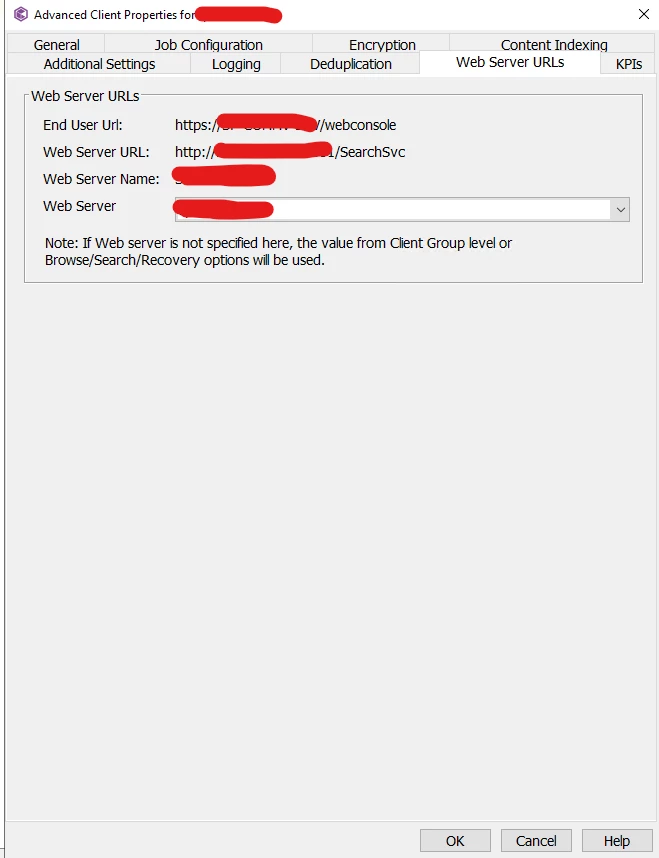
And than u can change web server role from this setting 


commserver client properties .


Nikos.Kyrm
Byte
Forum|alt.badge.img+15
  • Author
  • Byte
  • May 26, 2025

Ηι ​@BillyBoo

Is there any way to separate the web server and web console roles for the Self-Service Portal and CommServe respectively?

Ideally, we would like to have a dedicated web server for CommServe and another web server for the Self-Service Portal on a separate MediaAgent.

Is this scenario possible?

Best regards,
Nikos


Nikos.Kyrm
Byte
Forum|alt.badge.img+15
  • Author
  • Byte
  • June 12, 2025

Hello again,
 

Just wanted to update this thread that I've found about High Availability (HA) and relocation of Web Server, I got a feedback from support. Hope to help!  

  1. Install the Web Server and Web Console on Separate Machines: Ensure that the Web Server and Web Console are installed on different machines to enhance scalability and security.

  2. Configure High Availability:

    • Install two Web Servers and two Web Consoles in your CommCell environment.
    • Verify that each Web Console points to its respective Web Server.
    • Set up a load balancer with a common domain name to access the Web Consoles.
    • Configure sticky sessions on the load balancer to maintain session affinity.
  3. Switch Self-Service Service:

    • Update the configuration to point the Self-Service service to the new Web Server.
    • Ensure that the Self-Service Portal is accessible through the new Web Server.


Hoping this information can be useful to others!


Best regards,
Nikos