




Hi,
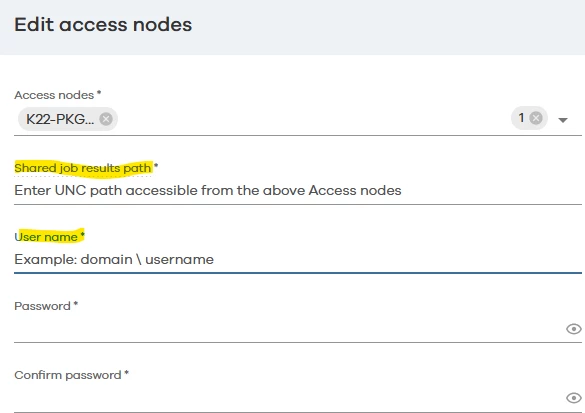
We accidentally added fields to the Access Node configuration for SharePoint Online and can no longer remove them. In our case, specifically the field: “shared job results path.”
Does anyone know of a way we can remove this field?
 +4
+4Hi,
We accidentally added fields to the Access Node configuration for SharePoint Online and can no longer remove them. In our case, specifically the field: “shared job results path.”
Does anyone know of a way we can remove this field?
Best answer by Dheeraj Shetty
Hi
There is currently no supported way to remove the Shared Job Results Path from the SharePoint Online Access Node configuration once it has been set. This field is required only when multiple access nodes are used for high availability, but the UI does not allow it to be cleared after it has been populated.
The Shared Job Results Path is mandatory for high availability (multiple access nodes) and must be a UNC path accessible by all nodes.
If you have only one access node, the field is not required, but after being set, it cannot be removed via the Command Center interface.
You can update the field to another valid UNC path if needed.
If reverting to a single access node, you may need to recreate the SharePoint Online app without specifying this path.
If this is impacting your setup, we recommend either recreating the app with one access node or contacting Commvault Support for further assistance.
Regards,
Dheeraj

Enter your E-mail address. We'll send you an e-mail with instructions to reset your password.

