Wanted to upgrade software to newest one. Many MediaAgents and Windows Servers installed it sucessfully, just one server of them not. I always get this error:
Error Code: [68:514] Description: Install/Upgrade job failed as installer could not execute WMI query. Please fix the WMI and resubmit the job Source: vie50, Process: DistributeSoftware
Google did not help me at all, perhaps some of you know this problem? Is there really a problem with the WMI of this server, never had any problems though.
Thanks!
Best answer by Remi Sprangers
Hi @Sime,
Can you try following to see if WMI is installed properly?
Launch the WMI MMC snapin: go to Start -> Run -> type wmimgmt.msc
Right click WMI Control (Local) and click Properties
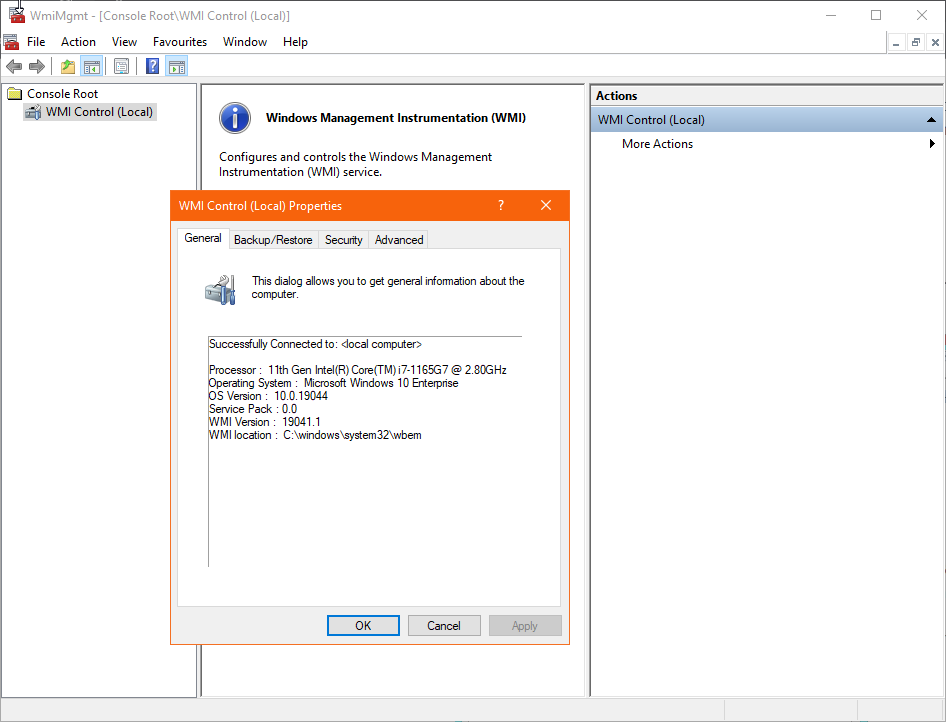
If WMI is working correctly, you will see Successfully connected window as shown below.
If you see Invalid class or any other error message, then WMI is not working properly
You can also check if the repository is damaged with the following command from the elevated Command Prompt (Start -> Search -> type "cmd" -> right-click and select Run as administrator):
winmgmt /verifyrepository
If the repository is not corrupted, a “WMI Repository is consistent” message will be returned.
Can you try a reboot of that client? I have seen other cases where a reboot of that client fixed the issue.
Kind regards,
Remi
I will try this. I cannot reboot that client that easily, as it is kinda critical, but the client was rebooted recently for Windows Updates. Normally the Software Upgrade should happened automatically, like it did with every other client, but this one never updated. And since then, it rebooted many times.
Can you try following to see if WMI is installed properly?
Launch the WMI MMC snapin: go to Start -> Run -> type wmimgmt.msc
Right click WMI Control (Local) and click Properties
If WMI is working correctly, you will see Successfully connected window as shown below.
If you see Invalid class or any other error message, then WMI is not working properly
You can also check if the repository is damaged with the following command from the elevated Command Prompt (Start -> Search -> type "cmd" -> right-click and select Run as administrator):
winmgmt /verifyrepository
If the repository is not corrupted, a “WMI Repository is consistent” message will be returned.
Can you try following to see if WMI is installed properly?
Launch the WMI MMC snapin: go to Start -> Run -> type wmimgmt.msc
Right click WMI Control (Local) and click Properties
If WMI is working correctly, you will see Successfully connected window as shown below.
If you see Invalid class or any other error message, then WMI is not working properly
You can also check if the repository is damaged with the following command from the elevated Command Prompt (Start -> Search -> type "cmd" -> right-click and select Run as administrator):
winmgmt /verifyrepository
If the repository is not corrupted, a “WMI Repository is consistent” message will be returned.
Kind regards,
Remi
This seems to be the issue. It does not say succesfully connected but an error. I have no idea, how the WMI can get damaged.
I need to repair this and the CV update will work properly, I guess.