
Question

Folder restore missing proper security

  • May 30, 2025
  • 11 replies
  • 154 views

Ken_H
Byte
Forum|alt.badge.img+15

I’m attempting to restore folders and files from a Commvault file system backup to a test system. All the files and folders *appear* to restore properly but when the application (SQL Server in this case) attempts to access the files, I get:

FCB::Open failed: Could not open file <path_and_file_name.ext> for file number 1.  

OS error: 5(Access is denied.).
Error: 5120, Severity: 16, State: 101.

When I compare the restored folder to the source server, I see the folder permissions are different. Is there an option to have Commvault restore the proper folder permissions while it’s running the restore?

Nay help appreciated.

Ken

11 replies

Onno van den Berg
Commvault Certified Expert
Forum|alt.badge.img+20

You are performing an out-of-place restore and most likely that ACLs on the source all relate to the local system. You therefore see that the permissions on the destination server are the ones set on the folder structure that is in place already/ I therefor would advice to update the ACLs structure manually and give it a try. 


Ken_H
Byte
Forum|alt.badge.img+15
  • Author
  • Byte
  • June 2, 2025

Thanks Onno,

Are you saying I need to manually go through the folder structure on the restored server and manually update the security of the restored folders? There’s not that many and I’m able to compare the restored server to the source server to make sure I get everything correct. The problem is that in a disaster recovery situation I won’t have the original server to check the permissions on. (Plus there are time constraints to worry about.)

Perhaps I need to build a PowerShell script that reads all the folder permissions generates a second PowerShell script to put everything back. I can then run it after Commvault restores the folder structure. Is this what other clients do?

Ken


Ken_H
Byte
Forum|alt.badge.img+15
  • Author
  • Byte
  • June 2, 2025

To be clear: No folders exist prior to the Commvault file restore. Commvault is creating the folder structure as well as restoring the files within.

Ken


Onno van den Berg
Commvault Certified Expert
Forum|alt.badge.img+20

It really depends on the permission structure that is applied and if SQL (and or Commvault agent) run under a specific account. The permissions on file level will be applied based on Inheritance or are overruled via for example GPOs or other config management tooling. How are you servers deployed? Are they identical? 

What happens on the destination if you create the structure yourself? 


Ken_H
Byte
Forum|alt.badge.img+15
  • Author
  • Byte
  • June 2, 2025

To give one specific example:

E:\MSSQL13.MSSQLSERVER      < Inherits security from E:\

E:\MSSQL13.MSSQLSERVER\MSSQL    < Inherits security from E:\

E:\MSSQL13.MSSQLSERVER\MSSQL\Data < Has unique security on the source virtual server that is missing on the restored virtual server.


SQL Server folder permissions on the “Data” folder are granted to “NT SERVICE\MSSQLSERVER” but the actual database service runs as “<domain>\svcsql”. “<domain>\svcsql” is not in the local Administrators group. 

Commvault uses the “<domain>\svcCommvault” account. This account _is_ in the local Administrators group

This is part of my disaster recovery planning. At this time, I have two CommVault backups for each SQL server host:

  1. Back up C: and D: as a VMware virtual server
  2. Back up E:, F:, G:, and H: as a file system.
    1. Exclude .mdf, .ldf, .sqlaudit, .xel, and job output files to limit backup size
    2. Include the .mdf and .ldf files for the system databases

The recovery process I was working on was to use these steps:

  1. Restore the SQL Server virtual host using the VMware backup of C: and D:
  2. Have the server team add in E:, F:, G:, and H: to the newly restored server
  3. Use the file system backup to restore folders and files to E:, F:, G:, and H:
  4. Use the SQL Server tools to restore the non-system databases to the very latest recovery time using the Full, Differential, and Transaction log backups from H:

The problem is that after completing step 3) of the recovery process, SQL Server services fail to start due to a “Could not open file / Access is denied” error which I’ve traced down to E:\MSSQL13.MSSQLSERVER\MSSQL\Data.

I guess I could write a PowerShell script that creates all the needed folders and sets the security and could include the execution of that script as a step after E:, F:, G:, and H: are created but before the file restore is done It just seems odd that Commvault can restore all the needed folders but doesn’t bother restoring the folder security.

Ken


Onno van den Berg
Commvault Certified Expert
Forum|alt.badge.img+20

How do you protect the SQL databases? I assume you use the SQL agent to do this so you actually have three backups:

  1. Back up C: and D: as a VMware virtual server
  2. Backup SQL databases using SQL agent
  3. Back up E:, F:, G:, and H: as a file system.
    1. Exclude .mdf, .ldf, .sqlaudit, .xel, and job output files to limit backup size
    2. Include the .mdf and .ldf files for the system databases

Pretty complex I would say. Does it meet your RTO? Why not only use VSA and a SQL agent? 
 

Anyway I think your issue lies in the permission inheritance. What are the permissions on the source database files? 


Ken_H
Byte
Forum|alt.badge.img+15
  • Author
  • Byte
  • June 3, 2025

Yeah, my backups are a bit of a mess. My HyperScale media agent runs over 90% full and has hit 100% full probably 7 times in the past year. I keep asking for more backup storage but have been told (for the past four years) that we’re “moving workloads to the cloud soon” so management doesn’t want to spend money on storage that will be orphaned.

My SQL Server hosts are set up with the following:

  • C:           - Windows OS
  • D:           - SQL Server software
  • E:            - Database data files
  • F:            - Database transaction logs
  • G:           - TempDB database files
  • H:           - SQL Server Backups

My SQL Server databases are backed up using the Ola Hallengren scripts that store the backups on H:.

In an attempt to get a backup that A) doesn’t consume significantly more space and B) can be restored without having to take 1.5 days to build a new Windows host and install SQL Server software, a Commvault contractor recommended we switch the backups of C: and D: to a VMware virtual server backup and then use Commvault to back up the databases. The problem is that when we restore the virtual machine backup, SQL Server won’t start because the system databases are missing. Without SQL Server running, we can’t use Commvault to do the database restores.

So that’s the history of how I got to this point. Your summary of all the steps in my backup strategy is accurate.

You asked: What are the permissions on the source database files? 

As I’ve said, E:\MSSQL13.MSSQLSERVER\MSSQL has the “normal” security inherited from the root of E:. E:\MSSQL13.MSSQLSERVER\MSSQL\Data has unique security that includes permissions for MSSQLSERVER. It’s this MSSQLSERVER permission that’s missing from the folders restored by Commvault.


Ken_H
Byte
Forum|alt.badge.img+15
  • Author
  • Byte
  • June 4, 2025

I started writing a PowerShell script that scans the drives and builds a second script that creates the drives and sets the proper security. The thought of implementing this across all SQL Servers and scheduling it as a weekly Windows task seems like something I shouldn’t need to do.

I’ve asked my local Commvault technical analyst to give me a presentation on how to back up and restore SQL Server VMs.


Ken_H
Byte
Forum|alt.badge.img+15
  • Author
  • Byte
  • June 4, 2025

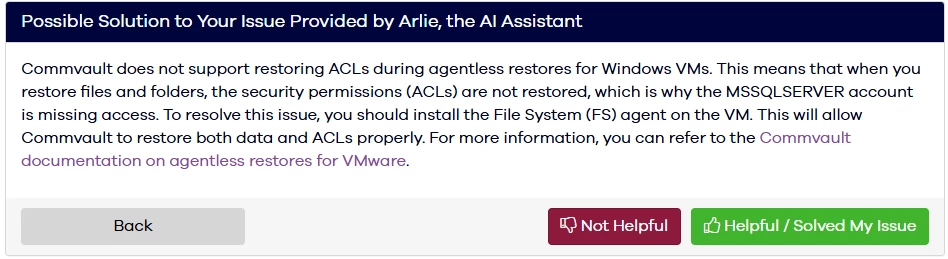
I started to create a ticket about Commvault not properly dealing with the folder security and Arlie the AI Assistant managed to find the solution to my problem.


Onno van den Berg
Commvault Certified Expert
Forum|alt.badge.img+20

Ahhh I thought you were already using the agent to perform the recovery. Indeed through an agentless recovery it will never be able to apply permissions as this requires direct interaction with the Windows operating system APIs.


Ken_H
Byte
Forum|alt.badge.img+15
  • Author
  • Byte
  • June 5, 2025

Wait, you’re right. I have a file system backup which meant I would have needed the file system client in order to do the restore. Hmm. I’ve gone through so many starts, stops, and redo attempts on this test restore that it’s no longer clear what works and what doesn’t. I think I’ll have to start a disaster recovery restore test from scratch.