
Question

How to Export All Job IDs from a Disk / Cloud Library

  • September 18, 2025
  • 3 replies
  • 22 views

Nikos.Kyrm
Byte
Forum|alt.badge.img+15

Hi Commvault Community,

I’m searching for a precise method to export all job IDs that “live” in every Disk / Cloud Library in our Commcell environment.

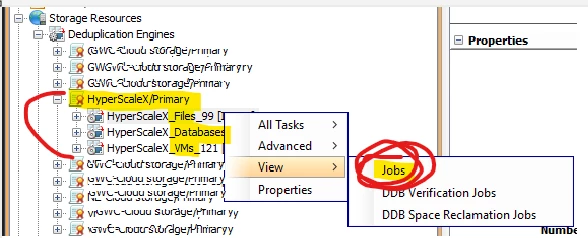
From a previous case, Commvault support mentioned that the recommended way is by querying the Deduplication Policy DDB (from the CommCell Console, under Storage Resources > Deduplication Engines, then view Jobs).


Question:
Is there a command line tool (like qoperation, qlist, or REST API) that can export all job IDs from a DDB (including Files, Databases & VMs Deduplication Stores)?   instead of manually exporting jobs manually from the GUI?

The goal is somehow to automate these reports for audits, analytics, or targeted operations (such as clean-up, reporting etc).
 

Please for your feedback.
Nikos

3 replies

Forum|alt.badge.img+5
  • Vaulter
  • September 18, 2025

Hi ​@Nikos.Kyrm,

You can try this qscript:FindJobsOnStore from command line.

This script give the details of jobs on all the ddbstores associated with mountpaths identified by a mountpathid or libraryalias name or library-device combination

You can refer the below documentation

https://documentation.commvault.com/2024e/commcell-console/findjobsonstore.html

Please let me know incase of any queries.


Regards,

Karthik


Erase4ndReuseMedia
Byte
Forum|alt.badge.img+14

I might be missing something, but does the Storage Information (CommCell Console) report with the include Job ID option provide what you’re after?


Nikos.Kyrm
Byte
Forum|alt.badge.img+15
  • Author
  • Byte
  • September 18, 2025

Dear ​@kkarthikk thanks a lot for your instant reply!

Testing with syntax, looking that qoperation execscript -sn QS_FindJobsOnStore working so far with following outputs:

Job Id, Storage Policy Name, Copy Name, Store Id, Client Name, Device Name 


Is there any way to include also the following columns?

Job ID    Status    Client    Agent Type    Instance    Backup Set    Subclient    Storage Policy    Job Type    Cycles/Sequences    Start Time    End Time    Duration    Stub Data Size    Size of Application    Average Throughput    Estimated Media Size    Savings Percentage(%)    Retain Until    Aged Time    Copied Time    Encrypted    Hardware Encrypted    Deduplicated    CRC Checked    User Name    Transfer Time    Description    Retained By    Retention Reason    System State    Reconcile Backup


Maybe needed to query CommServe DB, from  Management Studio (SSMS).