



Commvault environment is on V11 SP40.6
Hana instances reside on a cluster environment where the cluster IP is internal. End users and Commvault should reach the cluster via load balancing which has a hostname “load.balancer.IP” having following IPs:
--- snip ---
[root@node1 ~]# nslookup load.balancer.IP
Server: x.x.x.x
Address:
Non-authoritative answer:
load.balancer.IP canonical name = load.balancer.IP.ap-southeast-2.amazonaws.com.
Name: load.balancer.IP.ap-southeast-2.amazonaws.com
Address:
Name: load.balancer.IP.ap-southeast-2.amazonaws.com
Address: 1
Name: load.balancer.IP..ap-southeast-2.amazonaws.com
Address:
--- snip ---
The Hana cluster hostname and IP as below is not accessible to the external world:
--- snip ---
D:\>nslookup hana.cluster.ip
Server: ip--xx-xx-xx.ap-southeast-2.compute.internal
Address: x.x.x.x
Non-authoritative answer:
Name:
Address:
--- snip ---
CommCell should be reaching the Hana cluster hana.cluster.ip via the load balancer i.e “load.balancer.IP”
To recap, how do we configure the load balancer at CommCell level to reach the Hana cluster, and then use same in the Hana instance so as whenever fail over happens, backup continues to progress rather than going in the instance and manually move the primary server on top. We cannot create a Unix cluster client to use the load balancer hostname as CS will not be able to establish a connection to the load balancer.
I spoke with Daeyoung (commvault support APAC) over chat and he provided me following:
You don’t “create” the load balancer itself as a client in SAP HANA. The load balancer or cluster virtual hostname is already defined on the SAP HANA side as part of the high‑availability/scale‑out setup. In Commvault, you then configure a SAP HANA pseudo client that points to this virtual hostname (VIP). So:
• SAP HANA side → provides the cluster VIP/load balancer.
• Commvault side → you create the pseudo client using that VIP, not the individual node IPs.
1. SAP HANA Side (Cluster / Load Balancer Setup)
• In a scale‑out or HA cluster, SAP HANA administrators configure a virtual hostname or load balancer address that always points to the active Name Server or active node.
• This is part of the HANA installation/cluster configuration, not something Commvault creates.
• Example: resolves to whichever node is active.
2. Commvault Side (Pseudo Client Creation)
• In the CommCell Console, you create a SAP HANA pseudo client.
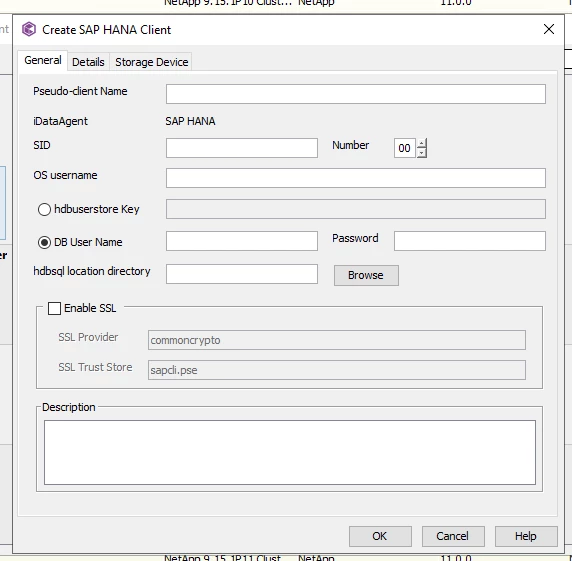
• On the General tab, you enter the SID, instance number, and virtual hostname (VIP).
• On the Details tab, you add all physical nodes as part of the cluster group, but the pseudo client itself uses the VIP for connection.
• This way, Commvault always connects through the load balancer, and failover is transparent.
From above it clearly states, "On the General tab, you enter the SID, instance number, and virtual hostname (VIP)." but we do not see a place when creating the Hana pseudo client where we can put the virtual hostname (VIP)
Any advice on how above can be achieved.



