Question

Laptop Bare Metal Restore in Command Center

  • February 11, 2026
  • 11 replies
  • 58 views

dude
Community All Star
Forum|alt.badge.img+20
  • Community All Star

Background. 11.40

We have a team that has permissions to run backups/restores and their management console is the command center.

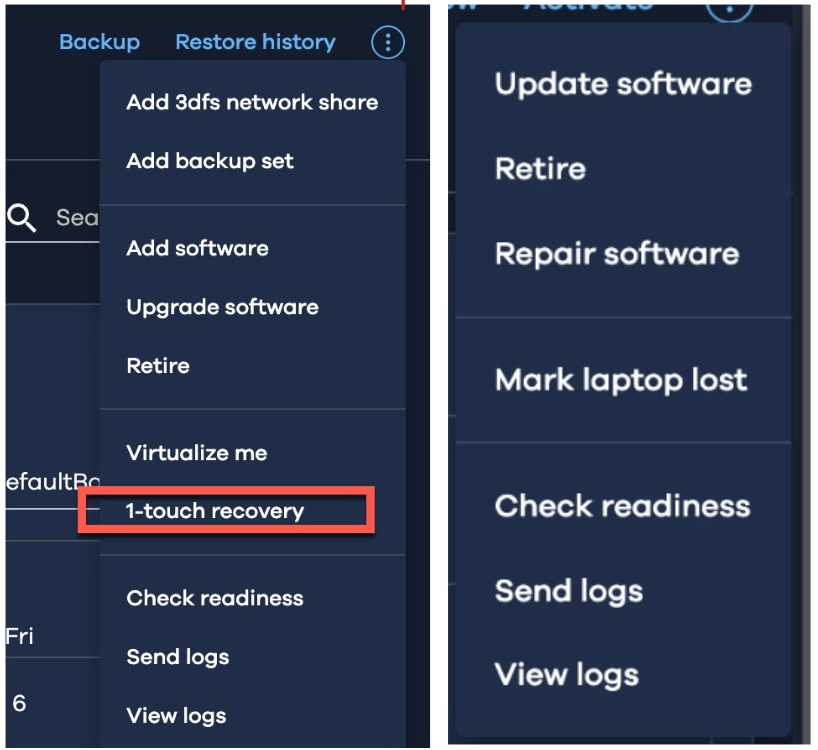
Recently we had a request for a Bare Metal restore for a Laptop. So my recommendation was to use 1-Touch but upon looking for the option on the laptop section, I noticed the option is not there. 

When I do the same thing within the File Servers entity, I can see 1-touch recovery.


Chatting with Arlie, and I was told that, BareMetal restores for Laptops are not available within Command Center.

So I thought I would ask the community if Arlie is correct or If I`m missing something here. If 1-Touch is truly not supported in Command Center for Laptops, would anyone know why? Just think its strange considering it leverages the same agent (File System) and its supported under File Server but not in Laptop? Will this be added in new FRs?

I asked the same question here about 3 years ago, post last post on this thread but got no answer. Would appreciate some feedback on how to proceed in this case to fully recover laptops.


       File Servers Entity                                   Laptop Entity


Thank you

11 replies

Gergely (Sydney)
Vaulter
Forum|alt.badge.img+7

Typically Laptop backups protect only user data and not the whole file system/system state what’s required for bare metal recovery.


dude
Community All Star
Forum|alt.badge.img+20
  • Author
  • Community All Star
  • February 11, 2026

Yeah I understand the view but in our environment it is a different scenario. How do I enable that?


Gergely (Sydney)
Vaulter
Forum|alt.badge.img+7

I don’t believe it will work with ‘Laptop’ agent, you would need the full File System Agent, i.e. not select ‘laptop’ option at agent install. Caveat - I have never done it that way.
https://documentation.commvault.com/11.40/software/laptop.html


Gergely (Sydney)
Vaulter
Forum|alt.badge.img+7

dude
Community All Star
Forum|alt.badge.img+20
  • Author
  • Community All Star
  • February 11, 2026

That link does not point to a Recovery of Laptop via commandcenter. 

Like I said in the beginning, 1-touch recovery for LAPTOP is not showing in command center.


dude
Community All Star
Forum|alt.badge.img+20
  • Author
  • Community All Star
  • February 11, 2026

@Sougato Roy  would you be able to reach out to technical teams internally and ask them about my question? We have laptop/desktop (Laptop License) that often times will have their harddisk fail and we need a bare metal restore. I can do this from Java GUI but currently not from Command Center. I understand Commvault`s plan to move towards a more CommandCenter management, in this case what do we do? Thank you


Sougato Roy
Vaulter
Forum|alt.badge.img+11
  • Vaulter
  • February 11, 2026

@Sougato Roy  would you be able to reach out to technical teams internally and ask them about my question? We have laptop/desktop (Laptop License) that often times will have their harddisk fail and we need a bare metal restore. I can do this from Java GUI but currently not from Command Center. I understand Commvault`s plan to move towards a more CommandCenter management, in this case what do we do? Thank you

@dude 
Thanks for the update.
I’ll need a little time to look into this and get back to you with the correct information.

Thank you,

Roy


Forum|alt.badge.img+4
  • Vaulter
  • February 12, 2026

Hi ​@dude Greetings !!


As pointed out by Gergerly , you will need to deploy the Full file system package on the laptop to make it appear in the command center and see the 1-touch recovery option , the option is not available in command center at this point for the laptop package (as on 11.42 ) . You can make an enhancement request via support for this functionality so that support can tag the relevant Product management team internally . 

Thanks & Regards


Sougato Roy
Vaulter
Forum|alt.badge.img+11
  • Vaulter
  • February 12, 2026

Hi ​@dude Greetings !!


As pointed out by Gergerly , you will need to deploy the Full file system package on the laptop to make it appear in the command center and see the 1-touch recovery option , the option is not available in command center at this point for the laptop package (as on 11.42 ) . You can make an enhancement request via support for this functionality so that support can tag the relevant Product management team internally . 

Thanks & Regards

@dude 
Hi,

An update for you on your issue. Please let me know what you think.

Thank you,

Roy


dude
Community All Star
Forum|alt.badge.img+20
  • Author
  • Community All Star
  • February 12, 2026

Thanks for the follow up ​@Sougato Roy 

The answer was the same, in other words, "customers can`t run / execute 1-touch restores via command center for laptop clients" 

I dont fully understand why 1-touch restores is available for some agents like I showed above but not others...seems like we are missing something here. So what I will do is to open a ticket to further understand the limitation. 

Thank you again


Sougato Roy
Vaulter
Forum|alt.badge.img+11
  • Vaulter
  • February 12, 2026

Thanks for the follow up ​@Sougato Roy 

The answer was the same, in other words, "customers can`t run / execute 1-touch restores via command center for laptop clients" 

I dont fully understand why 1-touch restores is available for some agents like I showed above but not others...seems like we are missing something here. So what I will do is to open a ticket to further understand the limitation. 

Thank you again

@dude 

I know this may not fully solve the issue just yet, but please know that I’m working behind the scenes to gather more information for you.

In the meantime, I’ll keep an eye out for your support ticket and follow along from there.

Thank you so much for your patience,

Roy