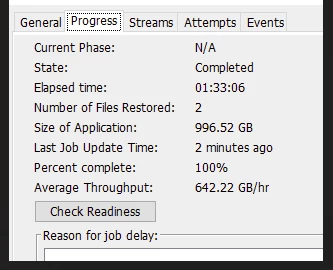
I want to ask, what is your SQL restore throughputs for large DBs.
We have a 8.4TB database that takes around 18hrs to restore with average throughput around 478GB/hr.
Wondering if this can be improved without introducing IntelliSnap.
Network is not a bottleneck. SQL server is hosted on all flash array and the backup target is HSX.
Cheers,
Marcin
Best answer by Sunil
@M. Milewski, Please try with a new backup with data streams increased to 8 and run restore from it. We use same number of streams as the backup during the restore. This may help improving the restore performance as IFI is already enabled.
If you have enabled IFI recently, it requires a restart of SQL server to take effect. Please ignore this if restart was performed after enabling IFI.
The current throughput looks very good. Could you please share the Write/Read performance as well?
If you’re familiar with the Disk Performance Tool, that would be great. Otherwise, you can share the logs using the scrub option to ensure no sensitive information is exposed.
Best regards, Mohammed Ramadan Commvault PS Engineer
Here is the Disk Performance Tool report for one of the DB disks with the default settings:
Creating folder M:\...\DISK_READ_TEST Creating files.. Writing files.. Reading files.. Deleting files.. DiskPerf Version : 2.2 Path Used : M:\... Performance type : Create new Read-Write type : RANDOM Block Size : 65536 Block Count : 16384 File Count : 6 Thread Count : 6 Total Bytes Read : 6442450944 Total Bytes Written : 6442450944 Total Bytes Deleted : 6442450944 ---- Time Taken to Create(S) : 3.29 Time Taken to Write&flush(S): 2.62 Time Taken to Read(S) : 5.56 Time Taken to Delete(S) : 0.11 ---- Per thread Throughput Create(GB/H) : 1095.55 Per thread Throughput Write(GB/H) : 1375.70 Per thread Throughput Read(GB/H) : 647.12 Per thread Throughput Delete(GB/H) : 32494.64 ---- Throughput Create(GB/H) : 6573.28 Throughput Write(GB/H) : 8254.22 Throughput Read(GB/H) : 3882.75 Throughput Delete(GB/H) : 194967.84
DiskPerf Version        : 2.2
Path Used               :
Performance type        : Create new
Read-Write type         : RANDOM
Block Size              : 65536
Block Count             : 16384
File Count              : 6
Thread Count            : 6
Total Bytes Read        : 6442450944
Total Bytes Written     : 6442450944
Total Bytes Deleted     : 6442450944
----
Time Taken to Create(S)     : 3.29
Time Taken to Write&flush(S): 2.62
Time Taken to Read(S)       : 5.56
Time Taken to Delete(S)     : 0.11
----
Per thread Throughput Create(GB/H)     : 1095.55
Per thread Throughput Write(GB/H)      : 1375.70
Per thread Throughput Read(GB/H)       : 647.12
Per thread Throughput Delete(GB/H)     : 32494.64
----
Throughput Create(GB/H)     : 6573.28
Throughput Write(GB/H)      : 8254.22
Throughput Read(GB/H)       : 3882.75
Throughput Delete(GB/H)     : 194967.84
When discussing about throughput for SQL database restore to instance, from the SQL Server end, a considerable amount of time is being consumed during the initialization phase of the restore process for huge database. This directly impacts the overall restore duration and throughput.
Verify Instant File Initialization (IFI) Status
Check with the DBA team whether Instant File Initialization (IFI) is enabled on the SQL Server instance.
IFI significantly reduces time during operations that require zero‑initializing data files, such as:
@M. Milewski, Please try with a new backup with data streams increased to 8 and run restore from it. We use same number of streams as the backup during the restore. This may help improving the restore performance as IFI is already enabled.
If you have enabled IFI recently, it requires a restart of SQL server to take effect. Please ignore this if restart was performed after enabling IFI.
@Sunil. Thanks for suggestion. I have change the data streams to 8 and that make a big difference.
My media agents are HSX nodes (5 of them). I don’t see much impact on those nodes in terms of CPU and mem utilization. Now testing with 10 data streams and monitoring.
We didn’t change the data streams count before as CV mentioned that this may have a negative impact on the backup/restore jobs.