




Dear Experts,
our objective is to restore a table from Source_PDB to Destination_PDB via Import functionality provided by CommVault.
Setup: CommServe Version 11.32.49; Source_ and Destiantion_CDB are both Oracle 19.22.
The Destination_CDB was set up according to CommVault documentation. The Destination_CDB and Source_CDB are both included to be in tnsnames.ora on either sides. Remote crosswise sqlplus-connect is working from both sides.
In Commvault-GUI we did:
Commcell → Client_Computers → select Source_Client → right-click Oracle Source-CDB → select All Tasks → select Browse And Restore → select Table View + set Time Range + End Time (select Date and PointInTime)→ View Content → Select table and its dependent tables from the respective schema in the Source_PDB → Recover All Selected …
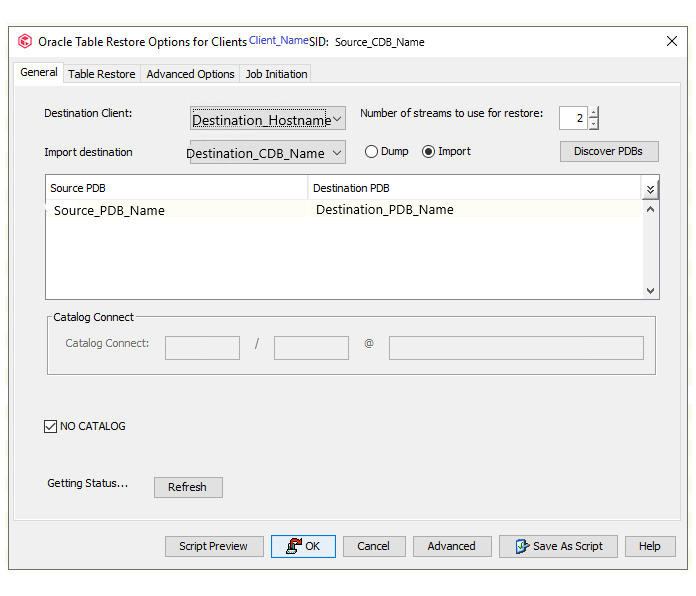
In the window “Table Restore Options for Clients Source_CDB_Client SID: Source_CDB” in the Tab “General” :
Set Destination Client Destination_Client_Name;
Set Use Oracle Settings from Auxiliary CDB;
Check Import;
Selected Destination_PDB;
#A1 Issue : the status of the destination client is not getting refreshed (it says: “Getting Status..” )
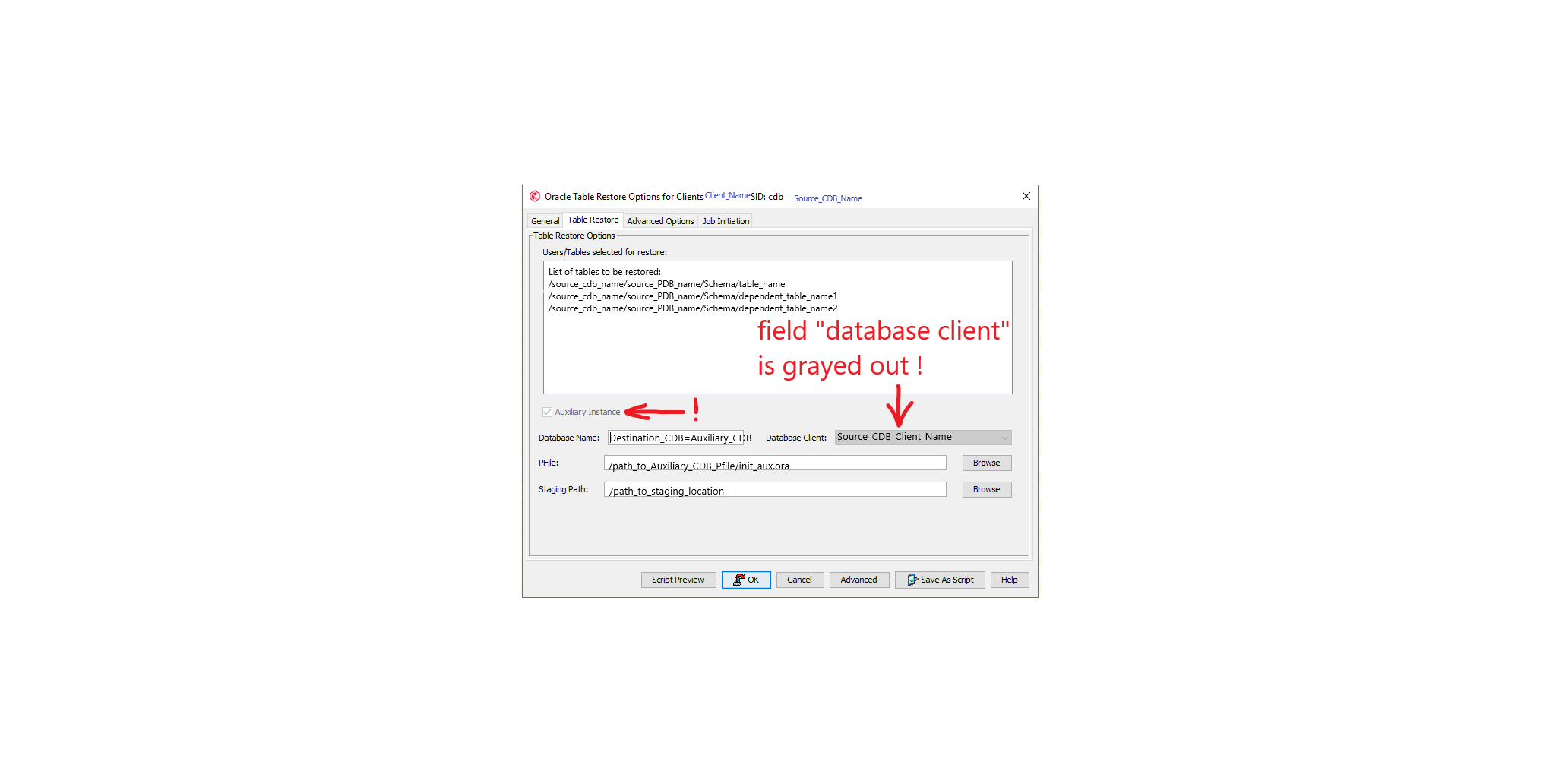
In the Tab “Table Restore” :
Checked the list of tables selected for restore;
Checked Auxiliary Instance;
Filled in Auxiliary CDB Name;
Failed to fill in path to auxiliary instance’s pfile and Staging Path, because “Current Selected” is shown for the Source_CDB_Machine only.
#A2 Issue: the field Database Client is grayed out and can’t be set to show the destination client.
An attempt was made to solve #1 and #2 Issues by restarting CommVault-Client and restarting the Destination_CDB and repeating the above mentioned steps immediately after the restart.
As for #A1 Issue: Status was shown as OPEN.
As for #A2 Issue: Database client was settable to Destination_Client.
Started the Restore Procedure by clicking on “OK”.
Table Restore Procedure fails with #B1 Issue:
Copyright (c) 1982, 2019, Oracle and/or its affiliates. All rights reserved.
RMAN>
RMAN-00571: ===========================================================
RMAN-00569: =============== ERROR MESSAGE STACK FOLLOWS ===============
RMAN-00571: ===========================================================
ORA-12514: TNS:listener does not currently know of service requested in connect descriptor
connected to auxiliary database: TSRST127 (not mounted)
Suspended the job, checked DB-Status: not mounted. Restarted and opened the Destination_CDB.
Resumed the job. Received the same RMAN-Error. Killed the job after 3-rd attempt.
Now, when repeating the whole procedure from: see above just after “In Commvault-GUI we did:” until “#A2 Issue: ..[...]...client” leaves us with #A1 and #A1 Issues still unsolved.
We would greatly appreciate Your quick response and valuable assistance in solving #A1, #A2 and #B1!
Kind regards,
Florian
