





Answer

Post Quantum Cryptography enabling

  • August 6, 2025
  • 16 replies
  • 167 views

Michael Woodward
Commvault Certified Expert
Forum|alt.badge.img+12

I’m in the process of testing a new deployment and looking to enable Post Quantum Cryptography, building it out in my lab to confirm how it all works and following the process in documentation here: Enabling Post-Quantum Cryptography 

Config is an “all in one” with the CS & webserver on the same server on 11.40.10 media. When I have the two additional settings enabled for the CommServe the Command Centre doesn’t start up.
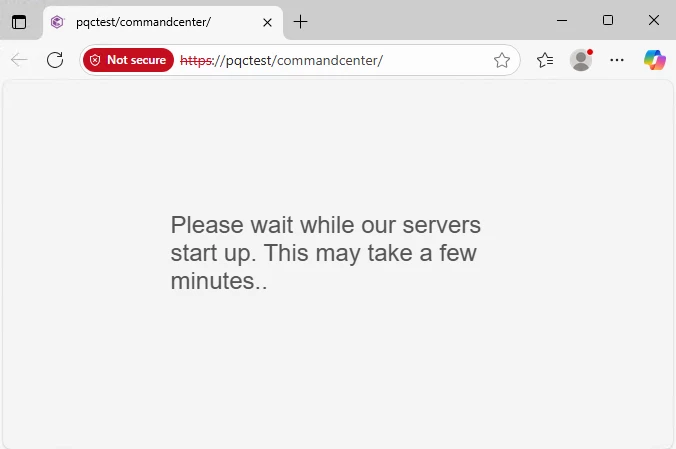
 

The CommandCentre.log has this entry repeating:

 11396 9 08/06 15:38:53 ### 192.168.1.116   ERROR PlainHttpHelper:getResponse:494 - ******Error code 400 returned for API:[/getOemId] 
11396 9 08/06 15:38:53 ### 192.168.1.116 WARN CVAppContext:getOemIdHelper:334 - oemId null or 0, this should be cached already, fetching it again.
11396 9 08/06 15:38:53 ### 192.168.1.116 INFO SettingsService:getOemId:587 - Request /getOemId

When I disable the settings for the CommServe Command Centre loads and the errors aren’t present in the logs (but clients won’t install with the PQC checkbox enabled). 

I’m wondering where I’m going wrong.

Best answer by MFasulo

Scott, this was a windows problem with the MaxRequestBytes and MaxFieldLength being set to 30720 decimal instead of hex (we got the documentation updated).

Since they aren’t required for a Linux CS it must be something else.   Check webserver.log or commandcenter.log there should be corresponding errors.   Hit up me if you need help.  


16 replies

MFasulo
Vaulter
Forum|alt.badge.img+12
  • Vaulter
  • August 6, 2025

Michael, awesome that you are testing this out.    Are you using Windows CS or Linux?   I’m running the same version in my lab so this should work.   Shoot me an email, I’ll compare your setup to mine and lets get you fixed up.  mfasulo@commvault.com


Michael Woodward
Commvault Certified Expert
Forum|alt.badge.img+12
  • Author
  • Commvault Certified Expert
  • August 7, 2025

Michael, awesome that you are testing this out.    Are you using Windows CS or Linux?   I’m running the same version in my lab so this should work.   Shoot me an email, I’ll compare your setup to mine and lets get you fixed up.  mfasulo@commvault.com


Thanks Mike - have sent you an email this morning - appreciate you reaching out.


Scott Moseman
Vaulter
Forum|alt.badge.img+19

I’m experiencing the same on a Linux CS.  If we find resolution, please share.

Thanks,
Scott


MFasulo
Vaulter
Forum|alt.badge.img+12
  • Vaulter
  • Answer
  • August 19, 2025

Scott, this was a windows problem with the MaxRequestBytes and MaxFieldLength being set to 30720 decimal instead of hex (we got the documentation updated).

Since they aren’t required for a Linux CS it must be something else.   Check webserver.log or commandcenter.log there should be corresponding errors.   Hit up me if you need help.  


Onno van den Berg
Commvault Certified Expert
Forum|alt.badge.img+20

Still not clear to me what the fix was in case you run your CommServe on Linux.


MFasulo
Vaulter
Forum|alt.badge.img+12
  • Vaulter
  • August 20, 2025

Still not clear to me what the fix was in case you run your CommServe on Linux.


The problem Michael reported is related to a setting that only affects windows (and in this case a windows CS).   

Although Scott’s symptom is the same, the underlying problem is different, and I'll need those two logs to troubleshoot. 


Onno van den Berg
Commvault Certified Expert
Forum|alt.badge.img+20

Check! Clear now! Thanks ​@MFasulo 


Onno van den Berg
Commvault Certified Expert
Forum|alt.badge.img+20

Is it true that you can enable this only for new Commcell installations? Can we expect a deployment procedure for existing environments soon?

Additionally I read Windows clients require a registry modification of MaxRequestBytes and MaxFieldLength. Assuming you have to apply it on all Windows systems; what happens when you haven't pushed out the change? Will Windows clients still be able to connect? In case it continues to communicate in non-PQC does Command Center alert the user that the client is not meeting the requirements for PQC?


Michael Woodward
Commvault Certified Expert
Forum|alt.badge.img+12
  • Author
  • Commvault Certified Expert
  • October 20, 2025

Is it true that you can enable this only for new Commcell installations? Can we expect a deployment procedure for existing environments soon?

That’s a good question, I was testing in a new deployment in my lab, I should try and retrofit it and see what breaks, but documentation seems to state it’s only for new.


Additionally I read Windows clients require a registry modification of MaxRequestBytes and MaxFieldLength. Assuming you have to apply it on all Windows systems; what happens when you haven't pushed out the change? Will Windows clients still be able to connect? In case it continues to communicate in non-PQC does Command Center alert the user that the client is not meeting the requirements for PQC?

When testing I didn’t put the reg key on clients, and they seemed to follow the expected behavior in documentation.

During install you check the “CommServe has PQC enabled” on install. In my testing I couldn’t get this to work via a push install (via Command Centre or Java Console) but only an interactive install. As it’s a brand-new feature I’ve decided to wait until it's a bit wider adopted before I put it into any new production environment I’m building.


MFasulo
Vaulter
Forum|alt.badge.img+12
  • Vaulter
  • October 21, 2025

I thought i responded to this:    I need to dig into the new commcell mention, as I’ve been using this on my long-lived setup.  

The windows regkeys are necessary and should only be applied to the machines you need to activate PQC on.  Remember PQC has overhead so the certs themselves are nearly 6x the size, so apply only where necessary.  

I love the idea of an alert, given the requirements.   I’ll get a CMR logged.


Onno van den Berg
Commvault Certified Expert
Forum|alt.badge.img+20

I thought i responded to this:    I need to dig into the new commcell mention, as I’ve been using this on my long-lived setup.  

The windows regkeys are necessary and should only be applied to the machines you need to activate PQC on.  Remember PQC has overhead so the certs themselves are nearly 6x the size, so apply only where necessary.  

I love the idea of an alert, given the requirements.   I’ll get a CMR logged.


Thanks for the response ​@MFasulo! So, you state you implemented it in a running environment? If so, then I'm indeed curious to understand why documentation is clearly referring to new installs only. 

As for alerting I do not like the idea of sending alerts. Especially in large environments and MSP environment this will result in a alert sprawl. At a certain point in time people will not look at it anymore. I would rather see it visualized in a screen within Command Center for example in a dashboard, but preferably I would see it in a generic workload screen, which should be the main screen, from where you can easily see the status of a client.

You last remark I in all honesty do not understand. At a certain point in time you need/want to have all communication to be PQC, so why not enable it by default? I also think Commvault, at a certain point in time, should make PQC the default for new installs. 


MFasulo
Vaulter
Forum|alt.badge.img+12
  • Vaulter
  • October 21, 2025

That certain point is not now, unless you have long lived sensitive data.   Turning PQC on for all communication, transferring larger certs, and putting the encryption overhead isn't practical at this time to where quantum could pose a potential threat.


MFasulo
Vaulter
Forum|alt.badge.img+12
  • Vaulter
  • October 21, 2025

I thought i responded to this:    I need to dig into the new commcell mention, as I’ve been using this on my long-lived setup.  

The windows regkeys are necessary and should only be applied to the machines you need to activate PQC on.  Remember PQC has overhead so the certs themselves are nearly 6x the size, so apply only where necessary.  

I love the idea of an alert, given the requirements.   I’ll get a CMR logged.


Thanks for the response ​@MFasulo! So, you state you implemented it in a running environment? If so, then I'm indeed curious to understand why documentation is clearly referring to new installs only. 

As for alerting I do not like the idea of sending alerts. Especially in large environments and MSP environment this will result in a alert sprawl. At a certain point in time people will not look at it anymore. I would rather see it visualized in a screen within Command Center for example in a dashboard, but preferably I would see it in a generic workload screen, which should be the main screen, from where you can easily see the status of a client.

You last remark I in all honesty do not understand. At a certain point in time you need/want to have all communication to be PQC, so why not enable it by default? I also think Commvault, at a certain point in time, should make PQC the default for new installs. 

I’ll let the PMs sort through how they want to implement it but ill pass your feedback onto them


Onno van den Berg
Commvault Certified Expert
Forum|alt.badge.img+20

I thought i responded to this:    I need to dig into the new commcell mention, as I’ve been using this on my long-lived setup.  

The windows regkeys are necessary and should only be applied to the machines you need to activate PQC on.  Remember PQC has overhead so the certs themselves are nearly 6x the size, so apply only where necessary.  

I love the idea of an alert, given the requirements.   I’ll get a CMR logged.


Thanks for the response ​@MFasulo! So, you state you implemented it in a running environment? If so, then I'm indeed curious to understand why documentation is clearly referring to new installs only. 

As for alerting I do not like the idea of sending alerts. Especially in large environments and MSP environment this will result in a alert sprawl. At a certain point in time people will not look at it anymore. I would rather see it visualized in a screen within Command Center for example in a dashboard, but preferably I would see it in a generic workload screen, which should be the main screen, from where you can easily see the status of a client.

You last remark I in all honesty do not understand. At a certain point in time you need/want to have all communication to be PQC, so why not enable it by default? I also think Commvault, at a certain point in time, should make PQC the default for new installs. 

I’ll let the PMs sort through how they want to implement it but ill pass your feedback onto them

Thanks!


Onno van den Berg
Commvault Certified Expert
Forum|alt.badge.img+20

That certain point is not now, unless you have long lived sensitive data.   Turning PQC on for all communication, transferring larger certs, and putting the encryption overhead isn't practical at this time to where quantum could pose a potential threat.

I don’t think we should speculate too much, as there’s still a lot we don’t know. It feels like you're suggesting we hold off for now due to the constraints involved. However, you did make the option to turn on PQC very easy for new installs and you were ones of the first to deliver PQC support which I think is/was great. So, now we want to utilize it as in better set than sorry and while readying if appears when it is implemented right most recent CPU architectures do offer support for instructions to offload some or all of the load to the CPU to mitigate computational waste from kicking in if you would have to do all the PQC encryption in software. Did you capture negative side effects in your lab following the enablement of PQC like an increase of CPU load or any other? 


MFasulo
Vaulter
Forum|alt.badge.img+12
  • Vaulter
  • October 22, 2025

That certain point is not now, unless you have long lived sensitive data.   Turning PQC on for all communication, transferring larger certs, and putting the encryption overhead isn't practical at this time to where quantum could pose a potential threat.

I don’t think we should speculate too much, as there’s still a lot we don’t know. It feels like you're suggesting we hold off for now due to the constraints involved. However, you did make the option to turn on PQC very easy for new installs and you were ones of the first to deliver PQC support which I think is/was great. So, now we want to utilize it as in better set than sorry and while readying if appears when it is implemented right most recent CPU architectures do offer support for instructions to offload some or all of the load to the CPU to mitigate computational waste from kicking in if you would have to do all the PQC encryption in software. Did you capture negative side effects in your lab following the enablement of PQC like an increase of CPU load or any other? 

I’m not speculating, I’m giving you grounded guidance on the give & takes.





