Looking for a NORECOVER option when restoring SQL DB with powershell.
Not possible with this cmdlet.
Is there another way?
 +1
+1Looking for a NORECOVER option when restoring SQL DB with powershell.
Not possible with this cmdlet.
Is there another way?
Best answer by Chris Hollis
Hi
There is another community post about similar Restore-CVSQLDatabase related questions:
From what I can see, there is no other way when using powershell - Someone else in the community however may know something I don’t!
As for alternatives, you could try using qcommands: https://documentation.commvault.com/11.24/expert/18366_restoring_sql_server_agent_using_command_line_interface.html
There is a template that can be leveraged: https://documentation.commvault.com/11.24/assets/products/sql/command_line_xml/restore_template.xml
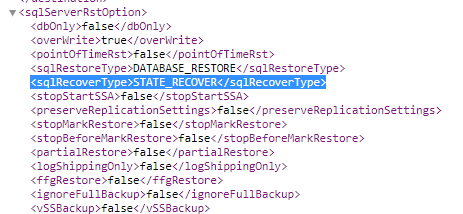
You populate the parameters you require, in this particular situation you would modify the sqlServerRstOption <sqlRecoverType> "STATE_RECOVER" to "STATE_NORECOVER" and the restore will leave the database in a no recovery state.
If you must use powershell, the other community article I linked above has next steps you can follow on how you can get answers or clarification.
Hopefully this helps in some way.
Chris

Enter your E-mail address. We'll send you an e-mail with instructions to reset your password.