



Solved

Security Assessment report - "Requires user authentication for installing agents"

  • October 28, 2022
  • 4 replies
  • 529 views

Forum|alt.badge.img

in the Commvault Security Assessment report, the item “Requires user authentication for installing agents” says:

Authentication is not required
Commvault recommends you enable this setting

Where do i do this? The “How to Change this setting” link goes to http://documentation.commvault.com/commvault/v11/article?p=8077.htm which seems to just tell you how to authenticate while installing a client, not how to enforce the setting on the Commcell?

I have the 11.28/2022E version.
Best answer by Matt Medvedeff

Hello @KelvinF 

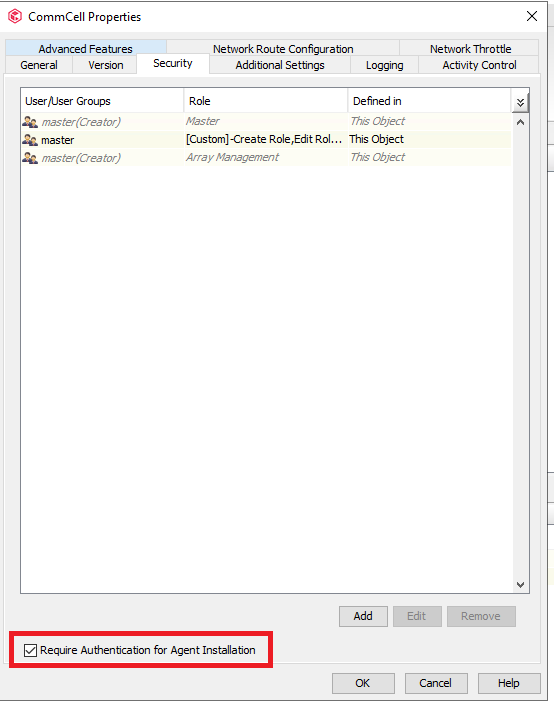
You can enable this option in the Commcell Console. Right click on the Commserve icon → Properties ->Security tab → Check the box at the bottom of the dialog:


That should enforce any installs to require Authentication to the Commserve. Thanks

4 replies

Forum|alt.badge.img+10

Hello @KelvinF 

You can enable this option in the Commcell Console. Right click on the Commserve icon → Properties ->Security tab → Check the box at the bottom of the dialog:


That should enforce any installs to require Authentication to the Commserve. Thanks


Onno van den Berg
Community All Star
Forum|alt.badge.img+22

Hello @KelvinF 

You can enable this option in the Commcell Console. Right click on the Commserve icon → Properties ->Security tab → Check the box at the bottom of the dialog:


That should enforce any installs to require Authentication to the Commserve. Thanks

I think by now it makes sense to have this turned ON by default as it adds an additional security layer. 


Forum|alt.badge.img+7
  • Novice
  • February 12, 2024

Hi, can this option be disabled ?


Forum|alt.badge.img
  • Novice
  • March 5, 2024

If you enable this, will it still allow authentication codes to pass? Documentation makes it sound like one or the other.





