Answer

systemd-readahead - Permission denied

  • March 29, 2022
  • 3 replies
  • 698 views

Forum|alt.badge.img+9

Every time I boot a Linux MA server running CVLT version 11.26.3 I have some messages like those:


[   83.681139] systemd-readahead[1017]: mmap(/opt/commvault/Base64/cvd) failed: Permission denied
[   83.715006] systemd-readahead[1017]: mmap(/opt/commvault/MediaAgent64/CvMountd) failed: Permission denied
[   83.717208] systemd-readahead[1017]: mmap(/opt/commvault/Base64/CVODS) failed: Permission denied
 

CentOS Linux release 7.9.2009 (Core)


[root@cvault-ma-02 2022.03.29-15:17:26 ]
[ ~ ] rpm -qa | grep systemd
systemd-libs-219-78.el7_9.5.x86_64
systemd-sysv-219-78.el7_9.5.x86_64
systemd-219-78.el7_9.5.x86_64
[root@cvault-ma-02 2022.03.29-15:27:55 ]
[ ~ ]
 

Any hint?

Best answer by Mike Struening

Noting this was answered here:


If you have a question or comment, please create a topic

3 replies

Damian Andre
Vaulter
Forum|alt.badge.img+22

Does the software still work correctly?

Looks like this could be related to SELinux - is it enabled? You could temporarily disable and see if the error goes away. (more info)


Also - did you enable ransomware protection - I believe that enables and sets SElinux policies but it should work correctly out of the box.


Forum|alt.badge.img+9

Does the software still work correctly?

Looks like this could be related to SELinux - is it enabled? You could temporarily disable and see if the error goes away. (more info)


Also - did you enable ransomware protection - I believe that enables and sets SElinux policies but it should work correctly out of the box.

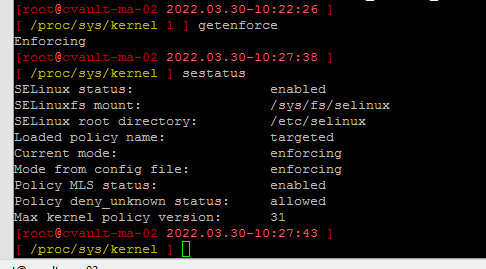
Mike, Thank you. Yes. SELinux is enabled. 


It sounds like a conflict between systemd-readahead component and SELinux.

Is there a command to verify if ransomware protection is enabled other than running ./cvsecurity.py enable_protection again? 


Mike Struening
Vaulter
Forum|alt.badge.img+22

Noting this was answered here: