




Hello Commvault Community,
On one of the Commvault environments that uses gMSA accounts for authentication during MSSQL backup, we noticed that when upgrading from SP28 to SP32, the gMSA configuration was reset to a local account.
Group Managed Service Accounts Overview
https://learn.microsoft.com/en-us/windows-server/identity/ad-ds/manage/group-managed-service-accounts/group-managed-service-accounts/group-managed-service-accounts-overview
Using Group Managed Service Accounts for the SQL Server Agent
https://documentation.commvault.com/2023e/expert/using_group_managed_service_accounts_for_sql_server_agent.html
The solution has been tested and works very well. However, a problem occurred during the next upgrade of agents on MSSQL servers.
To use this functionality, first of all, the Commvault Communications Service must be launched on a special account instead of the local account as is the default.
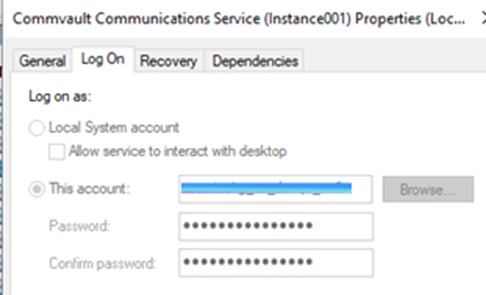
Unfortunately, after upgrading agents on SQL servers, the account on which this service should operate is changed to a local account again.
This causes backups to stop being performed and the entire configuration procedure must be repeated from the beginning.
Unfortunately, changing the account itself does nothing because we often have to restart the entire server due to Kerberos token incompatibility. So in the current situation, although the functionality is supported, it is useless. (due to automatic change from the gMSA account to the local account during the upgrade CV version)
In environments where several dozen SQL servers are operating, manual correction is not feasible.
It would be good if, when performing an agent upgrade, the installer could save the settings of the accounts on which a given service is operating and did not change them to local. This would solve the problem. Do you have a solution for this or am I the first person who has encountered this situation and is causing problems after a Commvault version upgrade?
Thanks in advance!
KindRegards
Kamil



