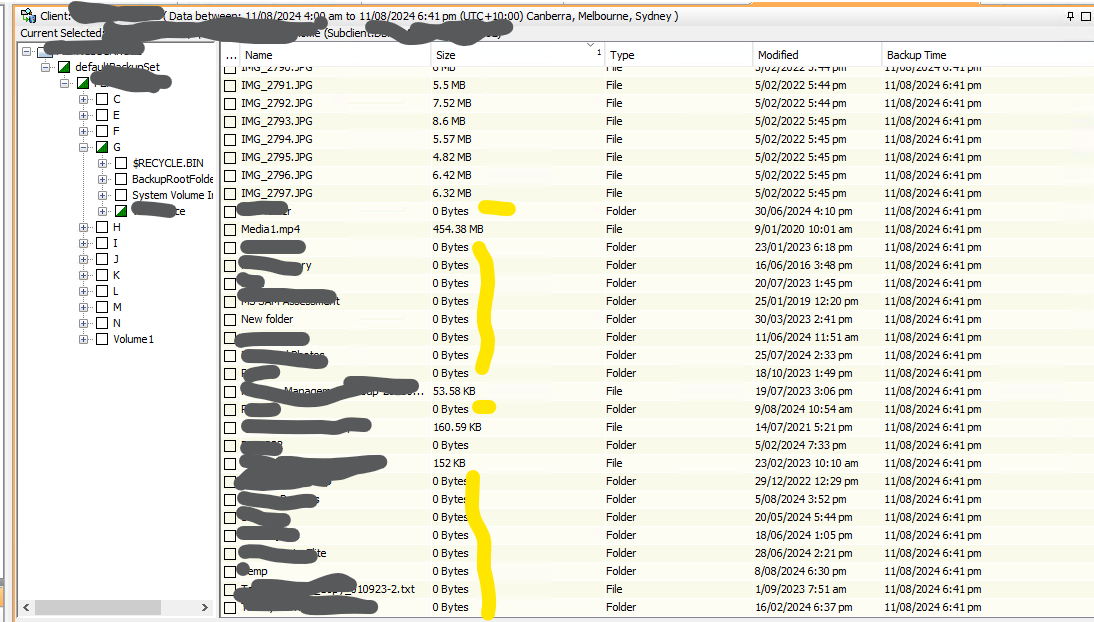
Need to restore deleted data, and user have no clue about the size of data, in CommVault as you know we can see the size of individual files, but not folders, for folders and sub-folders it shows 0 Bytes.
So is there anyway to find that before we actually hit the restore and filled up any space.
Best answer by Robert.R
I wanted to share a quick guide on how to check the folder size within subclients. Please follow the steps outlined below:
Step 1: Right-click on the subclients. Step 2: Select "Browse and Restore." Step 3: Double-click on the drive. Step 4: On the right side, you will be able to see the folder size displayed.
I wanted to share a quick guide on how to check the folder size within subclients. Please follow the steps outlined below:
Step 1: Right-click on the subclients. Step 2: Select "Browse and Restore." Step 3: Double-click on the drive. Step 4: On the right side, you will be able to see the folder size displayed.
NO, it’s doesn’t, that’s what my question is, is there any way to find the size of folders/sub-folders ? (please see the yellow highlighted, those all are folder/subfolders, and it shows them as 0 Bytes)