Answer

Postgres FS based - Best practice for log backups

  • June 5, 2024
  • 6 replies
  • 1299 views

Forum|alt.badge.img+6

Good morning,


We are new to postgres databases and are implementing our first production cluster soon.  What are you all using for your log backups in terms of scheduling?  We are running in continuous archive mode and currently have backups every 15 minutes.  Even 2G  backups are taking under a minute. 

What are the considerations for setting this? 

If our RPO is 5 minutes, would it make sense to backup every 5 minutes, or is that trying to fit Commvault into a high availability box that it is not designed for?

If using FSBasedBackups, are you also using regularly scheduled dump based backups?  In what scenario?


Thank you very much, this forum has been fantastic!

-Chris

Best answer by Alex Deaconu

My personal recommendation is to run Log Backups every 15 minutes. You can lower the RPO to 5 minutes, but try and do it sparingly to only the most demanding PostgreSQL Databases, and make sure that the backups actually finish in under 5 minutes. That is because there is a little overhead when launching a backup job, and if you have a lot of databases, that will mean your CommServe will need to be really up to the task to keep up with many requests and modifying the MS SQL DB constantly. The more you can tune your CommServe DB, the more operations it can handle.


Depending on your environment, that might take a bit longer to launch and complete a job, even a TLog Backup, because of factors like CPU and Memory of both your client and your CommServe, networking latency between client and Media Agent, disk IOPS on both the client, the CommServe’s DB volume, and the Media Agent’s backup library, and more.


For PostgreSQL Clusters, you will need to modify the archive_command, and if you are already using that parameter to ship the logs to standby nodes, then you will need to modify it to also accommodate Commvault’s Log Backup requirements.

https://documentation.commvault.com/v11/expert/configuring_postgresql_archive_log_directory.html


It can be as easy as this.

archive_command = ‘cp %p /data/pg15/instance_5432_wal/%f && other-utility %p do-whatever-to-send-logs standby-note:/path/to/wal-read-location/%f’


FS Based Backups are different backup strategy than Dump Based Backups, and they work completely independently. You can run both. For large databases, it is better to run Dumps sparingly, as these take a big toll on the database.


With not that large databases, you can have a Daily Full FS Based Backup and Dump Based Backup, but try to not run them at the same time/schedule, and Incremental backups, which in PostgreSQL only means WAL Backups, as infrequent as 12 hours, or as low as 5 minutes, but my recommendation is generally every 15 minutes for large databases, and either one or four hours for the less utilized DB.


FS Based Backups just backup the PG Data Directory, using pg_start_backup() and pg_stop_backup(), then back up the WAL Files. When restoring, this allows you to Restore to a Point in Time, and can only be performed offline, when the DB is down.


Dump Based Backups use pg_dump on each database. Please make sure to enable Indexing V2, if it is not already enabled, and enable Global Objects Backups. These give you the ability to restore out of place when you have no clue what users and roles were present on the source DB, that means, in disaster recovery scenarios.


Dump Based Backups allow you to restore individual databases and tablespaces online, but they can only be restored to the time of the dump, meaning you will have a pretty low RPO on that, because you can only take dumps so often, if even once a day.


Some customers are completely unable to run Dump Based Backups, and some opt to not do that, because Dumps do not benefit much, if at all, from Deduplication in the Backup Library. Their solution to this ‘problem’ is to quickly stage a PostgreSQL Instance anywhere else, do a Point in Time Restore of the FS Based Backup Set, and quickly manually dump whatever Database or Tablespace that needs to be restored to that point in time out of the temporary staged DB, and then import it into the Production Database.


This can also be done with Commvault, assuming you go the extra mile of also installing Commvault on the Temporary Staged PostgreSQL Server. You can restore the PG Data and WAL files to disk and copy them to another host, but since Commvault makes it easy to do the restore, it is easier to just spin up a Commvault PostgreSQL Agent on the Temporary Server, run the restore through Commvault, and then make a new Dump Based Backup Set Subclient that only backs up the DB that you need, point it to a Storage Policy or Plan with very low retention, like One or Three Days Retention, take the dump, and then restore Out of Place from the Temporary Server to the Production Server.


Let me know if you have any questions.


Kind regards,

Alex

6 replies

Alex Deaconu
Vaulter
Forum|alt.badge.img+4
  • Vaulter
  • Answer
  • June 12, 2024

My personal recommendation is to run Log Backups every 15 minutes. You can lower the RPO to 5 minutes, but try and do it sparingly to only the most demanding PostgreSQL Databases, and make sure that the backups actually finish in under 5 minutes. That is because there is a little overhead when launching a backup job, and if you have a lot of databases, that will mean your CommServe will need to be really up to the task to keep up with many requests and modifying the MS SQL DB constantly. The more you can tune your CommServe DB, the more operations it can handle.


Depending on your environment, that might take a bit longer to launch and complete a job, even a TLog Backup, because of factors like CPU and Memory of both your client and your CommServe, networking latency between client and Media Agent, disk IOPS on both the client, the CommServe’s DB volume, and the Media Agent’s backup library, and more.


For PostgreSQL Clusters, you will need to modify the archive_command, and if you are already using that parameter to ship the logs to standby nodes, then you will need to modify it to also accommodate Commvault’s Log Backup requirements.

https://documentation.commvault.com/v11/expert/configuring_postgresql_archive_log_directory.html


It can be as easy as this.

archive_command = ‘cp %p /data/pg15/instance_5432_wal/%f && other-utility %p do-whatever-to-send-logs standby-note:/path/to/wal-read-location/%f’


FS Based Backups are different backup strategy than Dump Based Backups, and they work completely independently. You can run both. For large databases, it is better to run Dumps sparingly, as these take a big toll on the database.


With not that large databases, you can have a Daily Full FS Based Backup and Dump Based Backup, but try to not run them at the same time/schedule, and Incremental backups, which in PostgreSQL only means WAL Backups, as infrequent as 12 hours, or as low as 5 minutes, but my recommendation is generally every 15 minutes for large databases, and either one or four hours for the less utilized DB.


FS Based Backups just backup the PG Data Directory, using pg_start_backup() and pg_stop_backup(), then back up the WAL Files. When restoring, this allows you to Restore to a Point in Time, and can only be performed offline, when the DB is down.


Dump Based Backups use pg_dump on each database. Please make sure to enable Indexing V2, if it is not already enabled, and enable Global Objects Backups. These give you the ability to restore out of place when you have no clue what users and roles were present on the source DB, that means, in disaster recovery scenarios.


Dump Based Backups allow you to restore individual databases and tablespaces online, but they can only be restored to the time of the dump, meaning you will have a pretty low RPO on that, because you can only take dumps so often, if even once a day.


Some customers are completely unable to run Dump Based Backups, and some opt to not do that, because Dumps do not benefit much, if at all, from Deduplication in the Backup Library. Their solution to this ‘problem’ is to quickly stage a PostgreSQL Instance anywhere else, do a Point in Time Restore of the FS Based Backup Set, and quickly manually dump whatever Database or Tablespace that needs to be restored to that point in time out of the temporary staged DB, and then import it into the Production Database.


This can also be done with Commvault, assuming you go the extra mile of also installing Commvault on the Temporary Staged PostgreSQL Server. You can restore the PG Data and WAL files to disk and copy them to another host, but since Commvault makes it easy to do the restore, it is easier to just spin up a Commvault PostgreSQL Agent on the Temporary Server, run the restore through Commvault, and then make a new Dump Based Backup Set Subclient that only backs up the DB that you need, point it to a Storage Policy or Plan with very low retention, like One or Three Days Retention, take the dump, and then restore Out of Place from the Temporary Server to the Production Server.


Let me know if you have any questions.


Kind regards,

Alex


Forum|alt.badge.img+6

Thank you Alex, you put together a great ELI5 for me and I appreciate it.  We’ll be sticking with 15 minutes and FS backups with dumps primarily being on demand as opposed to regularly scheduled.


Thank you!


Forum|alt.badge.img+15
  • Byte
  • December 2, 2025

@Chris Newman ​@Alex Deaconu Any idee how i can fix this with backup of FSBasetBackupSet


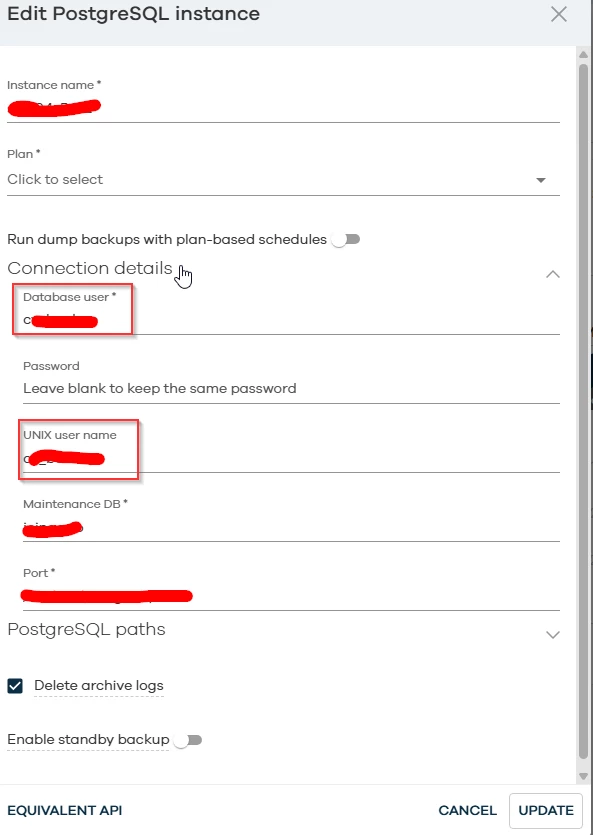
Description: PostgreSQL Database: [~User [xxxxx] is not a super user.     Missing EXECUTE GRANT on [pg_start_backup(text, boolean, boolean)].     Remedy: GRANT execute on function pg_start_backup(text, boolean, boolean)     to xxxxx; Missing EXECUTE GRANT on [pg_stop_backup()]. Remedy: GRANT     execute on function pg_stop_backup() to xxxx; Missing EXECUTE GRANT     on [pg_stop_backup(boolean, boolean)]. Remedy: GRANT execute on function     pg_stop_backup(boolean, boolean) to xxxxx; Missing EXECUTE GRANT on     [pg_switch_wal()]. Remedy: GRANT execute on function pg_switch_wal() to     xxxxx;~] Data Backup Failed.


The user is not superuser and i have already grant executions


GRANT EXECUTE ON FUNCTION pg_catalog.pg_start_backup(text, boolean, boolean) TO xxxxx;
GRANT EXECUTE ON FUNCTION pg_catalog.pg_stop_backup() TO xxxxx;
GRANT EXECUTE ON FUNCTION pg_catalog.pg_stop_backup(boolean, boolean) TO xxxxx;
GRANT EXECUTE ON FUNCTION pg_catalog.pg_switch_wal() TO xxxxx;
GRANT
GRANT
GRANT
GRANT


postgres=> SELECT rolname, rolcanlogin, rolreplication
FROM pg_roles
WHERE rolname = 'xxxxx';
  rolname  | rolcanlogin | rolreplication
-----------+-------------+----------------
xxxxx | t           | t
(1 row)


I have no probleem to connect to db from another psotgresql client


Alex Deaconu
Vaulter
Forum|alt.badge.img+4

Given pg_start_backup, and pg_stop_backup, this is an older PostgreSql Version.
https://documentation.commvault.com/v11/commcell-console/configuring_user_accounts_for_postgresql_backups.html


Versions above 9.6

  • The user must be a member of pg_read_all_settings and should have execute privilege on functions like pg_backup_start, pg_backup_stop and pg_switch_wal.

  • Connect to the maintenance database specified in the PostgreSQL instance properties and execute the following GRANT statements:

Version 10 to 14

  • GRANT pg_read_all_settings to user_name;

  • GRANT execute on function pg_start_backup , pg_stop_backup() , pg_stop_backup(boolean,boolean) , pg_switch_wal to xxxx;


 Note that the documentation says nothing about ‘pg_start_backup(test, boolean, boolean)’, but just ‘pg_start_backup’.

 
The error message in the Job Details is slightly misleading, as it is coming from PostgreSql, and it is PostgreSql that suggests that permission grant. Can you try this one?
‘GRANT EXECUTE ON FUNCTION pg_start_backup() TO xxxx;’


Forum|alt.badge.img+15

@Alex Deaconu 


postgres=# GRANT execute on function pg_start_backup to xxxx;
GRANT
postgres=# GRANT execute on function pg_stop_backup() to xxxxx;
GRANT
postgres=# GRANT execute on function pg_stop_backup(boolean,boolean) to xxxx;
GRANT
postgres=# GRANT execute on function pg_switch_wal to xxxx;
GRANT
postgres=# GRANT pg_read_all_settings to xxxx;
NOTICE:  role "xxx" is already a member of role "pg_read_all_settings"
GRANT ROLE
 

Still getting same error, when i make user superuser then itys work correct but the backup keep hanging on 75%


The user is olso member of replication role that shoulds be enough too


Alex Deaconu
Vaulter
Forum|alt.badge.img+4

The hanging at 75% is because the logs are not getting copied to where the Commvault Agent is expecting them, to be.
 
https://documentation.commvault.com/v11/commcell-console/configuring_postgresql_archive_log_directory.html


When you configure the archive_command, in postgresql.conf for the first time, you need to restart the database services. If the DB already has an archive_command, this can be changed in the configuration file, then a reload of the database triggered.
 
The line should look like this, with the specified destination directory of the Write Ahead Log files, of your choosing.

archive_command = 'cp %p /opt/wal/%f' #UNIX
archive_command = 'copy "%p" "D:\\PostgreSQL\\wal\\%f"' #Windows


If you have any other commands you want to use in the archive_command, put them after the copy command. Something like this.

archive_command = ‘cp %p /opt/wal/%f && rsync %p user@other-system:/opt/wal/%f’


This is just an example, but always keep the copy command the first. In case the destination WAL directory does not exist, on Unix systems.

mkdir /opt/wal
chown postgres:postgres /opt/wal


I assume you know how to restart the DB Services, in case there is no archive_command present, but if there was one already configured, reloading can be done through three methods.


Running the psql command, and logging into the DB as a super user.

psql 

postgres=# SELECT pg_reload_conf(); 


Using the SystemD Service.

systemctl reload postgresql-XX.service


Using the pg_ctl command.
pg_ctl –D /path/to/pg/data_dir reload 
 
 
There are other ways to reload, like sending a SIGHUP to postmaster, but that is prone to error. Always, whenever you make a change in the postgresql.conf, make sure that the change does not require a DB restart. If the archive_command was in the postgresql.conf, but the DB never restarted to apply it, then the DB needs a service restart.
 
 
As for the lesser user privileges, there is one thing to consider. When doing a restore operation, using the FS Based Backup Set, the user that you have configured in the PostgreSql Instance inside Commvault, will need close to superuser, if not superuser privileges. I am not sure if this documentation below is relevant.
https://documentation.commvault.com/v11/commcell-console/user_requirements_for_postgresql_agent_fsbased_backup_set.html


If, say, you manage to get the backups to work without the superuser role, then, when you want to restore the DB, either in place, or out of place, you might find yourself in a situation where the user configured had enough privileges to back up the DB, but not to restore it. That means you will need to change the backup user, in the Instance Properties, to a superuser role that already existed at the time of the backup. If the backup user already had the superuser roles to begin with, then the restores will go smoothly.