Question

Active Directory Permissions to Back Up Group Policy Objects

  • March 18, 2025
  • 25 replies
  • 2305 views

Forum|alt.badge.img+2

Hello!

Having just upgraded to 2024E, specifically 11.36.41, I notice the Active Directory agent now supports backups for GPO as documented here - Great. Changes in Commvault Platform Release 2024E

However, the permissions required are not particularly helpful:

  • Permissions to Back Up Group Policy Objects via PowerShell: The account must have the necessary permissions to back up GPOs using PowerShell cmdlets. By default, members of the Remote Management Users group possess these permissions.

My question is, if you don’t want the account to be a member of “Remote Management Users” or admin groups, what granular permissions can be set on the account to still achieve the backup?


full error:
-----

Currently whilst the backup is completing for AD as it always has, its now completing but with error “Failed to process group policy object”.
Error Code: [28:548]
Description: Failed to process group policy object. Please verify following: (1) User account configured in Active Directory connection settings is member of Remote Management Users group or has administrator permissions. (2) User account configured in Active Directory connection settings has read and write permission to job results directory.

-----

25 replies

Damian Andre
Vaulter
Forum|alt.badge.img+23

Hi ​@Rafter,

I gathered some info internally that may help with this:

To back up Group Policy Objects (GPOs) using PowerShell cmdlets, you need appropriate permissions on the Group Policy objects. Specifically, you require:

1. Minimum Permissions Required

  • Read and Backup permissions on the GPOs you want to back up.

2. Recommended Group Memberships

To successfully back up GPOs, you should be a member of one of the following groups:

  • Domain Admins (recommended)
  • Enterprise Admins
  • Group Policy Creator Owners (if you are the owner of the GPO)
  • A custom security group with at least the following permissions:
    • Read
    • List Contents
    • Read Permissions
    • Backup Group Policy Objects

Forum|alt.badge.img+5
  • Byte
  • April 4, 2025

Hello

I have run into the same issue yesterday

Hoping that the original poster can confirm whether the suggestion here worked or was there some alternative

Thanks


Forum|alt.badge.img+2
  • Author
  • Byte
  • April 4, 2025

Hi,

To be honest, no I’ve not found a working solution at the moment, but more down to time.

The recommendation of Domain/Ent Admin is just ridiculous, no service account in our org is a Domain Admin.  I’ve attempted with the Group Policy Creator Owners builtin role, which wouldn’t be ideal, but that doesn’t appear to work anyway.

A custom security group is the way we’d like to go, but setting that on existing GPO raises a lot of concern and remembering to set it for every new GPO will be a change nightmare as there’s no inheritance on the permission.

So I’ve left if completing with errors for now, hoping someone else comes up with a solution! 😀

All that said, it also failed with a brief test with domain admin membership (size went up, but still errors - may just be one item with incorrect privileges I guess), which needs investigation and may help work out using lesser privileges with GPO CreatorOwner.

Keep me posted if you find a resolution before we have the time to resolve!


Forum|alt.badge.img+2
  • Author
  • Byte
  • April 4, 2025

Here’s a quick update, I thought I’d take a look in the logs, when Domain Admin, it failed with path length error, so it has completed most GPOs.

I notice release update 11.36.49, released a couple of days ago.  One hotfix reference to resolving issues with GPO backups, so that’s going to be the next test, applying the update!

AD - PowerShell to backup GPOs may fail.

9663


Getting it working with a domain admin account in dev environment will at least help look at the permissions after that.


Forum|alt.badge.img+9
  • Byte
  • April 7, 2025

all, is there a way to disable the Group Policy Objects part of the AD backups ?


Forum|alt.badge.img+5
  • Byte
  • April 8, 2025

Hi Rafter

Just to let you know, I had two failing DC backups (have 19 different domains for various customers)

Applying 11.36.49 has resolved this issue for one of the AD backups - the other one is still failing it appears to be always on the same GPO

My AD expert says he can back it up using the Powershell command in the logs

I have a ticket open, we will see what happens

@atitagain - I’m sure I saw a parameter in the documentation when reading last week - of course, I can’t find it now


Forum|alt.badge.img+9
  • Byte
  • April 8, 2025

@jracjdb2 if you find this parameter again would you mind sharing.


thanks 


Forum|alt.badge.img+5
  • Byte
  • April 9, 2025

Our second AD backup problem is now resolved


My AD guy ran the ‘Action Plan’ from Commvault, some Powershell tests as well as this Registry item
 

Hope it helps someone out there


Microsoft provides a solution for handling long paths by enabling a specific registry setting. Below steps enable long paths:


– Open the Registry Editor.

– Navigate to the following path

Computer\HKEY_LOCAL_MACHINE\SYSTEM\CurrentControlSet\Control\FileSystem\LongPathsEnabled

– Create a new DWORD (32-bit) value named LongPathsEnabled.

– Set the value to 1.


For detailed instructions, refer to the Microsoft documentation on enabling long paths in Windows -  https://learn.microsoft.com/en-us/windows/win32/fileio/maximum-file-path-limitation?tabs=registry#enable-long-paths-in-windows-10-version-1607-and-later


Forum|alt.badge.img+2
  • Byte
  • April 23, 2025


Hello,

We used this KB : FR 36 Active Directory Backup Completes with Error Code: [28:548] Description: Failed to process group policy object.


Step 3 helped us : Create Additional Setting


No special characters
Byte
Forum|alt.badge.img+8


Hello,

We used this KB : FR 36 Active Directory Backup Completes with Error Code: [28:548] Description: Failed to process group policy object.


Step 3 helped us : Create Additional Setting


Do you know if the service account needs to be able to create the folder, or how is it added to the C:\ drive? Did you create it first?

I added this additional setting, but still got the “too long” error in the logs. No mention of it even trying the “c:\CVGPO” path.. so I suspect it was not able to create the folder


Forum|alt.badge.img+3
  • Bit
  • May 22, 2025


Hello,

We used this KB : FR 36 Active Directory Backup Completes with Error Code: [28:548] Description: Failed to process group policy object.


Step 3 helped us : Create Additional Setting


Do you know if the service account needs to be able to create the folder, or how is it added to the C:\ drive? Did you create it first?

I added this additional setting, but still got the “too long” error in the logs. No mention of it even trying the “c:\CVGPO” path.. so I suspect it was not able to create the folder

Same issue here, the path did not change.


We are on the 11.36.52 and still having issues with the backups.

Seeing access denied in the logs, even though we’ve added the correct permissions as advised by CV.


Forum|alt.badge.img


Hello,

We used this KB : FR 36 Active Directory Backup Completes with Error Code: [28:548] Description: Failed to process group policy object.


Step 3 helped us : Create Additional Setting


Do you know if the service account needs to be able to create the folder, or how is it added to the C:\ drive? Did you create it first?

I added this additional setting, but still got the “too long” error in the logs. No mention of it even trying the “c:\CVGPO” path.. so I suspect it was not able to create the folder

Same issue here, the path did not change.


We are on the 11.36.52 and still having issues with the backups.

Seeing access denied in the logs, even though we’ve added the correct permissions as advised by CV.

We were also having same issues with GPO backups because paths were too long on version11.36.55. It was fixed by manually creating folder in the root of the C: drive of each DC (name of it doesn’t need to exactly match name listed on the KB doc as long as it is kept short and it will be clear for all admins what is that being used for) and adding additional setting for each DC via CV console to point agent to that folder (as per above KB).


Forum|alt.badge.img

@jracjdb2 if you find this parameter again would you mind sharing.


thanks 

Hello, I asked CV support team when logged call for failing AD/GPO backups and I was advised that the following change will disable GPO backups: “setting the configuration parameter 'AD.BackupGPO' to 0 (integer). This will skip the GPO backup. ”

I haven’t tried that as we still need the GPO backups to be taken.


Rajiv
Vaulter
Forum|alt.badge.img+12
  • Vaulter
  • June 6, 2025

Hello ​@Piotr Nowak ​@Paupau ​@No special characters Are you still facing any issues with AD backup, specifically for GPO?

Best,

Rajiv Singal


Forum|alt.badge.img+3
  • Bit
  • June 6, 2025

Hello ​@Piotr Nowak ​@Paupau ​@No special characters Are you still facing any issues with AD backup, specifically for GPO?

Best,

Rajiv Singal

Hello ​@Rajiv yes we are, but we’re facing permissions issues and getting access denied.

We’re not quite sure on which level the permissions needs to be set for the commvault service account to be able to use the backup-gpo command. 

Any ideas perhaps?

Thanks


Rajiv
Vaulter
Forum|alt.badge.img+12
  • Vaulter
  • June 6, 2025

@Paupau Would it be possible to share the ADBackup.log along with the Job id once? 

Best,

Rajiv Singal


Forum|alt.badge.img

Hello ​@Piotr Nowak ​@Paupau ​@No special characters Are you still facing any issues with AD backup, specifically for GPO?

Best,

Rajiv Singal

Hi,

We are still having issues with some GPO backups but that’s the MS fault not Commvault. This is because our DCs are running on Windows Core version and some GPOs settings aren’t supported due to missing PS modules/libraries as per MS doc: https://learn.microsoft.com/en-us/troubleshoot/windows-server/group-policy/error-0x8007000d-backup-gpo-cmdlet


No special characters
Byte
Forum|alt.badge.img+8

Hello ​@Piotr Nowak ​@Paupau ​@No special characters Are you still facing any issues with AD backup, specifically for GPO?

Best,

Rajiv Singal

I am trying the workarounds mentioned in the Commvault KBs, registry to allow longer path, and/or folder with short name on C:\ drive.

However, I would still like to know if Commvault tries to add the folder set in the Additional Setting, or if the customer needs to create it?

(We do not have access to our customers’ servers. They set up Commvault agent on their end, and we manage the service on their behalf, but without any access, except for what we can do within Commvault.)


Rajiv
Vaulter
Forum|alt.badge.img+12
  • Vaulter
  • June 6, 2025

Hello ​@No special characters 

You can use this additional key and this can be applied from commcell as well as command center.

======================================================

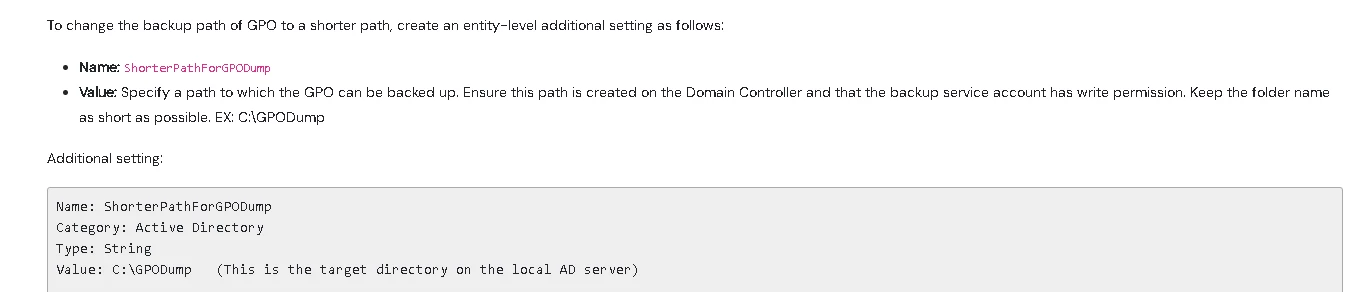
Name: ShorterPathForGPODump

Category: Active Directory

Type: String

Value: C:\GPODump (This is the target directory on the local AD server)

=======================================================

Best,

Rajiv Singal


No special characters
Byte
Forum|alt.badge.img+8

Hello ​@No special characters 

You can use this additional key and this can be applied from commcell as well as command center.

======================================================

Name: ShorterPathForGPODump

Category: Active Directory

Type: String

Value: C:\GPODump (This is the target directory on the local AD server)

=======================================================

Best,

Rajiv Singal

Thank you, I am aware. I apologise for not being clear:
When using this Additional Setting, and set the folder value C:\GPODump:
Does the folder need to exist, or will Commvault service account try to create it during the backup process?


Forum|alt.badge.img

Hello ​@No special characters 

You can use this additional key and this can be applied from commcell as well as command center.

======================================================

Name: ShorterPathForGPODump

Category: Active Directory

Type: String

Value: C:\GPODump (This is the target directory on the local AD server)

=======================================================

Best,

Rajiv Singal

Thank you, I am aware. I apologise for not being clear:
When using this Additional Setting, and set the folder value C:\GPODump:
Does the folder need to exist, or will Commvault service account try to create it during the backup process?

Yes, folder needs to be created by the admin otherwise backup will fail (Commvault won’t create that folder). Just found another KB where this is clearly stated https://kb.commvault.com/article/84962


Rajiv
Vaulter
Forum|alt.badge.img+12
  • Vaulter
  • June 6, 2025

Hello ​@No special characters 

You have to create a folder and make sure the user used has full rights on that folder.

This is also mentioned here: https://kb.commvault.com/article/84962

Best,

Rajiv Singal


Forum|alt.badge.img
  • Bit
  • June 6, 2025

Hi team,

Great conversation here. Assuming permissions to the GPOs themselves are ok, how might one get around domain controllers where:

  • they are CIS level 1 hardened (this removes alot of the default “allow logon ...” groups for domain controllers)
  • the service account used is not an admin
  • and so access to use the backup-gpo powershell command is denied (it only works when using a DA or EA account...which isn’t going to fly). 

In this instance, due to CIS hardening, the backup operators group does not have necessary privilieges. Group Policy Creator Owner group does not work either. 

Example:


15584 1a4c  06/06 22:11:03 1187360 adBackupClass::backupSingleEntry(4233) - Failed to backup GPO for [CN={blahblahblah},CN=blah, DN=blah], error: 0x80070306:{adBackupClass::BackupGPO(6624)/Failed to create backup dump for gpo [blah]} + {adBackupClass::CreateGPOBackupDump(6780)/Failed to get backup dump for GPO [blah], error: 0x80070306:{CvAdHelper::RunPowershellCommandWithLocalLogon(983)/W32.774.(One or more errors occurred while processing the request. (ERROR_ERRORS_ENCOUNTERED.774))-Failed to execute powershell command [powershell.exe " $cvJob = Start-Job -ScriptBlock { Start-Sleep -seconds 0; Backup-GPO -Guid 'blah' -Path 'blah' -Domain 'blah.blah' -Server 'bleh'  | Out-File -Encoding ASCII -FilePath 'blah.txt'; if ($? -eq $False) { Write $Error[0] | Out-File -Encoding ASCII -FilePath 'blah.txt'; throw $Error[0]};} ; wait-job $cvJob -timeout 900; if ($cvJob.state -like 'Failed') {Exit 1;}; if ($cvJob.state -like 'Running') {stop-job $cvJob; Exit 2;}"], error: Backup-GPO : Access is denied. (Exception from HRESULT: 0x80070005 (E_ACCESSDENIED))

At line:1 char:26
+ ... -seconds 0; Backup-GPO -Guid ‘blah' - ...
+                 ~~~~~~~~~~~~~~~~~~~~~~~~~~~~~~~~~~~~~~~~~~~~~~~~~~~~~~~~~
+ CategoryInfo          : NotSpecified: (:) [Backup-GPO], UnauthorizedAccessException
+ FullyQualifiedErrorId : System.UnauthorizedAccessException,Microsoft.GroupPolicy.Commands.BackupGpoCommand

}} + {CvAdHelper::RunPowershellCommandWithLocalLogon(983)/W32.774.(One or more errors occurred while processing the request. (ERROR_ERRORS_ENCOUNTERED.774))-Failed to execute powershell command [powershell.exe blah blah blah blah…., error: Backup-GPO : Access is denied. (Exception from HRESULT: 0x80070005 (E_ACCESSDENIED))
At line:1 char:26
+ ... -seconds 0; Backup-GPO -Guid 'blah' - ...
+                 ~~~~~~~~~~~~~~~~~~~~~~~~~~~~~~~~~~~~~~~~~~~~~~~~~~~~~~~~~
+ CategoryInfo          : NotSpecified: (:) [Backup-GPO], UnauthorizedAccessException
+ FullyQualifiedErrorId : System.UnauthorizedAccessException,Microsoft.GroupPolicy.Commands.BackupGpoCommand

}

any thoughts? 


Forum|alt.badge.img+9
  • Byte
  • June 24, 2025

I have a customer on 11.36.55 with the same issue. The reg entry was on the DC but the folder C:\CVGPO was not created. I created this folder and AD backups ran without errors. 


  • Bit
  • August 14, 2025

Hello, I'm experiencing the same issue. Have you found a solution ?


Hi team,

Great conversation here. Assuming permissions to the GPOs themselves are ok, how might one get around domain controllers where:

  • they are CIS level 1 hardened (this removes alot of the default “allow logon ...” groups for domain controllers)
  • the service account used is not an admin
  • and so access to use the backup-gpo powershell command is denied (it only works when using a DA or EA account...which isn’t going to fly). 

In this instance, due to CIS hardening, the backup operators group does not have necessary privilieges. Group Policy Creator Owner group does not work either. 

Example:


15584 1a4c  06/06 22:11:03 1187360 adBackupClass::backupSingleEntry(4233) - Failed to backup GPO for [CN={blahblahblah},CN=blah, DN=blah], error: 0x80070306:{adBackupClass::BackupGPO(6624)/Failed to create backup dump for gpo [blah]} + {adBackupClass::CreateGPOBackupDump(6780)/Failed to get backup dump for GPO [blah], error: 0x80070306:{CvAdHelper::RunPowershellCommandWithLocalLogon(983)/W32.774.(One or more errors occurred while processing the request. (ERROR_ERRORS_ENCOUNTERED.774))-Failed to execute powershell command [powershell.exe " $cvJob = Start-Job -ScriptBlock { Start-Sleep -seconds 0; Backup-GPO -Guid 'blah' -Path 'blah' -Domain 'blah.blah' -Server 'bleh'  | Out-File -Encoding ASCII -FilePath 'blah.txt'; if ($? -eq $False) { Write $Error[0] | Out-File -Encoding ASCII -FilePath 'blah.txt'; throw $Error[0]};} ; wait-job $cvJob -timeout 900; if ($cvJob.state -like 'Failed') {Exit 1;}; if ($cvJob.state -like 'Running') {stop-job $cvJob; Exit 2;}"], error: Backup-GPO : Access is denied. (Exception from HRESULT: 0x80070005 (E_ACCESSDENIED))

At line:1 char:26
+ ... -seconds 0; Backup-GPO -Guid ‘blah' - ...
+                 ~~~~~~~~~~~~~~~~~~~~~~~~~~~~~~~~~~~~~~~~~~~~~~~~~~~~~~~~~
+ CategoryInfo          : NotSpecified: (:) [Backup-GPO], UnauthorizedAccessException
+ FullyQualifiedErrorId : System.UnauthorizedAccessException,Microsoft.GroupPolicy.Commands.BackupGpoCommand

}} + {CvAdHelper::RunPowershellCommandWithLocalLogon(983)/W32.774.(One or more errors occurred while processing the request. (ERROR_ERRORS_ENCOUNTERED.774))-Failed to execute powershell command [powershell.exe blah blah blah blah…., error: Backup-GPO : Access is denied. (Exception from HRESULT: 0x80070005 (E_ACCESSDENIED))
At line:1 char:26
+ ... -seconds 0; Backup-GPO -Guid 'blah' - ...
+                 ~~~~~~~~~~~~~~~~~~~~~~~~~~~~~~~~~~~~~~~~~~~~~~~~~~~~~~~~~
+ CategoryInfo          : NotSpecified: (:) [Backup-GPO], UnauthorizedAccessException
+ FullyQualifiedErrorId : System.UnauthorizedAccessException,Microsoft.GroupPolicy.Commands.BackupGpoCommand

}

any thoughts?