


Question

Disabled "Perform Datastore Freespace Check" after 11.40.8

  • December 15, 2025
  • 5 replies
  • 54 views

Forum|alt.badge.img

.

5 replies

dude
Community All Star
Forum|alt.badge.img+18
  • Community All Star
  • December 15, 2025

@Naveen Kumar D yeah that is pretty interesting that I too could not find any "official" information about this change. Perhaps ​@Sougato Roy  could reach out to someone on the VSA team which I believe would be the ones that could provide some info on this change.


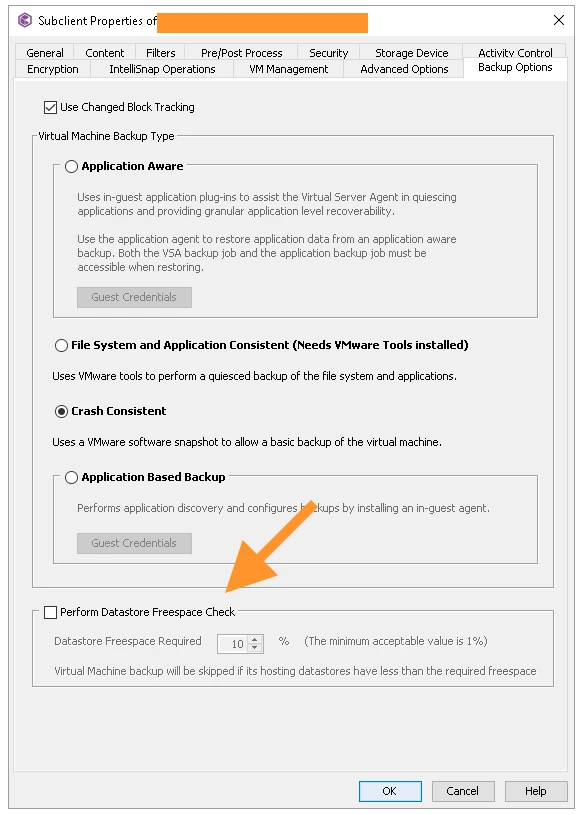
On the reverting the changes back you can do via GUI or XML.


If you have a lot of subclients, you can use the xml file shared here Setting Datastore Freespace Parameters (VMware command line)

Note: To modify all subclients under a backup set, use a command in the following form, omitting the subclient parameter:

qoperation.exe execute -af update_subclient_vm_datastorefreespace_template.xml -appName 'Virtual Server' -clientName xxxxxx -instanceName xxxxxx -backupSetName xxxxxx -datastoreFreespaceCheck 0|1 -datastoreFreespaceRequired 1-100


Hope you can get it reverted back without major impact. 


Sougato Roy
Vaulter
Forum|alt.badge.img+10
  • Vaulter
  • December 15, 2025

@Naveen Kumar D yeah that is pretty interesting that I too could not find any "official" information about this change. Perhaps ​@Sougato Roy  could reach out to someone on the VSA team which I believe would be the ones that could provide some info on this change.


On the reverting the changes back you can do via GUI or XML.


If you have a lot of subclients, you can use the xml file shared here Setting Datastore Freespace Parameters (VMware command line)

Note: To modify all subclients under a backup set, use a command in the following form, omitting the subclient parameter:

qoperation.exe execute -af update_subclient_vm_datastorefreespace_template.xml -appName 'Virtual Server' -clientName xxxxxx -instanceName xxxxxx -backupSetName xxxxxx -datastoreFreespaceCheck 0|1 -datastoreFreespaceRequired 1-100


Hope you can get it reverted back without major impact. 


@dude  Appreciate you pointing this out. I’ll look into it with the team and get back to you as soon as I have more information.

Thank you,

Roy


dude
Community All Star
Forum|alt.badge.img+18
  • Community All Star
  • December 15, 2025

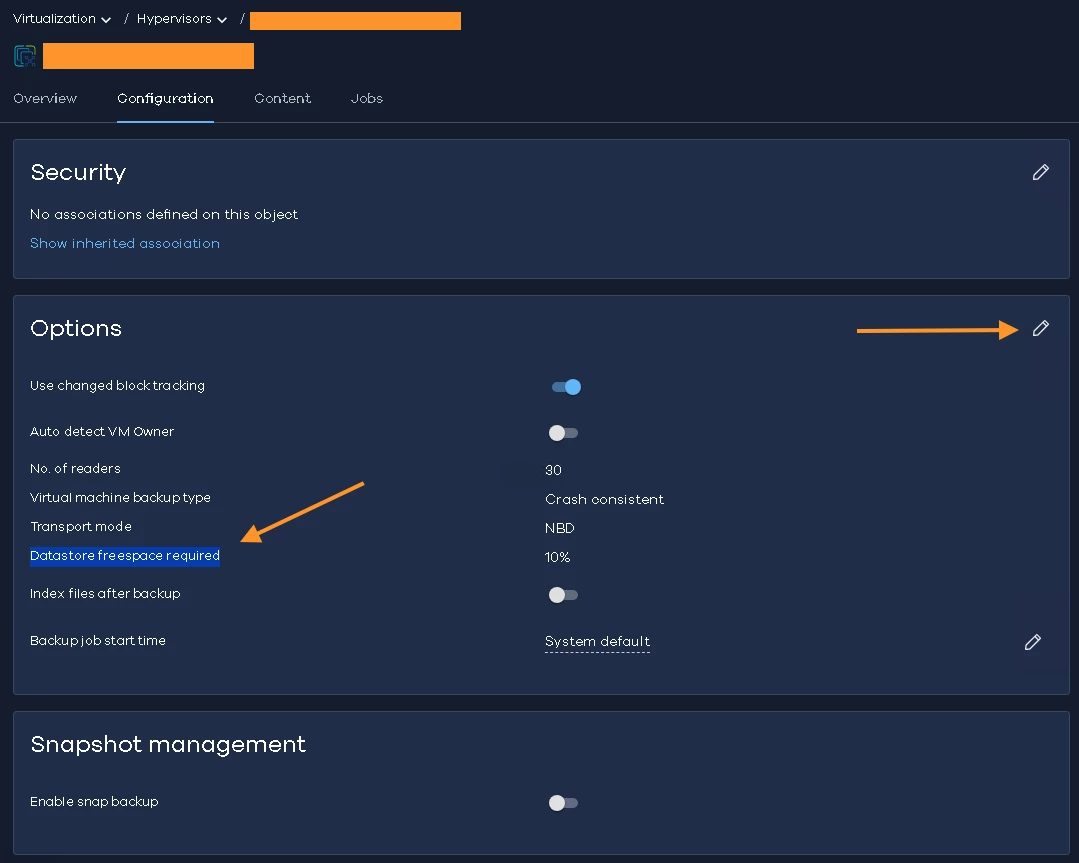
@Naveen Kumar D the other place I forgot to mention is Command Center. 

Protect → Virtualization → Hypervisors → VM Groups → Configuration → Options (edit)


Forum|alt.badge.img

@Naveen Kumar D the other place I forgot to mention is Command Center. 

Protect → Virtualization → Hypervisors → VM Groups → Configuration → Options (edit)


Thank you a ton, ​@dude and ​@Sougato Roy 


wgrande
Vaulter
Forum|alt.badge.img+10
  • Vaulter
  • December 16, 2025

I see the initial question was removed… 

To close off for context, yes, in Commvault version 11.40.8, the default behavior for the "Perform Datastore Freespace Check" setting was changed. This decision was made after extensive support case reviews to avoid complications during backup operations, which can result in missed RTO/RPOs.

  • Before 11.40.8:
    The "Perform Datastore Freespace Check" was enabled by default for VMware VSA subclients. If you did not explicitly configure this setting, backups would check datastore free space and fail if the threshold was breached.

  • After upgrading to 11.40.8:
    The default value for "Perform Datastore Freespace Check" is now disabled. If the setting was not explicitly configured in the database before the upgrade, it will be set to false, and backups will run without checking datastore free space. This can lead to backup failures if the datastore runs out of space during the job.