



Question

Backup Job Summary Report – “Completed without Backup” Status Post Upgrade to 11.40.13

  • August 26, 2025
  • 2 replies
  • 133 views

Forum|alt.badge.img+3

Hi Team,

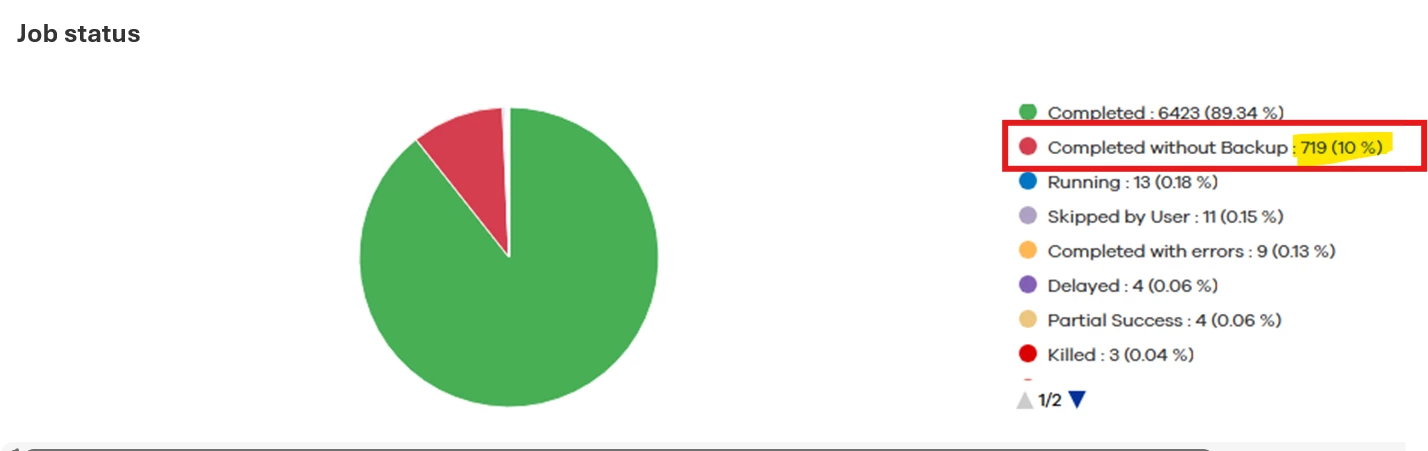
After upgrading to Commvault Platform Release 11.40.13, we observed an issue in the Backup Job Summary Report. The report now shows an additional status – “Completed without Backup.”

On review, most of the jobs under this status belong to SQL servers with databases configured in Simple Recovery Model, where TLOG backups are skipped. Although the jobs complete successfully, they are being flagged under this new status, which is impacting the SLA completion percentage in reporting.

We would like your guidance on the best approach to handle this:

  1. Exclude “Completed without Backup” jobs from the Backup Job Summary report so they don’t affect SLA metrics.

  2. Alternatively, create separate schedules for databases configured with Simple Recovery Model (without TLOG backups).

Kindly suggest which approach would be recommended or if there is a Commvault-supported configuration change to address this reporting issue.
 

2 replies

Forum|alt.badge.img+1
  • Vaulter
  • August 28, 2025

Hello ​@Kumar Devaraj ,

                      This status typically means that the scheduled SQL database backup job ran successfully, but no new or changed data was detected, so no actual backup data was transferred. The "Last Successful Backup" timestamp will update, but a new recovery point is not created. This is expected behavior if there have been no changes to the database since the last backup.

                          You can check for the below to verify this,

  • In Command Center, navigate to the affected SQL client.
  • Check the Backup Job History for the relevant period.
  • Look for jobs marked "Completed w/o Errors" or similar, indicating the backup ran but found nothing to back up.

Checking the Logs on the SQL client:

  • Review the OSC logs in the SQL agent installation directory.
  • Look for messages such as:
    • 'nothing to backup' status to CS for subclient <SubclientId>
    • OscReportLastNoGoReason() - Reporting nogo reason [No changed files] to CS for subclient <SubclientId>
  • These confirm the agent detected no changes.

Expected Behavior:

  • The system updates the "Last Successful Backup" timestamp for each successful check, even if no new data is backed up.

There is no documented way to exclude jobs with the "Completed without Backup" status from the Job Report or Job Status views in the Command Center. The available filters and customization options in Command Center reports do not provide a method to specifically exclude this status.


If you need further assistance on this, kindly reach out to support ...


Forum|alt.badge.img+3
  • Author
  • Byte
  • September 17, 2025

Thank you, Praveen, for the support. I agree with your point — when there is no data transfer for a job but it completes successfully, it is captured under the “Completed without backup” category, which is expected behavior.

I have created a new storage policy plan for databases in Simple Recovery Model to exclude T-log jobs. This will help improve the Backup Percentage SLA.

