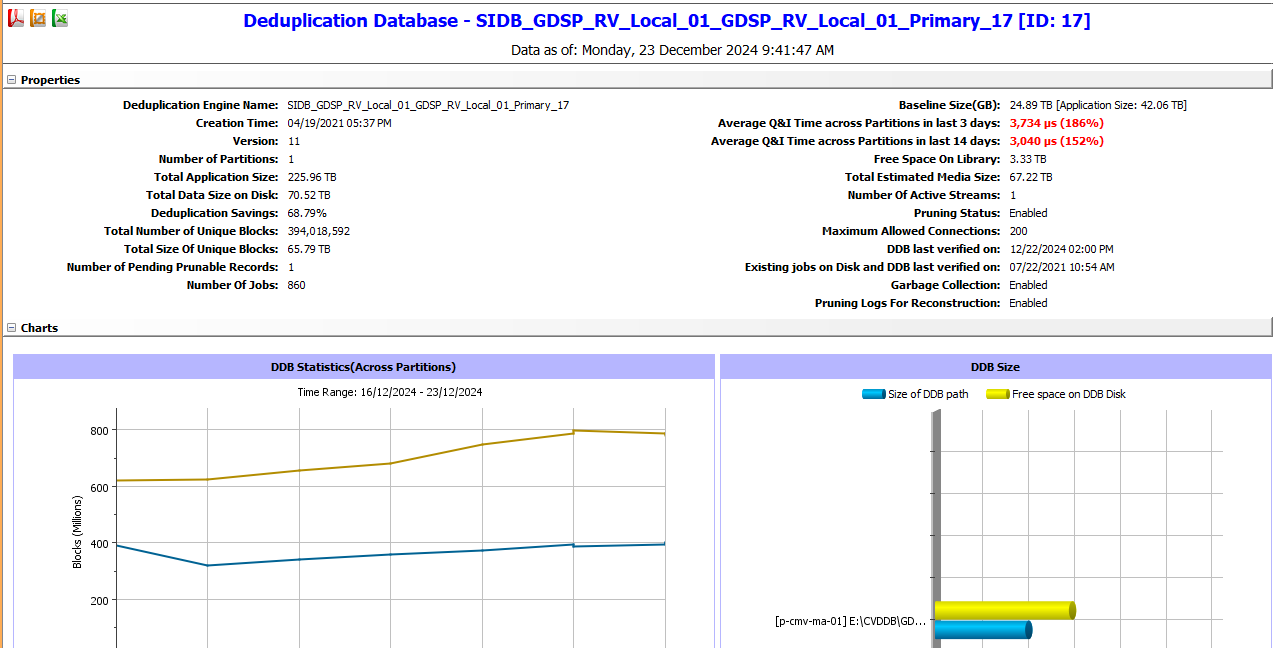
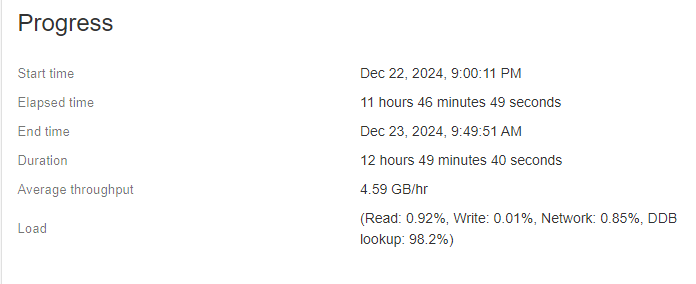
Here is a screenshot of the current status of the ddb. Backups are running over desired time windows with 98.27% of load being ddb lookups. We are close to capacity currently with backup storage though this will be resolved soon. How can we resolve the high DDB lookup % issue?
DDB and job status screenshots below.
Best answer by Onno van den Berg
Here is a screenshot of the current status of the ddb. Backups are running over desired time windows with 98.27% of load being ddb lookups. We are close to capacity currently with backup storage though this will be resolved soon. How can we resolve the high DDB lookup % issue?
DDB and job status screenshots below.
Make sure your DDB is hosted on a SSD, preferably one that is NVMe connected, and if this is already the case then you should look into the specs and health state of the drive.
Here the issue is with the Q&I value. The average Q&I time is the average time (in micro seconds) that was taken for insertion and query of signature in the deduplication database.
For this workload we require "600 GB SSD Class Disk 1,2 2 GB Controller Cache Memory7 For Linux, the DDB volume must be configured by using the Logical Volume Management (LVM) package" disk.
Here is a screenshot of the current status of the ddb. Backups are running over desired time windows with 98.27% of load being ddb lookups. We are close to capacity currently with backup storage though this will be resolved soon. How can we resolve the high DDB lookup % issue?
DDB and job status screenshots below.
Make sure your DDB is hosted on a SSD, preferably one that is NVMe connected, and if this is already the case then you should look into the specs and health state of the drive.