Solved

Status of IndexCache using CLI/RestAPI/ ... is there a way to get it ?

  • August 30, 2023
  • 9 replies
  • 219 views

Forum|alt.badge.img+1

Hello,

I’m looking a manner to get the IndexCache status using Command Line or RestAPI or qscript, qcommand … in order to automate  some maintenance tasks

Commvault version is 11.28.

Best answer by Navneet Singh

@mchaussoy 

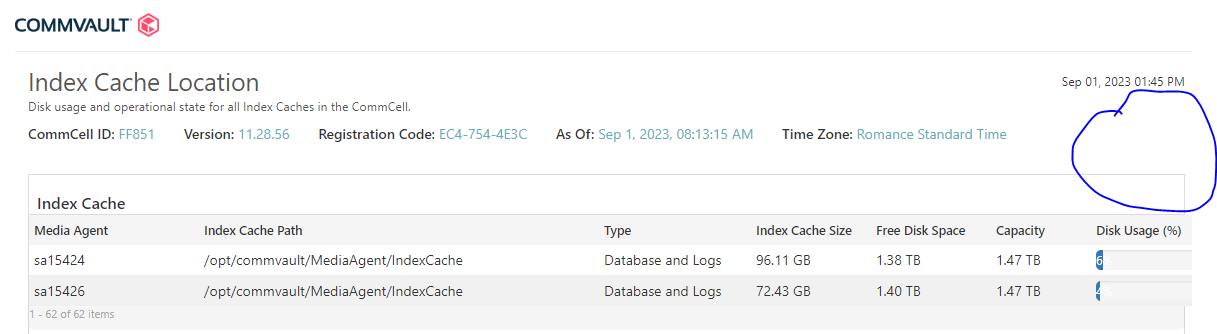
You can go to health report and go to the index cache location.

Copy the rest API from the report and pull the details.


9 replies

Forum|alt.badge.img+13

@mchaussoy 

Please try this API and let us know if this helps.

https://api-next.commvault.com/docs/api/cv/OpenAPI3/get-media-agent-details


Forum|alt.badge.img+1
  • Author
  • Apprentice
  • August 31, 2023

Hello,
Thanks for your answer,  the API call works but it does not give the information I need

part of return about index cache : 

"indexCache": {

        "path": "/opt/commvault/MediaAgent/IndexCache",

        "logsCache": {

            "enabled": true,

            "path": "/var/tmp"

        }

    }

not the status of indexCache but only those of alternate path for Index log directory


Forum|alt.badge.img+13
  • Vaulter
  • Answer
  • September 1, 2023

@mchaussoy 

You can go to health report and go to the index cache location.

Copy the rest API from the report and pull the details.



Forum|alt.badge.img+1
  • Author
  • Apprentice
  • September 1, 2023

Hi,

the REST API provides a link on Commvault Cloud :

1/ not usable for a script on a server without web access

2/ the link is about report engine and dataset : not able to extract the information I need from this

https://cloud.commvault.com/webconsole/api/cr/reportsplusengine/datasets/96fe6756-89b7-46dd-84d4-1e173af94188:13a944d9-96b7-4c43-80e3-19622d922829/data/?offset=0&parameter.CommServUniqueId=136568&parameter.GroupId=-1&parameter.UseStoredPrediction=-1&parameter.sys_commcellGroupId=-1&limit=50
 

thanks for your efforts.


Forum|alt.badge.img+13

@mchaussoy 

You can use the report API using your webconsole URL as well. Example if you pull your health report from the Webconsole or Command center then it will redirect to your webconsole URL not to the cloud.commvault.com

https://localhost/webconsole/api/……..

Considering if your CS is acting as a webserver.


Forum|alt.badge.img+1
  • Author
  • Apprentice
  • September 1, 2023

Locally, health report is not the same :

  • no possibility to access REST API
  • not even the ability to view the full list of Media Agents (62  but only 2 printed)


Forum|alt.badge.img+1
  • Author
  • Apprentice
  • August 11, 2026

Hi,


If somebody is still interested in, the best I found 2 years ago was (and nothing better since):

qoperation checkready -cs ${Commcell} -c ${MA} -sm | awk -F 'MediaAgent' '{ print $2 }' | awk -F '>' '{ print $3 }'`

→ Just the status of IndexCache


Scott Moseman
Vaulter
Forum|alt.badge.img+23

Using the REST API for the report mentioned previously, I created a Python script to grab the Media Agents and Index Status. Using AI help, this took less than 5 minutes. 😀

$ python cv_index_status.py | head -3
Media Agent  Status
-------------------
commserve    1_Good

Thanks,
Scott


Forum|alt.badge.img+1
  • Author
  • Apprentice
  • August 11, 2026

Hi Scott
Your script looks good but I was interested only in IndexCache state (awk action on MA general state) : in an hyperscale (1.5)  cluster, if one NVME drive (where DDB and IndexCache are) is broken or just has access issues, the node does not fall and is not always automatically disabled by the commserv (MA status remains good)

It induces errors and slows everything so I check (cron job) and if IndexCache is not available (whatever the reason is), I put the node offline and disabled using qcommand.

No more errors and we can schedule test/debug/replacement easier.