Answer

Command Center error

  • October 13, 2022
  • 7 replies
  • 143 views

Forum|alt.badge.img+2

I can't open command center, what can I do here?

Best answer by Vijay Chander Gajarla

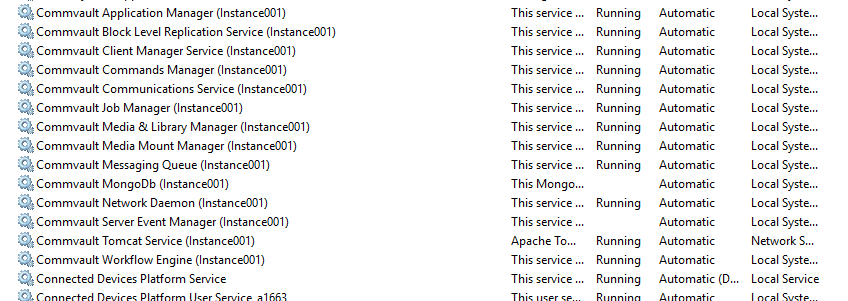
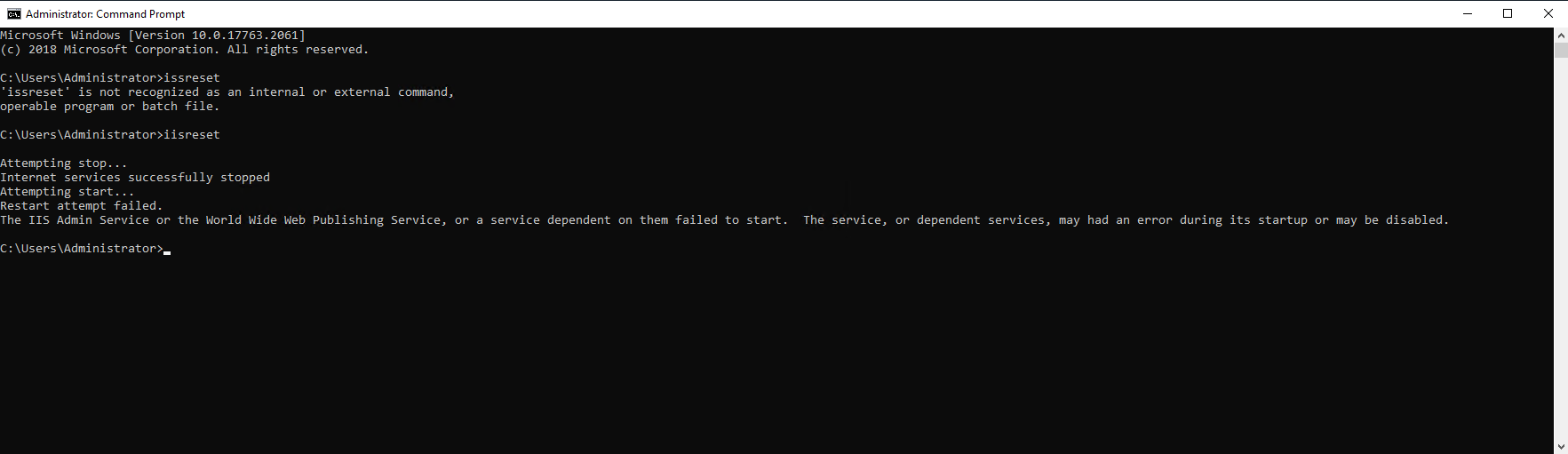
Seems IIS dependent services were not started as per screenshot.

Refer to below Microsoft link:

https://techcommunity.microsoft.com/t5/iis-support-blog/iis-reset-issue-restart-attempt-failed/ba-p/1031976


Also for Commvault services open: process manager and check services and start services which are not running.(Above screenshot few services seems not started)

7 replies

Forum|alt.badge.img+4

Seems generic error, do check all commvault services are running and try and reset IIS


Forum|alt.badge.img+2
any other suggestions?


Forum|alt.badge.img+4

Seems IIS dependent services were not started as per screenshot.

Refer to below Microsoft link:

https://techcommunity.microsoft.com/t5/iis-support-blog/iis-reset-issue-restart-attempt-failed/ba-p/1031976


Also for Commvault services open: process manager and check services and start services which are not running.(Above screenshot few services seems not started)


Forum|alt.badge.img+2

@Vijay Chander Gajarla , I tried to fix it, but problem was the same


SparshGupta
Vaulter
Forum|alt.badge.img+10
  • Vaulter
  • October 18, 2022

Hi @Command Center error 


  1. What error do you see in WebServer.log & AdminConsole.log? 
     
  2. Was it working before? If so, were any updates installed recently?


Can you make sure your webservice is up?

In your browser hit the webservice URL. This url is configured in registry as baseUrl.  

E.g. https://:81/searchsvc/cvwebservice.svc


You should see a message that says webservice is up and running. If you don’t see this message, webserver needs to be fixed. You can try restarting the webserver.


Thanks,

Sparsh


Forum|alt.badge.img+2

problem solved


thank you


Forum|alt.badge.img+4

Good to know, Thanks for the update.